

ICC Profiles Course - Certification
Course
- source_url: https://ambitious.academy/course/icc-profiles-course-certification
- dump Date: 2026-08-21 (academy.jsonl Last-Modified Fri, 21 Aug 2026 09:25:14 GMT; fetched_at_utc 2026-08-21T10:42:48Z = 12:42 SAST)
- export post_date: 2026-06-10 11:45:46
- post_author: 28
- post_status: publish
- post_excerpt: (empty)
- post_parent: 0
- comment_status: closed
- comment_count: 0
- course_expire_enrollment: 0
- course_type: paid
- course_product_id: 6046
- course_download_id: 0
- course_max_students: 0
- course_language: (empty)
- course_difficulty_level: all_levels
- course_benefits: (empty)
- course_requirements: (empty)
- course_audience: (empty)
- course_materials: (empty)
- is_enabled_course_qa: 1
- is_enabled_course_announcements: 1
- course_certificate_id: 2471
- is_disabled_course_review: (empty)
- rcp_membership_levels: []
- course_enable_certificate: 1
- edd_price: (empty)
- regular_price: 50
- sale_price: (empty)
- course_duration: 0 hours, 0 minutes, 0 seconds (raw [0,0,0])
- course_intro_video kind: none
- course_intro_video raw: []
- catalog Title: ICC Profiles Course - Certification
- catalog url: https://ambitious.academy/course/icc-profiles-course-certification
- content merge: export HTML and jsonl catalog text differ — academy.jsonl dump (2026-08-21) is newer than export post_date; both kept in full. Older export kept as history below; catalog kept as dump text.
Curriculum
Curriculum sections (from course_curriculum):
- section: Information
- section: Examinations
Curriculum topics (id / name / type) in export order:
- id 497 · lesson · About ICCPC
- id 43 · lesson · How To Follow Along
- id 498 · lesson · ICC Profile Practical
- id 5969 · quiz · Exam - ICCPC
- id 167 · lesson · Exam Assessment & Results
Raw course_curriculum (export, kept in full):
[{"title":"Information","content":"","topics":[{"id":497,"name":"About ICCPC","type":"lesson"},{"id":43,"name":"How To Follow Along","type":"lesson"}]},{"title":"Examinations","content":"","topics":[{"id":498,"name":"ICC Profile Practical","type":"lesson"},{"id":5969,"name":"Exam - ICCPC","type":"quiz"},{"id":167,"name":"Exam Assessment & Results","type":"lesson"}]}]
Course content (academy.jsonl catalog)
dump Date 2026-08-21 (academy.jsonl Last-Modified Fri, 21 Aug 2026 09:25:14 GMT; fetched_at_utc 2026-08-21T10:42:48Z = 12:42 SAST). Public visit link is source_url (paywall).
About CCMS Certification Exam -
Welcome to your final step toward becoming a Certified Color Management Specialist (CCMS) ! This exam officially proves you have the real-world skills to get perfect colors out of your hardware.
-
Recommendation: We highly recommend finishing all course modules and the practice project before taking this test.
ICC Profiles Course Link
-
Exam Breakdown The exam takes 90 minutes in total and is split into two parts:
Theory Test (30 Minutes): Multiple-choice questions. Practical Test (60 Minutes): A software simulation where you upload screenshots of your work. -
Part 1: What You Need to Know (Theory) You will be quizzed on these 4 core topics:
InkRIP Basics: How to set up resolutions (DPI), enter matching English/Chinese profile names, and navigate the calibration menu. Color Limits Curves: Understanding how to stop ink from bleeding (Ink Limits) and how to make gradients smooth (Linearization). The Hardware: How to prepare your printer's nozzles and how to correctly scan a target chart using a Spectrophotometer. Different Printer Rules: Knowing the unique tricks for Eco-Solvent, DTF, Dye-Sublimation, Laser, and UV-DTF machines. -
Part 2: What You Need to Do (Practical) You will log into your InkRIP software and submit screenshots to prove you can do the job:
Step 1: Start a new profile and select your calibration settings correctly. Step 2: Show how you find individual ink limits and adjust mixed black inks to prevent muddy colors. Step 3: Show how you load your finished custom profile into the InkRIP "Solution" dropdown menu for a final print job. -
Good luck! Your official certificate is waiting for you. Because at the end of the day, real-world skills matter!
Course content (export post_content)
History from export post_date 2026-06-10 11:45:46. Full HTML converted; nothing summarized.
About CCMS Certification Exam
-
Welcome to your final step toward becoming a Certified Color Management Specialist (CCMS)! This exam officially proves you have the real-world skills to get perfect colors out of your hardware.
-
Recommendation: We highly recommend finishing all course modules and the practice project before taking this test.
-
Exam Breakdown
The exam takes 90 minutes in total and is split into two parts:
- Theory Test (30 Minutes): Multiple-choice questions.
- Practical Test (60 Minutes): A software simulation where you upload screenshots of your work.
-
Part 1: What You Need to Know (Theory)
You will be quizzed on these 4 core topics:
- InkRIP Basics: How to set up resolutions (DPI), enter matching English/Chinese profile names, and navigate the calibration menu.
- Color Limits & Curves: Understanding how to stop ink from bleeding (Ink Limits) and how to make gradients smooth (Linearization).
- The Hardware: How to prepare your printer's nozzles and how to correctly scan a target chart using a Spectrophotometer.
- Different Printer Rules: Knowing the unique tricks for Eco-Solvent, DTF, Dye-Sublimation, Laser, and UV-DTF machines.
-
Part 2: What You Need to Do (Practical)
You will log into your InkRIP software and submit screenshots to prove you can do the job:
- Step 1: Start a new profile and select your calibration settings correctly.
- Step 2: Show how you find individual ink limits and adjust mixed black inks to prevent muddy colors.
- Step 3: Show how you load your finished custom profile into the InkRIP "Solution" dropdown menu for a final print job.
-
Good luck! Your official certificate is waiting for you. Because at the end of the day, real-world skills matter!
Lessons
Nest order. 4 lessons. Overlapping titles kept as separate lessons. HTML converted in full, not summarized.
1. About ICCPC
- title: About ICCPC
- status: publish
- author: 0
- is_previewable: (empty)
- video_duration: 0h 0m 0s (raw {"hours":0,"minutes":0,"seconds":0})
- video_source_type: (empty)
About CCMS Certification Exam
Welcome to your final step toward becoming a Certified Color Management Specialist (CCMS)! This exam officially proves you have the real-world skills to get perfect colors out of your hardware.
Recommendation: We highly recommend finishing all course modules and the practice project before taking this test.
Exam Breakdown
The exam takes 90 minutes in total and is split into two parts:
- Theory Test (30 Minutes): Multiple-choice questions.
- Practical Test (60 Minutes): A software simulation where you upload screenshots of your work.
Part 1: What You Need to Know (Theory)
You will be quizzed on these 4 core topics:
- InkRIP Basics: How to set up resolutions (DPI), enter matching English/Chinese profile names, and navigate the calibration menu.
- Color Limits & Curves: Understanding how to stop ink from bleeding (Ink Limits) and how to make gradients smooth (Linearization).
- The Hardware: How to prepare your printer's nozzles and how to correctly scan a target chart using a Spectrophotometer.
- Different Printer Rules: Knowing the unique tricks for Eco-Solvent, DTF, Dye-Sublimation, Laser, and UV-DTF machines.
Part 2: What You Need to Do (Practical)
You will log into your InkRIP software and submit screenshots to prove you can do the job:
- Step 1: Start a new profile and select your calibration settings correctly.
- Step 2: Show how you find individual ink limits and adjust mixed black inks to prevent muddy colors.
- Step 3: Show how you load your finished custom profile into the InkRIP "Solution" dropdown menu for a final print job.
Good luck! Your official certificate is waiting for you. Because at the end of the day, real-world skills matter!
2. How To Follow Along
- title: How To Follow Along
- status: publish
- author: 0
- is_previewable: 1
- video_duration: 0h 0m 0s (raw {"hours":0,"minutes":0,"seconds":0})
- video_source_type: (empty)
In this section we will be looking at some important things for a student to bear in mind throughout the course.
Progression
- If it is your first time doing the course, we would recommend that you follow along from start to finish without skipping content.
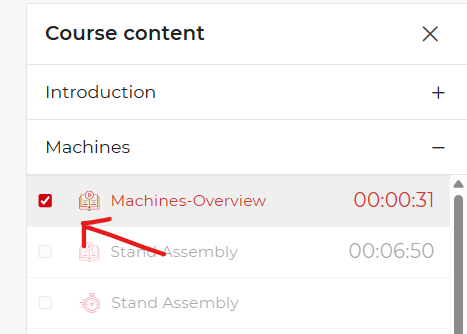
- If you have completed a lesson and it was not automatically marked as complete, you will have to mark it manually as completed.

Quizzes
- After important lessons we have added quizzes, these will help you better retain the lessons learned within that topic.
- The quizzes have no limit in regard to the number of attempts.
Q&A
- If you have any questions that need answers, please leave them below each lesson in the Q&A section.
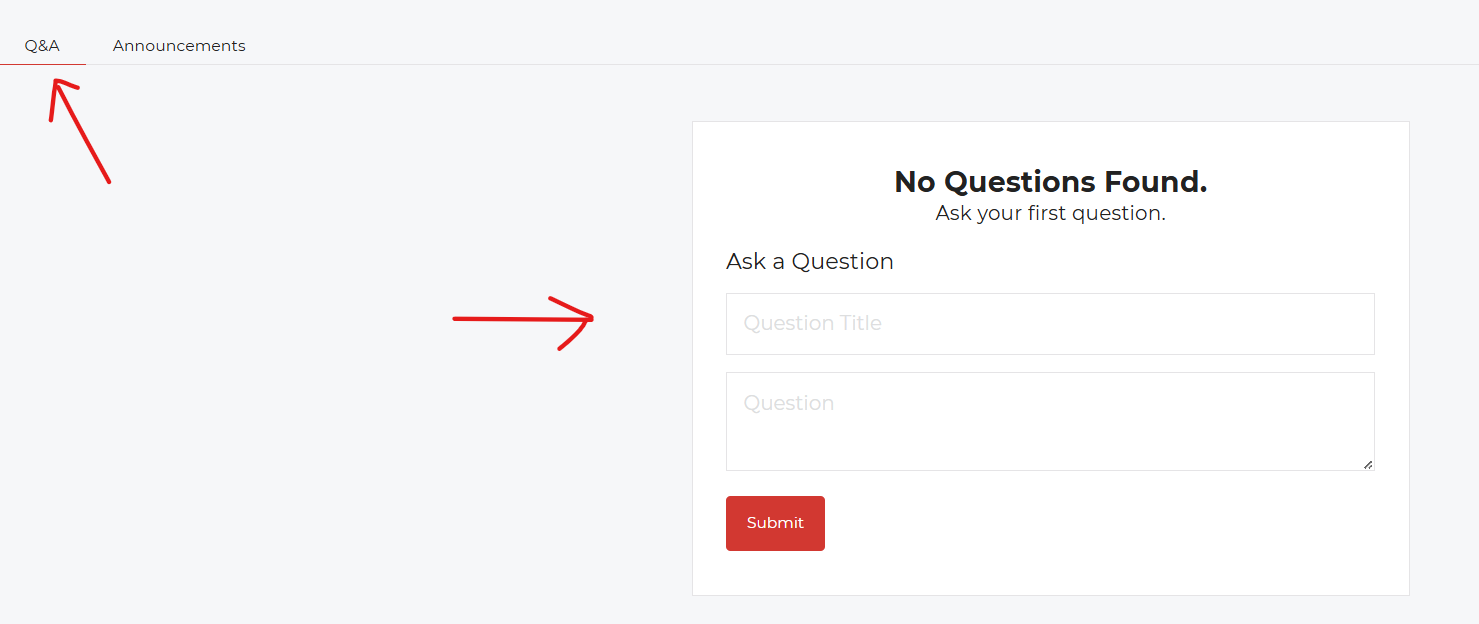
- Keep questions relevant to the lesson at hand.
- Before leaving a question, ensure that a similar question has not been asked and answered already.
Practise
- Theory without practice is not as effective as practising what you've learned.
- The more you practise what has been shown in these lessons, the more value this course will have for you.
Bonus Things
- At the end of the course we have a section called Bonus Things; this section will be used to add any content and lessons that we did not cover throughout the course.
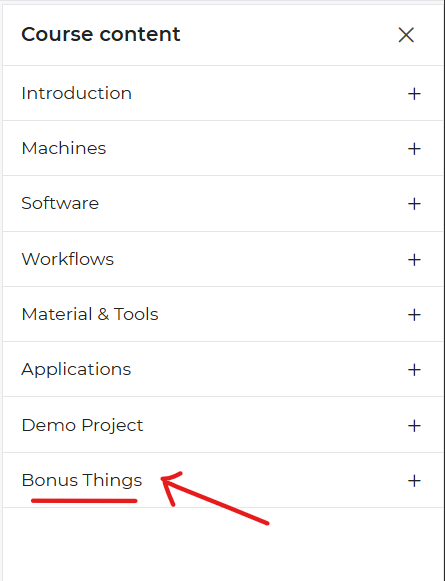
- This section will also grow overtime, so make sure to come and look for updates from time to time.
- If you have any suggestions for content to cover on Vinyl Cutting, feel free to leave your suggestions within the Q&A section for the Bonus Things.
3. ICC Profile Practical
- title: ICC Profile Practical
- status: publish
- author: 0
- is_previewable: (empty)
- video_duration: 0h 0m 0s (raw {"hours":0,"minutes":0,"seconds":0})
- video_source_type: (empty)
- drive_file_id:
1goZwBBNFZd-pvlIYkbEN_PUnOLtYmiNP(source_ref; not a public link) - transcript pending / keyframes pending / presentation extract pending
Module 3: Practical Assignment - The Custom ICC Profile Challenge
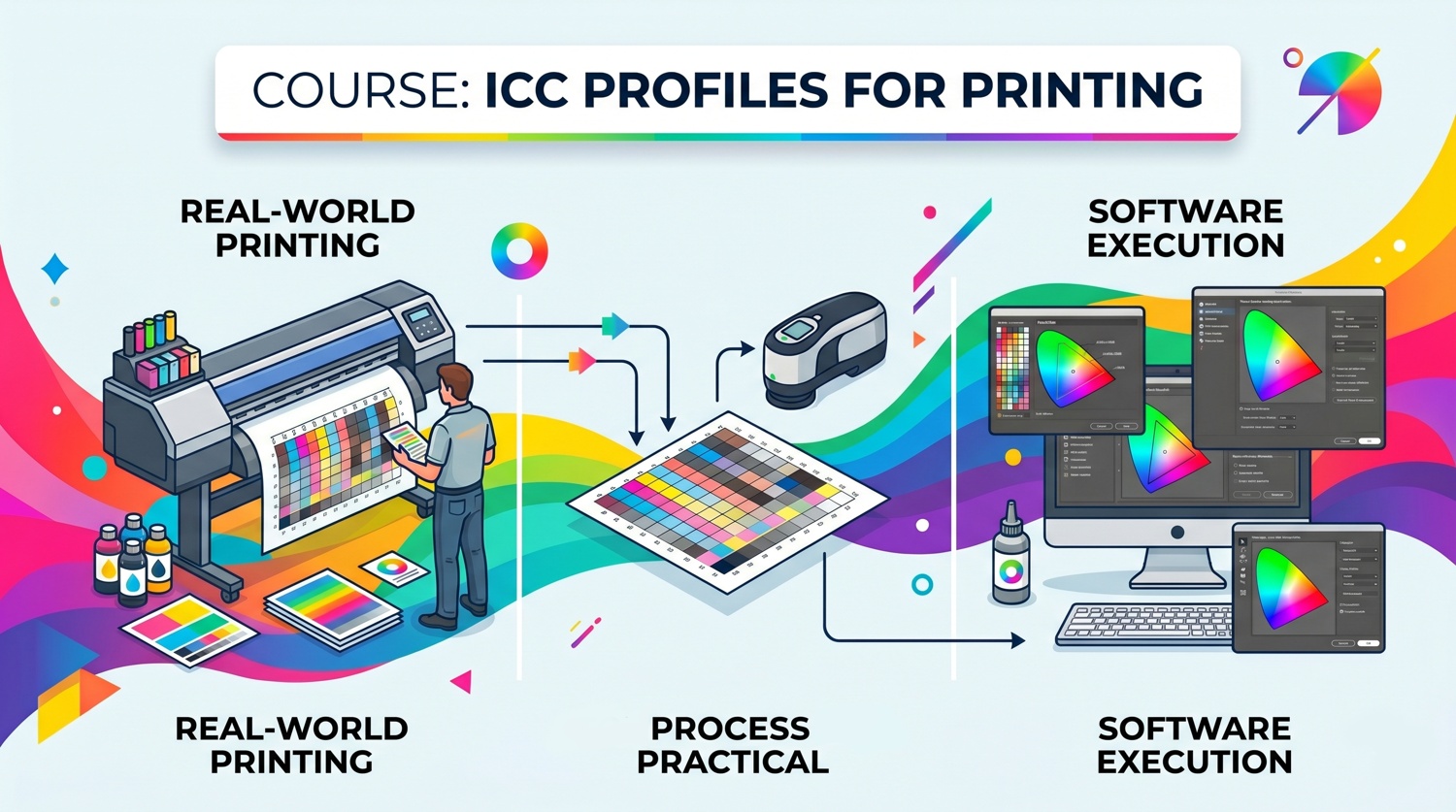
Assignment Overview
For this practical assignment, you will step up to your workshop machine and build a custom ICC profile from scratch using the InkRIP Color Manager software. You will calibrate the machine for a media of your choice, export the profile, and run a successful test print to prove your real-world color accuracy.
The 4-Step Workflow
Step 1: Pre-Flight Hardware Check
- Run an initial nozzle test from your printer to ensure the print head is completely clean and ready.
- Document your specific Printer, Ink, and Paper/Film combination-the "Trinity". Remember that your profile is only valid for this exact setup.
Step 2: InkRIP Setup & Naming
- Launch InkRIP Color Manager, click "New", and set your native printing resolution (DPI) and media type.
- The Pro-Tip Naming Constraint: Type the exact same profile name in both the English Name and Chinese Name fields.
Step 3: Ink Limits & Linearization Curves
- Print the single ink limit chart with all printer driver color management disabled ("No Color Adjustment").
- Let the chart dry for 20-30 minutes so the colors shift into their true state before scanning.
- Scan your charts row-by-row with your spectrophotometer. Maintain a steady pace to achieve a successful green light rather than a flashing red error light.
- Adjust your mixed ink limit percentages so your multi-color blacks combine cleanly without turning muddy or green.
Step 4: Profile Generation & Final Test
- Print and measure your final large target chart with the spectrophotometer, then click "Create ICC" to generate your file.
- Save your profile using a logical name format (e.g., PrinterModel_PaperBrand_PaperType.icc).
- Download the Ambitious Academy ICC Print Practical Image (Link).
- Import a test image into InkRIP. Go to Print Settings and select your newly created profile from the "Solution" dropdown menu. Run a final demo print to verify your color accuracy.
Submission Requirements
For your practical submission you must upload a single PDF report containing the following three items:
1. The "Trinity" Specification Sheet
Fill out this quick table so your assessor knows your environment variables:
- Printer Model: (e.g., am.co.za FastCOLOUR 1.8m)
- Ink Type: (e.g., Eco-Solvent Prime Ink)
- Media Brand & Type: (e.g., AM 100μm Gloss Vinyl)
2. InkRIP Software Proof
- Take a screenshot showing your newly generated .icc file successfully saved inside the InkRIP Color Manager.
- The filename must match your specification sheet.
3. Visual Accuracy Photograph
- Take a clear, high-resolution photograph showing the physical print in well-lit conditions.
- What the assessor is looking for: Smooth gray gradients with no sudden color jumps, zero ink pooling/bleeding, and rich neutral blacks that don't look green or muddy.
Complete any write-ups, screenshots or videos then submit via email to the instructor at info@ambitious.co.za
- quizzes_following_this_lesson: 1 (full text in Quizzes)
- Exam - ICCPC (10 questions)
4. Exam Assessment & Results
- title: Exam Assessment & Results
- status: publish
- author: 0
- is_previewable: (empty)
- video_duration: 0h 0m 0s (raw {"hours":0,"minutes":0,"seconds":0})
- video_source_type: (empty)
**

**
Exam Assessment and Results
Thank you for completing the Exam!
Please be aware that your exam submission-particularly the Practical Assessment-requires manual review by a certified instructor.
What Happens Next:
- Instructor Review: An instructor will thoroughly evaluate your theoretical answers and your submitted documentation, images and videos for the practical component to ensure all specifications were met.
- Assessment Timeframe: Review and grading typically take 5-10 business days from the time of submission.
- Notification: Once the assessment is complete, you will be notified with your final score and, upon passing, your official certification credentials.
We appreciate your patience during this review process. Congratulations on taking this final step!
Quizzes
1 quizzes in nest order, each under the lesson it followed. Every question and every answer is kept, including answer_is_correct.
After lesson: ICC Profile Practical
Quiz: Exam - ICCPC
- follows_lesson: ICC Profile Practical
- quiz_content: (empty)
- quiz_time: 0
- quiz_time_unit: minutes
- quiz_hide_time: (empty)
- quiz_feedback_mode: retry
- quiz_passing_grade: 80
- quiz_max_attempts_allowed: 0
- quiz_questions_order: rand
- quiz_hide_question_number: (empty)
- quiz_questions_layout: single
- quiz_explanation_enabled: (empty)
- quiz_skip_question_showing: (empty)
- question_count: 10
Question 1: Dye-Sublimation
- question_type: singleChoice
- question_points: 1.00
- question_status: publish
- question_display_points: 1
- question_answer_required: 1
- question_randomize: (empty)
- question_order: 0
- question_negative_score: 0.00
- question_content: Why can you NOT scan the printed paper directly when profiling a Dye-Sublimation printer?
- question_explanation: (empty)
Answers (4):
-
- [incorrect] answer_is_correct=0 · view_format=text · Sublimation paper causes too much optical glare for the sensor eye
-
- [incorrect] answer_is_correct=0 · view_format=text · Sublimation paper shrinks more than 50% in width when printed
-
- [CORRECT] answer_is_correct=1 · view_format=text · Sublimation ink on paper is dull and only reveals its true color after being heat-pressed onto polyester
-
- [incorrect] answer_is_correct=0 · view_format=text · The spectrophotometer ruler tracks will rip the transfer paper
Question 2: Delta-E (ΔE)
- question_type: singleChoice
- question_points: 1.00
- question_status: publish
- question_display_points: 1
- question_answer_required: 1
- question_randomize: (empty)
- question_order: 0
- question_negative_score: 0.00
- question_content: When using a handheld color sensor (like the Nix) for outbound quality control, what does a Delta-E (ΔE) score between 1.0 and 2.0 mean?
- question_explanation: (empty)
Answers (4):
-
- [incorrect] answer_is_correct=0 · view_format=text · The varnish channel was left on during the scan
-
- [incorrect] answer_is_correct=0 · view_format=text · The print has failed completely and must be discarded
-
- [incorrect] answer_is_correct=0 · view_format=text · The sensor was blinded by ambient room light leaks
-
- [CORRECT] answer_is_correct=1 · view_format=text · The color match is an excellent commercial print industry standard
Question 3: Out of Gamut
- question_type: singleChoice
- question_points: 1.00
- question_status: publish
- question_display_points: 1
- question_answer_required: 1
- question_randomize: (empty)
- question_order: 0
- question_negative_score: 0.00
- question_content: What does it mean when a color in a digital graphic file is "Out of Gamut" for your printing setup?
- question_explanation: (empty)
Answers (4):
-
- [incorrect] answer_is_correct=0 · view_format=text · The color requires a higher resolution file layout (above 300 DPI)
-
- [CORRECT] answer_is_correct=1 · view_format=text · The color falls outside the physical boundary of what your printer, ink, and media can reproduce
-
- [incorrect] answer_is_correct=0 · view_format=text · The color can only be verified using a colorimeter rather than a spectrophotometer
-
- [incorrect] answer_is_correct=0 · view_format=text · The color can only be printed if the InkRIP software is set to Chinese
Question 4: Dry Time
- question_type: singleChoice
- question_points: 1.00
- question_status: publish
- question_display_points: 1
- question_answer_required: 1
- question_randomize: (empty)
- question_order: 0
- question_negative_score: 0.00
- question_content: Why is it critical to allow an eco-solvent ink limit chart to dry for at least 20–30 minutes before scanning?
- question_explanation: (empty)
Answers (4):
-
- [incorrect] answer_is_correct=0 · view_format=text · To prevent the printhead from crashing into the media
-
- [CORRECT] answer_is_correct=1 · view_format=text · Because ink colors physically shift and change as they dry
-
- [incorrect] answer_is_correct=0 · view_format=text · Because the spectrophotometer ruler will scratch wet ink
-
- [incorrect] answer_is_correct=0 · view_format=text · To let the InkRIP software finish compiling the layout width
Question 5: Mixed Ink Limit
- question_type: singleChoice
- question_points: 1.00
- question_status: publish
- question_display_points: 1
- question_answer_required: 1
- question_randomize: (empty)
- question_order: 0
- question_negative_score: 0.00
- question_content: Why is the "Mixed Ink Limit" step critical when combining two, three, or four inks?
- question_explanation: (empty)
Answers (4):
-
- [CORRECT] answer_is_correct=1 · view_format=text · It ensures multi-color blacks combine into a rich black instead of turning muddy or green
-
- [incorrect] answer_is_correct=0 · view_format=text · It calculates the total shrinkage of paper passing through a fuser
-
- [incorrect] answer_is_correct=0 · view_format=text · It automatically turns off the printer's varnish channel
-
- [incorrect] answer_is_correct=0 · view_format=text · It shrinks the white underbase layer by a negative pixel value
Question 6: Linearization Calibration
- question_type: singleChoice
- question_points: 1.00
- question_status: publish
- question_display_points: 1
- question_answer_required: 1
- question_randomize: (empty)
- question_order: 0
- question_negative_score: 0.00
- question_content: What is the primary purpose of Linearization Calibration?
- question_explanation: (empty)
Answers (4):
-
- [incorrect] answer_is_correct=0 · view_format=text · To choose between printing on vinyl or film
-
- [incorrect] answer_is_correct=0 · view_format=text · To activate the Bluetooth link on a handheld color sensor
-
- [incorrect] answer_is_correct=0 · view_format=text · To set the absolute maximum ink capacity before pooling occurs
-
- [CORRECT] answer_is_correct=1 · view_format=text · To balance the ink flow for smooth transitions from light gradients to deep solids
Question 7: No Color Adjustment
- question_type: singleChoice
- question_points: 1.00
- question_status: publish
- question_display_points: 1
- question_answer_required: 1
- question_randomize: (empty)
- question_order: 0
- question_negative_score: 0.00
- question_content: Why must you disable all color management settings (select "No Color Adjustment") in your printer driver before printing a calibration target?
- question_explanation: (empty)
Answers (4):
-
- [incorrect] answer_is_correct=0 · view_format=text · To allow the ink to dry 50% faster
-
- [incorrect] answer_is_correct=0 · view_format=text · To bypass the mandatory nozzle check step
-
- [CORRECT] answer_is_correct=1 · view_format=text · To ensure the chart prints completely raw without any uncoordinated driver adjustments
-
- [incorrect] answer_is_correct=0 · view_format=text · To automatically trigger the white ink underbase layer
Question 8: Mandatory Name
- question_type: singleChoice
- question_points: 1.00
- question_status: publish
- question_display_points: 1
- question_answer_required: 1
- question_randomize: (empty)
- question_order: 0
- question_negative_score: 0.00
- question_content: When setting up a new profile in InkRIP, what is the mandatory requirement for the profile name?
- question_explanation: (empty)
Answers (4):
-
- [incorrect] answer_is_correct=0 · view_format=text · It must contain the current date and time
-
- [CORRECT] answer_is_correct=1 · view_format=text · The exact identical profile name must be typed into both the English Name and Chinese Name fields
-
- [incorrect] answer_is_correct=0 · view_format=text · It must automatically match the printer's serial number
-
- [incorrect] answer_is_correct=0 · view_format=text · It must only be written in uppercase English letters
Question 9: DTF
- question_type: singleChoice
- question_points: 1.00
- question_status: publish
- question_display_points: 1
- question_answer_required: 1
- question_randomize: (empty)
- question_order: 0
- question_negative_score: 0.00
- question_content: When creating a custom ICC profile for a Direct-to-Film (DTF) printer, how must the target chart be printed?
- question_explanation: (empty)
Answers (4):
-
- [incorrect] answer_is_correct=0 · view_format=text · Onto a piece of standard white 80 gsm copy paper
-
- [incorrect] answer_is_correct=0 · view_format=text · In forward layout mode without any powder applied
-
- [incorrect] answer_is_correct=0 · view_format=text · Directly onto the clear PET film without any white ink
-
- [CORRECT] answer_is_correct=1 · view_format=text · With a solid 100% white spot color underbase layer underneath the CMYK color patches
Question 10: Red Light
- question_type: singleChoice
- question_points: 1.00
- question_status: publish
- question_display_points: 1
- question_answer_required: 1
- question_randomize: (empty)
- question_order: 0
- question_negative_score: 0.00
- question_content: While scanning a linearization chart row-by-row with your spectrophotometer, what does a flashing red light indicate?
- question_explanation: (empty)
Answers (4):
-
- [incorrect] answer_is_correct=0 · view_format=text · The device has successfully finished the calculation
-
- [incorrect] answer_is_correct=0 · view_format=text · The white tile calibration was successful
-
- [incorrect] answer_is_correct=0 · view_format=text · The ink layer is too thick to read
-
- [CORRECT] answer_is_correct=1 · view_format=text · The row scan failed and must be rescanned
Sources
- source_url: https://ambitious.academy/course/icc-profiles-course-certification
- source_ref: academy.jsonl (dumps-check; public catalog dump)
- source_ref: nested Course export b72d7de272f4c30d9f4c6640d2ac20ff9ac8aa6376479e9601dcfd04593de203.csv
- source_ref: drive_file_id list (extract pending — this pass did not download Drive files)
1goZwBBNFZd-pvlIYkbEN_PUnOLtYmiNP— transcript pending / keyframes pending / presentation extract pending- timestamp: 2026-08-21 SAST
- dest (do not write from this pass): T:\V\sources\academy\icc-profiles-course-certification.md