

Large Format Printing Course - Certification
Course
- source_url: https://ambitious.academy/course/large-format-printing-course-certification
- dump Date: 2026-08-21 (academy.jsonl Last-Modified Fri, 21 Aug 2026 09:25:14 GMT; fetched_at_utc 2026-08-21T10:42:48Z = 12:42 SAST)
- export post_date: 2026-03-02 10:58:22
- post_author: 28
- post_status: publish
- post_excerpt: (empty)
- post_parent: 0
- comment_status: closed
- comment_count: 0
- course_expire_enrollment: 0
- course_type: paid
- course_product_id: 5549
- course_download_id: 0
- course_max_students: 0
- course_language: (empty)
- course_difficulty_level: all_levels
- course_benefits: (empty)
- course_requirements: (empty)
- course_audience: (empty)
- course_materials: (empty)
- is_enabled_course_qa: 1
- is_enabled_course_announcements: 1
- course_certificate_id: 2471
- is_disabled_course_review: (empty)
- rcp_membership_levels: []
- course_enable_certificate: 1
- edd_price: (empty)
- regular_price: 40
- sale_price: (empty)
- course_duration: 0 hours, 0 minutes, 0 seconds (raw [0,0,0])
- course_intro_video kind: none
- course_intro_video raw: []
- catalog Title: Large Format Printing Course - Certification
- catalog url: https://ambitious.academy/course/large-format-printing-course-certification
- content merge: export HTML and jsonl catalog text differ — academy.jsonl dump (2026-08-21) is newer than export post_date; both kept in full. Older export kept as history below; catalog kept as dump text.
Curriculum
Curriculum sections (from course_curriculum):
- section: Information
- section: Examinations
Curriculum topics (id / name / type) in export order:
- id 400 · lesson · About CLFPS
- id 43 · lesson · How To Follow Along
- id 5507 · quiz · Exam - LFP About
- id 5508 · quiz · Exam - LFP Setup & Maintenance
- id 5509 · quiz · Exam - LFP Software
- id 5510 · quiz · Exam - LFP Workflow
- id 5511 · quiz · Exam - LFP Application
- id 5512 · quiz · Exam - LFP Software & Pre-Press
- id 406 · lesson · Practical - LFP
- id 167 · lesson · Exam Assessment & Results
Raw course_curriculum (export, kept in full):
[{"title":"Information","content":"","topics":[{"id":400,"name":"About CLFPS","type":"lesson"},{"id":43,"name":"How To Follow Along","type":"lesson"}]},{"title":"Examinations","content":"","topics":[{"id":5507,"name":"Exam - LFP About","type":"quiz"},{"id":5508,"name":"Exam - LFP Setup & Maintenance","type":"quiz"},{"id":5509,"name":"Exam - LFP Software","type":"quiz"},{"id":5510,"name":"Exam - LFP Workflow","type":"quiz"},{"id":5511,"name":"Exam - LFP Application","type":"quiz"},{"id":5512,"name":"Exam - LFP Software & Pre-Press","type":"quiz"},{"id":406,"name":"Practical - LFP","type":"lesson"},{"id":167,"name":"Exam Assessment & Results","type":"lesson"}]}]
Course content (academy.jsonl catalog)
dump Date 2026-08-21 (academy.jsonl Last-Modified Fri, 21 Aug 2026 09:25:14 GMT; fetched_at_utc 2026-08-21T10:42:48Z = 12:42 SAST). Public visit link is source_url (paywall).
Welcome! This is the culminating step in your journey to becoming a professionally certified Large Format Print Specialist (CLFPS). This external certification exam is designed to rigorously test and officially validate the comprehensive, industry-level skills you gained throughout the Large Format Print Specialist (LFPS) Certification Prep Course.
-
What This Exam Is About -
This is a Professional Competency Assessment . Its purpose is to verify your mastery of the entire digital print production workflow—from file preparation and machine calibration to final execution and application planning. Successful completion of this two-part exam certifies that you meet the high technical and efficiency standards required to manage LFP production and will earn you your official certification credential.
-
Exam Recommendation -
LFP Specialist (LFPS) Prep Course Completion -
Before proceeding to the official exam, you should ideally have successfully completed all modules, knowledge checks, and the final Demo Project within the LFP Specialist Certification Prep Course . This ensures you possess the specific theoretical knowledge and practical workflows necessary to pass this comprehensive assessment.
-
Exam Coverage and Structure -
The certification exam is divided into two distinct and weighted parts designed to test both your fundamental knowledge and your practical execution ability. The total assessment time is approximately 90 minutes (60 minutes for Theory, 30 minutes for Practical submission).
-
- Theory Assessment (60 Minutes) -
This section consists of multiple-choice questions designed to test your foundational knowledge of LFP principles and technical standards.
Workflow Software: Mastery of the correct sequence of actions from InkRIP to PrintEXP . Understanding the functions of Nesting, Tiling, and the critical data hand-off. Color Pre-Press: Proficiency in file preparation, including CMYK vs. RGB , required DPI/resolution for different viewing distances, and the use of Bleed and Die-Lines . Maintenance Calibration: Knowledge of the purpose and execution of the Nozzle Check , Feed Calibration , and the function of crucial components (Encoder Strip, Capping Station). Materials Safety: Understanding specialty inks (White Ink, Varnish), material properties (outgassing), and essential workplace safety (VOCs and manual handling). -
- Practical Assessment (Simulation) -
This section is a full-cycle simulation that requires you to execute and submit documented proof of your work using your RIP software (or equivalent). Due to the online nature of the course, the focus is on digital setup, documentation, and efficiency.
-
Simulate Pre-Press: Demonstrate the ability to import files, check resolution, and select the correct ICC Profile for the specified media. Demonstrate Efficiency: Successfully execute and submit documentation (screenshots) showing the most material-efficient nesting of two different jobs on a specified roll width. Validate Execution: Detail the correct three-step sequence for printing the job using the control software ( PrintEXP ). Documentation: Demonstrating an understanding of the business aspect of LFP. -
Good luck! Your professional credentials as a Certified Large Format Print Specialist (CLFPS) await.
Course content (export post_content)
History from export post_date 2026-03-02 10:58:22. Full HTML converted; nothing summarized.
Welcome! This is the culminating step in your journey to becoming a professionally certified Large Format Print Specialist (CLFPS). This external certification exam is designed to rigorously test and officially validate the comprehensive, industry-level skills you gained throughout the Large Format Print Specialist (LFPS) Certification Prep Course.
-
What This Exam Is About
-
This is a Professional Competency Assessment. Its purpose is to verify your mastery of the entire digital print production workflow—from file preparation and machine calibration to final execution and application planning. Successful completion of this two-part exam certifies that you meet the high technical and efficiency standards required to manage LFP production and will earn you your official certification credential.
-
Exam Recommendation
-
LFP Specialist (LFPS) Prep Course Completion
-
Before proceeding to the official exam, you should ideally have successfully completed all modules, knowledge checks, and the final Demo Project within the LFP Specialist Certification Prep Course. This ensures you possess the specific theoretical knowledge and practical workflows necessary to pass this comprehensive assessment.
-
Exam Coverage and Structure
-
The certification exam is divided into two distinct and weighted parts designed to test both your fundamental knowledge and your practical execution ability. The total assessment time is approximately 90 minutes (60 minutes for Theory, 30 minutes for Practical submission).
-
1. Theory Assessment (60 Minutes)
-
This section consists of multiple-choice questions designed to test your foundational knowledge of LFP principles and technical standards.
- Workflow & Software: Mastery of the correct sequence of actions from InkRIP to PrintEXP. Understanding the functions of Nesting, Tiling, and the critical data hand-off.
- Color & Pre-Press: Proficiency in file preparation, including CMYK vs. RGB, required DPI/resolution for different viewing distances, and the use of Bleed and Die-Lines.
- Maintenance & Calibration: Knowledge of the purpose and execution of the Nozzle Check, Feed Calibration, and the function of crucial components (Encoder Strip, Capping Station).
- Materials & Safety: Understanding specialty inks (White Ink, Varnish), material properties (outgassing), and essential workplace safety (VOCs and manual handling).
-
2. Practical Assessment (Simulation)
-
This section is a full-cycle simulation that requires you to execute and submit documented proof of your work using your RIP software (or equivalent). Due to the online nature of the course, the focus is on digital setup, documentation, and efficiency.
-
- Simulate Pre-Press: Demonstrate the ability to import files, check resolution, and select the correct ICC Profile for the specified media.
- Demonstrate Efficiency: Successfully execute and submit documentation (screenshots) showing the most material-efficient nesting of two different jobs on a specified roll width.
- Validate Execution: Detail the correct three-step sequence for printing the job using the control software (PrintEXP).
- Documentation: Demonstrating an understanding of the business aspect of LFP.
-
Good luck! Your professional credentials as a Certified Large Format Print Specialist (CLFPS) await.
Lessons
Nest order. 4 lessons. Overlapping titles kept as separate lessons. HTML converted in full, not summarized.
1. About CLFPS
- title: About CLFPS
- status: publish
- author: 0
- is_previewable: (empty)
- video_duration: 0h 0m 0s (raw {"hours":0,"minutes":0,"seconds":0})
- video_source_type: (empty)
Welcome! This is the culminating step in your journey to becoming a professionally certified Large Format Print Specialist (CLFPS). This external certification exam is designed to rigorously test and officially validate the comprehensive, industry-level skills you gained throughout the Large Format Print Specialist (LFPS) Certification Prep Course.
What This Exam Is About
This is a Professional Competency Assessment. Its purpose is to verify your mastery of the entire digital print production workflow-from file preparation and machine calibration to final execution and application planning. Successful completion of this two-part exam certifies that you meet the high technical and efficiency standards required to manage LFP production and will earn you your official certification credential.
Exam Recommendation
LFP Specialist (LFPS) Prep Course Completion
Before proceeding to the official exam, you should ideally have successfully completed all modules, knowledge checks, and the final Demo Project within the LFP Specialist Certification Prep Course. This ensures you possess the specific theoretical knowledge and practical workflows necessary to pass this comprehensive assessment.
Exam Coverage and Structure
The certification exam is divided into two distinct and weighted parts designed to test both your fundamental knowledge and your practical execution ability. The total assessment time is approximately 90 minutes (60 minutes for Theory, 30 minutes for Practical submission).
1. Theory Assessment (60 Minutes)
This section consists of multiple-choice questions designed to test your foundational knowledge of LFP principles and technical standards.
- Workflow & Software: Mastery of the correct sequence of actions from InkRIP to PrintEXP. Understanding the functions of Nesting, Tiling, and the critical data hand-off.
- Color & Pre-Press: Proficiency in file preparation, including CMYK vs. RGB, required DPI/resolution for different viewing distances, and the use of Bleed and Die-Lines.
- Maintenance & Calibration: Knowledge of the purpose and execution of the Nozzle Check, Feed Calibration, and the function of crucial components (Encoder Strip, Capping Station).
- Materials & Safety: Understanding specialty inks (White Ink, Varnish), material properties (outgassing), and essential workplace safety (VOCs and manual handling).
2. Practical Assessment (Simulation)
This section is a full-cycle simulation that requires you to execute and submit documented proof of your work using your RIP software (or equivalent). Due to the online nature of the course, the focus is on digital setup, documentation, and efficiency.
- Simulate Pre-Press: Demonstrate the ability to import files, check resolution, and select the correct ICC Profile for the specified media.
- Demonstrate Efficiency: Successfully execute and submit documentation (screenshots) showing the most material-efficient nesting of two different jobs on a specified roll width.
- Validate Execution: Detail the correct three-step sequence for printing the job using the control software (PrintEXP).
- Documentation: Demonstrating an understanding of the business aspect of LFP.
Good luck! Your professional credentials as a Certified Large Format Print Specialist (CLFPS) await.
2. How To Follow Along
- title: How To Follow Along
- status: publish
- author: 0
- is_previewable: 1
- video_duration: 0h 0m 0s (raw {"hours":0,"minutes":0,"seconds":0})
- video_source_type: (empty)
In this section we will be looking at some important things for a student to bear in mind throughout the course.
Progression
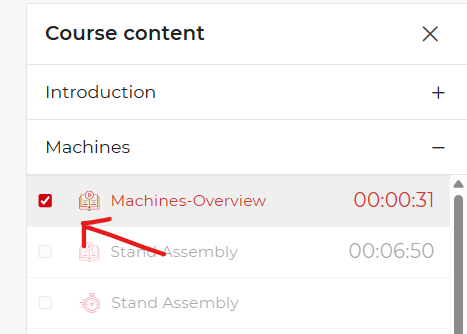
- If it is your first time doing the course, we would recommend that you follow along from start to finish without skipping content.
- If you have completed a lesson and it was not automatically marked as complete, you will have to mark it manually as completed.

Quizzes
- After important lessons we have added quizzes, these will help you better retain the lessons learned within that topic.
- The quizzes have no limit in regard to the number of attempts.
Q&A
- If you have any questions that need answers, please leave them below each lesson in the Q&A section.
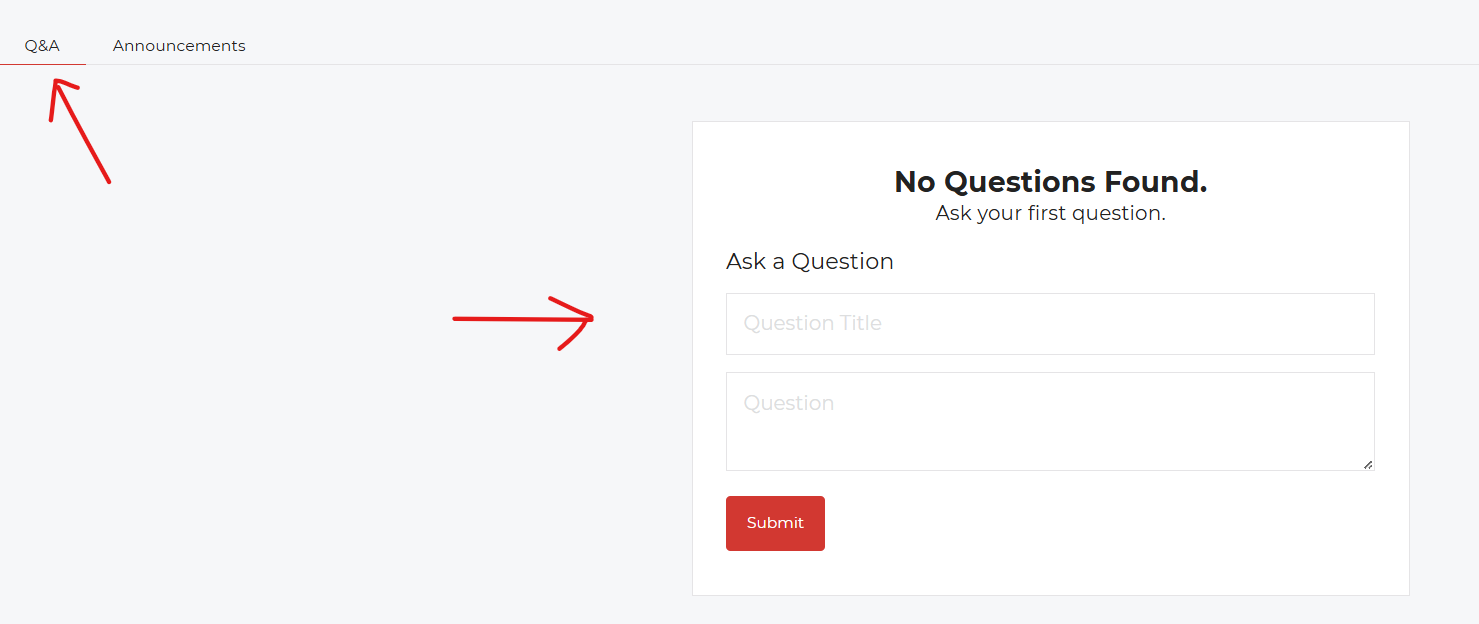
- Keep questions relevant to the lesson at hand.
- Before leaving a question, ensure that a similar question has not been asked and answered already.
Practise
- Theory without practice is not as effective as practising what you've learned.
- The more you practise what has been shown in these lessons, the more value this course will have for you.
Bonus Things
- At the end of the course we have a section called Bonus Things; this section will be used to add any content and lessons that we did not cover throughout the course.
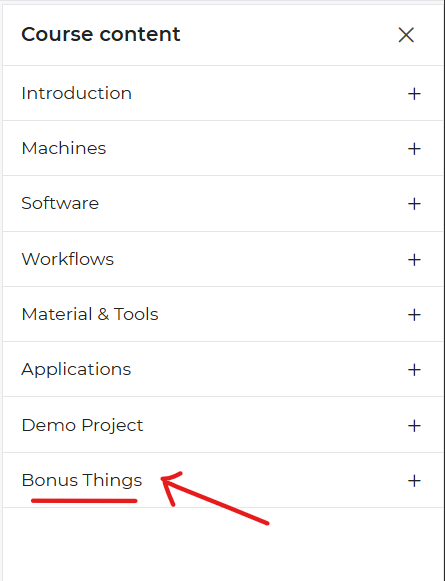
- This section will also grow overtime, so make sure to come and look for updates from time to time.
-
If you have any suggestions for content to cover on Vinyl Cutting, feel free to leave your suggestions within the Q&A section for the Bonus Things.
-
quizzes_following_this_lesson: 6 (full text in Quizzes)
- Exam - LFP About (4 questions)
- Exam - LFP Setup & Maintenance (7 questions)
- Exam - LFP Software (8 questions)
- Exam - LFP Workflow (6 questions)
- Exam - LFP Application (6 questions)
- Exam - LFP Software & Pre-Press (9 questions)
3. Practical - LFP
- title: Practical - LFP
- status: publish
- author: 0
- is_previewable: (empty)
- video_duration: 0h 0m 0s (raw {"hours":0,"minutes":0,"seconds":0})
- video_source_type: (empty)
**Practical Certification Assessment: **
Digital Workflow Execution
This assessment requires the student to simulate the full production process for two small jobs, demonstrating mastery of the RIP software (InkRIP) and Workflow sections of the course. Students will submit screenshots and a final written plan.
Project Scenario: \The Local Cafe Signage\"
A local cafe needs two simple, rectangular, high-quality prints using the same media.
| Job Name | File Type | Material & Finish | Final Print Dimensions | Workflow Focus |
|---|---|---|---|---|
| A. Menu Board | Raster Image (TIF) | Standard Vinyl | 80 cm x 100 cm | Color Profile Selection & Scaling |
| B. Opening Hours | Vector/Text (PDF) | Standard Vinyl | 30 cm x 45 cm | Nesting & Output Setup |
Assumed Printer Parameters
- Printer Width: 1.3 metres (maximum printable area).
- Media: Standard Vinyl (1.3 m wide roll is loaded).
- InkRIP Setup: Assume the student is using a RIP environment that includes Nesting tools.
Part 1: Pre-Press and Setup (10 Points)
The student must perform and document the essential pre-flight checks and material setup.
File Check & Scaling: (2 Points)
- Action: Verify that the raster file for the Menu Board (Job A) is at least 150 DPI at its final size and confirm both files are in the CMYK color mode.
- Deliverable: A single screenshot from the design software showing the image size/resolution window for the Menu Board, confirming the DPI.
ICC Profile Selection: (2 Points)
- Action: In InkRIP, select the appropriate ICC Profile for the material.
- Deliverable: A screenshot of the InkRIP media panel showing the profile \"Relevant to Machine\" selected.
Media Loading & Verification: (2 Points)
- Action: Simulate the loading process and verification.
- Deliverable: A written note (1-2 sentences) describing the most critical physical check an operator would perform after loading the 1.3 metre vinyl roll to prevent media waste (e.g., checking for skew).
Nozzle Check Simulation: (4 Points)
- Action: Simulate the result of a machine readiness check.
- Deliverable: A brief written analysis of the result below, stating whether the operator should proceed or run a cleaning cycle, and why.
Part 2: RIP Processing and Execution (15 Points)
The student must demonstrate efficient material usage and correct job processing.
Nesting and Layout: (5 Points)
- Action: Import both Job A (80 x 100 cm) and Job B (30 cm x 45 cm) into InkRIP and use the Nesting Tool to arrange them side-by-side to minimize media length used.
- Deliverable: A screenshot of the InkRIP layout window showing both jobs arranged on the 1.3 metre roll width, clearly demonstrating the most material-efficient layout.
Tiling Check (Verification): (3 Points)
- Action: Review Job A\'s dimensions (width) against the printer\'s capacity (1.3 m wide).
- Deliverable: A written answer stating whether Tiling is required for Job A and providing the maximum media length (in metres) that the combined, nested jobs will consume.
RIP and Status: (4 Points)
- Action: Simulate initiating the RIP Process and the final file output.
- Deliverable: A screenshot of the InkRIP job queue showing both jobs with the final status \"Ready to Print\" (or equivalent status).
PrintEXP Execution Sequence: (3 Points)
- Action: Detail the final execution step.
- Deliverable: A written sequence of the three final steps taken using PrintEXP (the control software) to physically start the job, beginning after the file has been processed by InkRIP.
Part 3: Finishing and Documentation (2 Points)
The student will provide a final finishing plan and cost breakdown.
Finishing Plan (Trimming and Application): (2 Points)
- Action: Create a brief plan for the final stages of the job.
- Deliverable: A written description detailing the correct order of the two final post-press steps after printing (excluding lamination and contour cut) for the combined print run.
Submission Instructions:
Complete any write-ups, screenshots or videos then submit via email to the instructor at info@ambitious.co.za.
Keep up the practical skills!
"
4. Exam Assessment & Results
- title: Exam Assessment & Results
- status: publish
- author: 0
- is_previewable: (empty)
- video_duration: 0h 0m 0s (raw {"hours":0,"minutes":0,"seconds":0})
- video_source_type: (empty)
**

**
Exam Assessment and Results
Thank you for completing the Exam!
Please be aware that your exam submission-particularly the Practical Assessment-requires manual review by a certified instructor.
What Happens Next:
- Instructor Review: An instructor will thoroughly evaluate your theoretical answers and your submitted documentation, images and videos for the practical component to ensure all specifications were met.
- Assessment Timeframe: Review and grading typically take 5-10 business days from the time of submission.
- Notification: Once the assessment is complete, you will be notified with your final score and, upon passing, your official certification credentials.
We appreciate your patience during this review process. Congratulations on taking this final step!
Quizzes
6 quizzes in nest order, each under the lesson it followed. Every question and every answer is kept, including answer_is_correct.
After lesson: How To Follow Along
Quiz: Exam - LFP About
- follows_lesson: How To Follow Along
- quiz_content: (empty)
- quiz_time: 0
- quiz_time_unit: minutes
- quiz_hide_time: (empty)
- quiz_feedback_mode: retry
- quiz_passing_grade: 80
- quiz_max_attempts_allowed: 0
- quiz_questions_order: rand
- quiz_hide_question_number: (empty)
- quiz_questions_layout: (empty)
- quiz_explanation_enabled: (empty)
- quiz_skip_question_showing: (empty)
- question_count: 4
Question 1: UV-Curable vs Solvent ink
- question_type: singleChoice
- question_points: 1.00
- question_status: publish
- question_display_points: 1
- question_answer_required: 1
- question_randomize: (empty)
- question_order: 0
- question_negative_score: 0.00
- question_content: A UV-curable ink is fundamentally different from a Solvent ink because it:
- question_explanation: (empty)
Answers (4):
-
- [CORRECT] answer_is_correct=1 · view_format=text · Requires an instant exposure to UV light to solidify (cure).
-
- [incorrect] answer_is_correct=0 · view_format=text · Only works on fabric.
-
- [incorrect] answer_is_correct=0 · view_format=text · Has to be heated to cure.
-
- [incorrect] answer_is_correct=0 · view_format=text · Is mixed with water.
Question 2: Large Format
- question_type: singleChoice
- question_points: 1.00
- question_status: publish
- question_display_points: 1
- question_answer_required: 1
- question_randomize: (empty)
- question_order: 0
- question_negative_score: 0.00
- question_content: A print is generally classified as "Large Format" if its width exceeds:
- question_explanation: (empty)
Answers (4):
-
- [incorrect] answer_is_correct=0 · view_format=text · 10 cm.
-
- [incorrect] answer_is_correct=0 · view_format=text · 1 metre.
-
- [incorrect] answer_is_correct=0 · view_format=text · 5 metres.
-
- [CORRECT] answer_is_correct=1 · view_format=text · 45 to 61 cm.
Question 3: Dedicated Ventilation
- question_type: singleChoice
- question_points: 1.00
- question_status: publish
- question_display_points: 1
- question_answer_required: 1
- question_randomize: (empty)
- question_order: 0
- question_negative_score: 0.00
- question_content: What is the main reason Solvent and Latex inks require dedicated ventilation systems in a print shop?
- question_explanation: (empty)
Answers (4):
-
- [incorrect] answer_is_correct=0 · view_format=text · To regulate the temperature of the ink cartridges.
-
- [incorrect] answer_is_correct=0 · view_format=text · To facilitate easy cleaning of the printheads.
-
- [CORRECT] answer_is_correct=1 · view_format=text · To remove harmful Volatile Organic Compounds (VOCs).
-
- [incorrect] answer_is_correct=0 · view_format=text · To prevent the media from skewing.
Question 4: Inconsistencies Power
- question_type: singleChoice
- question_points: 1.00
- question_status: publish
- question_display_points: 1
- question_answer_required: 1
- question_randomize: (empty)
- question_order: 0
- question_negative_score: 0.00
- question_content: Which specialized equipment is necessary to protect an LFP's sensitive electronics from minor fluctuations and inconsistencies in the main power supply?
- question_explanation: (empty)
Answers (4):
-
- [incorrect] answer_is_correct=0 · view_format=text · A standard Surge Protector.
-
- [incorrect] answer_is_correct=0 · view_format=text · A dedicated chiller unit.
-
- [CORRECT] answer_is_correct=1 · view_format=text · A Voltage Regulator (AVR).
-
- [incorrect] answer_is_correct=0 · view_format=text · A dehumidifier.
Quiz: Exam - LFP Setup & Maintenance
- follows_lesson: How To Follow Along
- quiz_content: (empty)
- quiz_time: 0
- quiz_time_unit: minutes
- quiz_hide_time: (empty)
- quiz_feedback_mode: retry
- quiz_passing_grade: 80
- quiz_max_attempts_allowed: 0
- quiz_questions_order: rand
- quiz_hide_question_number: (empty)
- quiz_questions_layout: (empty)
- quiz_explanation_enabled: (empty)
- quiz_skip_question_showing: (empty)
- question_count: 7
Question 1: Horizontal Banding
- question_type: singleChoice
- question_points: 1.00
- question_status: publish
- question_display_points: 1
- question_answer_required: 1
- question_randomize: (empty)
- question_order: 0
- question_negative_score: 0.00
- question_content: Horizontal banding (missing lines running perpendicular to the media feed) is a clear indication of:
- question_explanation: (empty)
Answers (4):
-
- [incorrect] answer_is_correct=0 · view_format=text · Pinch roller slippage.
-
- [incorrect] answer_is_correct=0 · view_format=text · An alignment error in the RIP.
-
- [CORRECT] answer_is_correct=1 · view_format=text · Clogged or missing nozzles in the printhead.
-
- [incorrect] answer_is_correct=0 · view_format=text · Incorrect heater settings.
Question 2: Pinch Rollers
- question_type: singleChoice
- question_points: 1.00
- question_status: publish
- question_display_points: 1
- question_answer_required: 1
- question_randomize: (empty)
- question_order: 0
- question_negative_score: 0.00
- question_content: What is the critical purpose of the Pinch Rollers?
- question_explanation: (empty)
Answers (4):
-
- [incorrect] answer_is_correct=0 · view_format=text · To heat the media before printing.
-
- [incorrect] answer_is_correct=0 · view_format=text · To measure the media width automatically.
-
- [CORRECT] answer_is_correct=1 · view_format=text · To firmly grip and advance the media with consistent, precise movement.
-
- [incorrect] answer_is_correct=0 · view_format=text · To clean the bottom of the printhead.
Question 3: Weekly Maintenance
- question_type: singleChoice
- question_points: 1.00
- question_status: publish
- question_display_points: 1
- question_answer_required: 1
- question_randomize: (empty)
- question_order: 0
- question_negative_score: 0.00
- question_content: What maintenance task should be performed Weekly to ensure the print carriage moves smoothly?
- question_explanation: (empty)
Answers (4):
-
- [incorrect] answer_is_correct=0 · view_format=text · Running a Nozzle Check.
-
- [incorrect] answer_is_correct=0 · view_format=text · Emptying the waste ink tank.
-
- [CORRECT] answer_is_correct=1 · view_format=text · Lubricating the Gantry/Carriage Rail.
-
- [incorrect] answer_is_correct=0 · view_format=text · Converting the ink supply to storage fluid.
Question 4: Dirty or Damaged Encoder
- question_type: singleChoice
- question_points: 1.00
- question_status: publish
- question_display_points: 1
- question_answer_required: 1
- question_randomize: (empty)
- question_order: 0
- question_negative_score: 0.00
- question_content: What is the main risk associated with a dirty or damaged Encoder Strip?
- question_explanation: (empty)
Answers (4):
-
- [incorrect] answer_is_correct=0 · view_format=text · The media will skew.
-
- [incorrect] answer_is_correct=0 · view_format=text · The ink will not dry.
-
- [incorrect] answer_is_correct=0 · view_format=text · The material profile will not load.
-
- [CORRECT] answer_is_correct=1 · view_format=text · The print carriage loses positional reference, resulting in misaligned or "ghosted" prints.
Question 5: Isopropyl Alcohol
- question_type: singleChoice
- question_points: 1.00
- question_status: publish
- question_display_points: 1
- question_answer_required: 1
- question_randomize: (empty)
- question_order: 0
- question_negative_score: 0.00
- question_content: Why is it recommended to clean the pinch rollers with Isopropyl Alcohol (IPA)?
- question_explanation: (empty)
Answers (4):
-
- [CORRECT] answer_is_correct=1 · view_format=text · To increase friction, reducing media slippage and preventing vertical banding.
-
- [incorrect] answer_is_correct=0 · view_format=text · To sanitize the media before printing.
-
- [incorrect] answer_is_correct=0 · view_format=text · To reduce friction, increasing media slippage.
-
- [incorrect] answer_is_correct=0 · view_format=text · To remove residual heat from the rollers.
Question 6: Material Strike
- question_type: singleChoice
- question_points: 1.00
- question_status: publish
- question_display_points: 1
- question_answer_required: 1
- question_randomize: (empty)
- question_order: 0
- question_negative_score: 0.00
- question_content: What should an operator immediately check if a thin vinyl media starts to buckle and causes the printhead carriage to strike the material?
- question_explanation: (empty)
Answers (4):
-
- [incorrect] answer_is_correct=0 · view_format=text · The tension of the take-up reel.
-
- [incorrect] answer_is_correct=0 · view_format=text · The ink expiration date.
-
- [incorrect] answer_is_correct=0 · view_format=text · The amount of vacuum suction applied.
-
- [CORRECT] answer_is_correct=1 · view_format=text · The Platen/Post-Heater temperature (it may be too high).
Question 7: Capping Station
- question_type: singleChoice
- question_points: 1.00
- question_status: publish
- question_display_points: 1
- question_answer_required: 1
- question_randomize: (empty)
- question_order: 0
- question_negative_score: 0.00
- question_content: When performing the Daily Maintenance check, why must the Capping Station be confirmed as moist and clean?
- question_explanation: (empty)
Answers (4):
-
- [incorrect] answer_is_correct=0 · view_format=text · To lubricate the moving parts of the print carriage.
-
- [incorrect] answer_is_correct=0 · view_format=text · To clean the media as it passes the platen.
-
- [incorrect] answer_is_correct=0 · view_format=text · To cool the ink before it enters the printhead.
-
- [CORRECT] answer_is_correct=1 · view_format=text · To ensure a tight seal that prevents the printheads from drying out and clogging.
Quiz: Exam - LFP Software
- follows_lesson: How To Follow Along
- quiz_content: (empty)
- quiz_time: 0
- quiz_time_unit: minutes
- quiz_hide_time: (empty)
- quiz_feedback_mode: retry
- quiz_passing_grade: 80
- quiz_max_attempts_allowed: 0
- quiz_questions_order: rand
- quiz_hide_question_number: (empty)
- quiz_questions_layout: (empty)
- quiz_explanation_enabled: (empty)
- quiz_skip_question_showing: (empty)
- question_count: 8
Question 1: PrintEXP Software
- question_type: singleChoice
- question_points: 1.00
- question_status: publish
- question_display_points: 1
- question_answer_required: 1
- question_randomize: (empty)
- question_order: 0
- question_negative_score: 0.00
- question_content: What is the function of the PrintEXP software during the execution phase of a print job?
- question_explanation: (empty)
Answers (4):
-
- [incorrect] answer_is_correct=0 · view_format=text · To design the graphic.
-
- [incorrect] answer_is_correct=0 · view_format=text · To calculate the final cost.
-
- [CORRECT] answer_is_correct=1 · view_format=text · To manage the machine's hardware functions and execute the print file.
-
- [incorrect] answer_is_correct=0 · view_format=text · To automatically check for low resolution.
Question 2: Color Mode
- question_type: singleChoice
- question_points: 1.00
- question_status: publish
- question_display_points: 1
- question_answer_required: 1
- question_randomize: (empty)
- question_order: 0
- question_negative_score: 0.00
- question_content: Which color mode is required for all print-ready files sent to the RIP software?
- question_explanation: (empty)
Answers (4):
-
- [incorrect] answer_is_correct=0 · view_format=text · RGB
-
- [incorrect] answer_is_correct=0 · view_format=text · Lab
-
- [incorrect] answer_is_correct=0 · view_format=text · HSL
-
- [CORRECT] answer_is_correct=1 · view_format=text · CMYK
Question 3: Convert to Curves
- question_type: singleChoice
- question_points: 1.00
- question_status: publish
- question_display_points: 1
- question_answer_required: 1
- question_randomize: (empty)
- question_order: 0
- question_negative_score: 0.00
- question_content: Before RIPping, why should the designer outline (or convert to curves) all text in a file?
- question_explanation: (empty)
Answers (4):
-
- [incorrect] answer_is_correct=0 · view_format=text · To increase the file size.
-
- [CORRECT] answer_is_correct=1 · view_format=text · To prevent the RIP software from substituting or misinterpreting the fonts.
-
- [incorrect] answer_is_correct=0 · view_format=text · To change the color mode to CMYK.
-
- [incorrect] answer_is_correct=0 · view_format=text · To make the file easier to scale.
Question 4: Save Material
- question_type: singleChoice
- question_points: 1.00
- question_status: publish
- question_display_points: 1
- question_answer_required: 1
- question_randomize: (empty)
- question_order: 0
- question_negative_score: 0.00
- question_content: What RIP tool is used to efficiently arrange multiple separate decal jobs onto a single roll of vinyl to save material?
- question_explanation: (empty)
Answers (4):
-
- [incorrect] answer_is_correct=0 · view_format=text · Tiling
-
- [incorrect] answer_is_correct=0 · view_format=text · Calibration
-
- [CORRECT] answer_is_correct=1 · view_format=text · Nesting
-
- [incorrect] answer_is_correct=0 · view_format=text · Scaling
Question 5: Low Resolution
- question_type: singleChoice
- question_points: 1.00
- question_status: publish
- question_display_points: 1
- question_answer_required: 1
- question_randomize: (empty)
- question_order: 0
- question_negative_score: 0.00
- question_content: A poster intended for a distant billboard view (e.g., 50 metres) can have a final resolution as low as:
- question_explanation: (empty)
Answers (4):
-
- [incorrect] answer_is_correct=0 · view_format=text · 300 DPI.
-
- [CORRECT] answer_is_correct=1 · view_format=text · 20 to 50 DPI.
-
- [incorrect] answer_is_correct=0 · view_format=text · 150 DPI.
-
- [incorrect] answer_is_correct=0 · view_format=text · 600 DPI.
Question 6: Vector Path
- question_type: singleChoice
- question_points: 1.00
- question_status: publish
- question_display_points: 1
- question_answer_required: 1
- question_randomize: (empty)
- question_order: 0
- question_negative_score: 0.00
- question_content: What is the term for the specific, non-printing vector path that tells the vinyl cutter exactly where to slice the decal?
- question_explanation: (empty)
Answers (4):
-
- [CORRECT] answer_is_correct=1 · view_format=text · Die-Line or Contour Cut Path.
-
- [incorrect] answer_is_correct=0 · view_format=text · Bleed Area.
-
- [incorrect] answer_is_correct=0 · view_format=text · Safe Zone.
-
- [incorrect] answer_is_correct=0 · view_format=text · Trim Box.
Question 7: ICC Profile
- question_type: singleChoice
- question_points: 1.00
- question_status: publish
- question_display_points: 1
- question_answer_required: 1
- question_randomize: (empty)
- question_order: 0
- question_negative_score: 0.00
- question_content: Which piece of information does the ICC Profile contain that is vital for preventing ink from puddling or bleeding onto the media?
- question_explanation: (empty)
Answers (4):
-
- [incorrect] answer_is_correct=0 · view_format=text · The printer's IP address.
-
- [incorrect] answer_is_correct=0 · view_format=text · The final dimensions of the graphic.
-
- [incorrect] answer_is_correct=0 · view_format=text · The last time the heads were cleaned.
-
- [CORRECT] answer_is_correct=1 · view_format=text · The Total Ink Coverage (TIC) limit.
Question 8: Bi-Directional Alignment
- question_type: singleChoice
- question_points: 1.00
- question_status: publish
- question_display_points: 1
- question_answer_required: 1
- question_randomize: (empty)
- question_order: 0
- question_negative_score: 0.00
- question_content: What is the primary purpose of the Bi-Directional Alignment Test run through the PrintEXP software?
- question_explanation: (empty)
Answers (4):
-
- [incorrect] answer_is_correct=0 · view_format=text · To check the levelness of the platen.
-
- [incorrect] answer_is_correct=0 · view_format=text · To determine the file's final resolution.
-
- [CORRECT] answer_is_correct=1 · view_format=text · To ensure the ink dots from the left-to-right pass align perfectly with the dots from the right-to-left pass.
-
- [incorrect] answer_is_correct=0 · view_format=text · To set the correct amount of ink limits.
Quiz: Exam - LFP Workflow
- follows_lesson: How To Follow Along
- quiz_content: (empty)
- quiz_time: 0
- quiz_time_unit: minutes
- quiz_hide_time: (empty)
- quiz_feedback_mode: retry
- quiz_passing_grade: 80
- quiz_max_attempts_allowed: 0
- quiz_questions_order: rand
- quiz_hide_question_number: 1
- quiz_questions_layout: (empty)
- quiz_explanation_enabled: (empty)
- quiz_skip_question_showing: (empty)
- question_count: 6
Question 1: Next Step
- question_type: singleChoice
- question_points: 1.00
- question_status: publish
- question_display_points: 1
- question_answer_required: 1
- question_randomize: (empty)
- question_order: 0
- question_negative_score: 0.00
- question_content: After a job is successfully RIPped in InkRIP, what is the next step typically executed using PrintEXP?
- question_explanation: (empty)
Answers (4):
-
- [incorrect] answer_is_correct=0 · view_format=text · Re-calibrating the profile.
-
- [CORRECT] answer_is_correct=1 · view_format=text · Loading the processed file into the execution queue.
-
- [incorrect] answer_is_correct=0 · view_format=text · Creating a new tile pattern.
-
- [incorrect] answer_is_correct=0 · view_format=text · Trimming the media.
Question 2: ICC Profile Applied
- question_type: singleChoice
- question_points: 1.00
- question_status: publish
- question_display_points: 1
- question_answer_required: 1
- question_randomize: (empty)
- question_order: 0
- question_negative_score: 0.00
- question_content: When must the ICC Profile be selected and applied in InkRIP?
- question_explanation: (empty)
Answers (4):
-
- [incorrect] answer_is_correct=0 · view_format=text · After the print has finished.
-
- [CORRECT] answer_is_correct=1 · view_format=text · Immediately after the material is loaded and before the file is RIPped.
-
- [incorrect] answer_is_correct=0 · view_format=text · Only when using specialty inks.
-
- [incorrect] answer_is_correct=0 · view_format=text · Only if the resolution is below 75 DPI.
Question 3: Shifting Feeds
- question_type: singleChoice
- question_points: 1.00
- question_status: publish
- question_display_points: 1
- question_answer_required: 1
- question_randomize: (empty)
- question_order: 0
- question_negative_score: 0.00
- question_content: If you observe the media is slightly shifting sideways as it feeds during a test run, what is the required action?
- question_explanation: (empty)
Answers (4):
-
- [incorrect] answer_is_correct=0 · view_format=text · Increase the heat.
-
- [incorrect] answer_is_correct=0 · view_format=text · Decrease the vacuum power.
-
- [CORRECT] answer_is_correct=1 · view_format=text · Stop the process and immediately reload the roll straight.
-
- [incorrect] answer_is_correct=0 · view_format=text · Run a deep head cleaning.
Question 4: Workflow Step
- question_type: singleChoice
- question_points: 1.00
- question_status: publish
- question_display_points: 1
- question_answer_required: 1
- question_randomize: (empty)
- question_order: 0
- question_negative_score: 0.00
- question_content: If a print job is 2.5 metres wide and your LFP width is 1.35 metres, which step in the workflow must be performed?
- question_explanation: (empty)
Answers (4):
-
- [incorrect] answer_is_correct=0 · view_format=text · Scaling the job down to fit.
-
- [incorrect] answer_is_correct=0 · view_format=text · Outlining the text.
-
- [CORRECT] answer_is_correct=1 · view_format=text · Tiling the image into two panels with a defined overlap.
-
- [incorrect] answer_is_correct=0 · view_format=text · Running a Bi-Dir alignment.
Question 5: Nozzle Check
- question_type: singleChoice
- question_points: 1.00
- question_status: publish
- question_display_points: 1
- question_answer_required: 1
- question_randomize: (empty)
- question_order: 0
- question_negative_score: 0.00
- question_content: In a full production pipeline, the Nozzle Check should be performed:
- question_explanation: (empty)
Answers (4):
-
- [incorrect] answer_is_correct=0 · view_format=text · Once per week.
-
- [incorrect] answer_is_correct=0 · view_format=text · Only when color shifts occur.
-
- [CORRECT] answer_is_correct=1 · view_format=text · Before the first job of every day and after every head cleaning cycle.
-
- [incorrect] answer_is_correct=0 · view_format=text · Only after the material is laminated.
Question 6: Best Immediate Action
- question_type: singleChoice
- question_points: 1.00
- question_status: publish
- question_display_points: 1
- question_answer_required: 1
- question_randomize: (empty)
- question_order: 0
- question_negative_score: 0.00
- question_content: If an operator sees severe banding and colour smear immediately after the print starts, what is the best immediate action?
- question_explanation: (empty)
Answers (4):
-
- [incorrect] answer_is_correct=0 · view_format=text · Let it continue printing to see if it fixes itself.
-
- [incorrect] answer_is_correct=0 · view_format=text · Check the profile used for the previous job.
-
- [incorrect] answer_is_correct=0 · view_format=text · Increase the vacuum suction.
-
- [CORRECT] answer_is_correct=1 · view_format=text · Hit the Pause/Stop button immediately to minimize material waste.
Quiz: Exam - LFP Application
- follows_lesson: How To Follow Along
- quiz_content: (empty)
- quiz_time: 0
- quiz_time_unit: minutes
- quiz_hide_time: (empty)
- quiz_feedback_mode: retry
- quiz_passing_grade: 80
- quiz_max_attempts_allowed: 0
- quiz_questions_order: rand
- quiz_hide_question_number: (empty)
- quiz_questions_layout: (empty)
- quiz_explanation_enabled: (empty)
- quiz_skip_question_showing: (empty)
- question_count: 6
Question 1: Hinge Method
- question_type: singleChoice
- question_points: 1.00
- question_status: publish
- question_display_points: 1
- question_answer_required: 1
- question_randomize: (empty)
- question_order: 0
- question_negative_score: 0.00
- question_content: The purpose of the Hinge Method during vinyl installation is to:
- question_explanation: (empty)
Answers (4):
-
- [incorrect] answer_is_correct=0 · view_format=text · Heat the vinyl to ensure adhesion.
-
- [CORRECT] answer_is_correct=1 · view_format=text · Establish a precise, straight alignment line across the graphic.
-
- [incorrect] answer_is_correct=0 · view_format=text · Create the custom die-line.
-
- [incorrect] answer_is_correct=0 · view_format=text · Clean the surface with IPA.
Question 2: Two Tiled Panels
- question_type: singleChoice
- question_points: 1.00
- question_status: publish
- question_display_points: 1
- question_answer_required: 1
- question_randomize: (empty)
- question_order: 0
- question_negative_score: 0.00
- question_content: What is the standard recommended overlap size for joining two tiled panels of a wall mural?
- question_explanation: (empty)
Answers (4):
-
- [incorrect] answer_is_correct=0 · view_format=text · 0.5 cm
-
- [CORRECT] answer_is_correct=1 · view_format=text · 10 mm to 25 mm
-
- [incorrect] answer_is_correct=0 · view_format=text · 5 mm
-
- [incorrect] answer_is_correct=0 · view_format=text · 1 metre
Question 3: Large Application
- question_type: singleChoice
- question_points: 1.00
- question_status: publish
- question_display_points: 1
- question_answer_required: 1
- question_randomize: (empty)
- question_order: 0
- question_negative_score: 0.00
- question_content: Which application technique is best suited for large window graphics and allows the operator time to reposition the graphic before finalizing the placement?
- question_explanation: (empty)
Answers (4):
-
- [incorrect] answer_is_correct=0 · view_format=text · The Hinge Method.
-
- [incorrect] answer_is_correct=0 · view_format=text · The Contour Cut Method.
-
- [incorrect] answer_is_correct=0 · view_format=text · The Dry Application Method.
-
- [CORRECT] answer_is_correct=1 · view_format=text · The Wet Application Method.
Question 4: Bubble-Free
- question_type: singleChoice
- question_points: 1.00
- question_status: publish
- question_display_points: 1
- question_answer_required: 1
- question_randomize: (empty)
- question_order: 0
- question_negative_score: 0.00
- question_content: The primary method for achieving a bubble-free bond when mounting vinyl onto a rigid PVC board is by using a:
- question_explanation: (empty)
Answers (4):
-
- [incorrect] answer_is_correct=0 · view_format=text · Standard office glue stick.
-
- [CORRECT] answer_is_correct=1 · view_format=text · Cold-pressure roller or lamination machine.
-
- [incorrect] answer_is_correct=0 · view_format=text · Grommet puncher.
-
- [incorrect] answer_is_correct=0 · view_format=text · Hair dryer.
Question 5: Near-Invisible Seam
- question_type: singleChoice
- question_points: 1.00
- question_status: publish
- question_display_points: 1
- question_answer_required: 1
- question_randomize: (empty)
- question_order: 0
- question_negative_score: 0.00
- question_content: To create a near-invisible seam on a tiled wall mural, the installer must use a sharp blade to perform a:
- question_explanation: (empty)
Answers (4):
-
- [CORRECT] answer_is_correct=1 · view_format=text · Double-cut through both overlapping layers.
-
- [incorrect] answer_is_correct=0 · view_format=text · Zig-zag cut.
-
- [incorrect] answer_is_correct=0 · view_format=text · Single trim on the top layer only.
-
- [incorrect] answer_is_correct=0 · view_format=text · Contour cut.
Question 6: Outdoor Banner
- question_type: singleChoice
- question_points: 1.00
- question_status: publish
- question_display_points: 1
- question_answer_required: 1
- question_randomize: (empty)
- question_order: 0
- question_negative_score: 0.00
- question_content: To ensure a large outdoor banner does not tear when hung, how far from the edge should the grommets generally be placed?
- question_explanation: (empty)
Answers (4):
-
- [incorrect] answer_is_correct=0 · view_format=text · 1 metre
-
- [incorrect] answer_is_correct=0 · view_format=text · Right on the edge.
-
- [incorrect] answer_is_correct=0 · view_format=text · At least 5 cm.
-
- [CORRECT] answer_is_correct=1 · view_format=text · At least 2.5 cm.
Quiz: Exam - LFP Software & Pre-Press
- follows_lesson: How To Follow Along
- quiz_content: (empty)
- quiz_time: 0
- quiz_time_unit: minutes
- quiz_hide_time: (empty)
- quiz_feedback_mode: retry
- quiz_passing_grade: 80
- quiz_max_attempts_allowed: 0
- quiz_questions_order: rand
- quiz_hide_question_number: (empty)
- quiz_questions_layout: (empty)
- quiz_explanation_enabled: (empty)
- quiz_skip_question_showing: (empty)
- question_count: 9
Question 1: Too Low Resolution
- question_type: singleChoice
- question_points: 1.00
- question_status: publish
- question_display_points: 1
- question_answer_required: 1
- question_randomize: (empty)
- question_order: 0
- question_negative_score: 0.00
- question_content: If an imported file's resolution is too low, the resulting print will exhibit:
- question_explanation: (empty)
Answers (4):
-
- [incorrect] answer_is_correct=0 · view_format=text · Misaligned colors.
-
- [incorrect] answer_is_correct=0 · view_format=text · Excessive bleeding.
-
- [CORRECT] answer_is_correct=1 · view_format=text · Pixelation and blurriness (jagged edges).
-
- [incorrect] answer_is_correct=0 · view_format=text · Inconsistent heating.
Question 2: Design Software
- question_type: singleChoice
- question_points: 1.00
- question_status: publish
- question_display_points: 1
- question_answer_required: 1
- question_randomize: (empty)
- question_order: 0
- question_negative_score: 0.00
- question_content: Which design software is generally preferred for creating complex, resolution-independent vector graphics like logos and text layouts?
- question_explanation: (empty)
Answers (4):
-
- [incorrect] answer_is_correct=0 · view_format=text · Adobe Photoshop.
-
- [CORRECT] answer_is_correct=1 · view_format=text · Adobe Illustrator.
-
- [incorrect] answer_is_correct=0 · view_format=text · Microsoft Word.
-
- [incorrect] answer_is_correct=0 · view_format=text · PrintEXP.
Question 3: Format
- question_type: singleChoice
- question_points: 1.00
- question_status: publish
- question_display_points: 1
- question_answer_required: 1
- question_randomize: (empty)
- question_order: 0
- question_negative_score: 0.00
- question_content: What file format is generally preferred for sending photographic and complex raster images to the RIP while maintaining color fidelity with minimal lossy compression?
- question_explanation: (empty)
Answers (4):
-
- [incorrect] answer_is_correct=0 · view_format=text · JPEG.
-
- [incorrect] answer_is_correct=0 · view_format=text · DOCX.
-
- [incorrect] answer_is_correct=0 · view_format=text · PNG.
-
- [CORRECT] answer_is_correct=1 · view_format=text · TIFF.
Question 4: RGB to CMYK
- question_type: singleChoice
- question_points: 1.00
- question_status: publish
- question_display_points: 1
- question_answer_required: 1
- question_randomize: (empty)
- question_order: 0
- question_negative_score: 0.00
- question_content: The conversion of an RGB file to CMYK should ideally be performed by the:
- question_explanation: (empty)
Answers (4):
-
- [incorrect] answer_is_correct=0 · view_format=text · Printer hardware.
-
- [CORRECT] answer_is_correct=1 · view_format=text · Designer using the correct ICC profile in the design software.
-
- [incorrect] answer_is_correct=0 · view_format=text · Client.
-
- [incorrect] answer_is_correct=0 · view_format=text · Ink damper.
Question 5: Adequate Bleed
- question_type: singleChoice
- question_points: 1.00
- question_status: publish
- question_display_points: 1
- question_answer_required: 1
- question_randomize: (empty)
- question_order: 0
- question_negative_score: 0.00
- question_content: Why is it important to check that a client's file is set up with adequate bleed?
- question_explanation: (empty)
Answers (4):
-
- [incorrect] answer_is_correct=0 · view_format=text · To activate the printer's vacuum system.
-
- [incorrect] answer_is_correct=0 · view_format=text · To allow for easy weeding of decals.
-
- [incorrect] answer_is_correct=0 · view_format=text · To reduce the time spent in the RIP software.
-
- [CORRECT] answer_is_correct=1 · view_format=text · To ensure slight trimming errors do not leave a white, unprinted edge.
Question 6: Tiling Tool
- question_type: singleChoice
- question_points: 1.00
- question_status: publish
- question_display_points: 1
- question_answer_required: 1
- question_randomize: (empty)
- question_order: 0
- question_negative_score: 0.00
- question_content: When using the Tiling tool in InkRIP, what is the key output requirement that must be defined by the operator?
- question_explanation: (empty)
Answers (4):
-
- [CORRECT] answer_is_correct=1 · view_format=text · The necessary overlap between the cut panels.
-
- [incorrect] answer_is_correct=0 · view_format=text · The ink consumption rate.
-
- [incorrect] answer_is_correct=0 · view_format=text · The alignment of the printheads.
-
- [incorrect] answer_is_correct=0 · view_format=text · The cost per square metre.
Question 7: Safe Zone
- question_type: singleChoice
- question_points: 1.00
- question_status: publish
- question_display_points: 1
- question_answer_required: 1
- question_randomize: (empty)
- question_order: 0
- question_negative_score: 0.00
- question_content: What is the minimum recommended distance (the Safe Zone) that critical text should be placed away from the final trim line to avoid being cut off or obscured by grommets?
- question_explanation: (empty)
Answers (4):
-
- [incorrect] answer_is_correct=0 · view_format=text · 5 mm.
-
- [CORRECT] answer_is_correct=1 · view_format=text · 25 mm to 50 mm.
-
- [incorrect] answer_is_correct=0 · view_format=text · 10 mm.
-
- [incorrect] answer_is_correct=0 · view_format=text · 1 mm.
Question 8: Trim Line
- question_type: singleChoice
- question_points: 1.00
- question_status: publish
- question_display_points: 1
- question_answer_required: 1
- question_randomize: (empty)
- question_order: 0
- question_negative_score: 0.00
- question_content: For a large graphic, the extra image area that extends past the final trim line is called the:
- question_explanation: (empty)
Answers (4):
-
- [incorrect] answer_is_correct=0 · view_format=text · Safe Zone.
-
- [incorrect] answer_is_correct=0 · view_format=text · Plumb Line.
-
- [incorrect] answer_is_correct=0 · view_format=text · Die-Line.
-
- [CORRECT] answer_is_correct=1 · view_format=text · Bleed.
Question 9: Raster Image
- question_type: singleChoice
- question_points: 1.00
- question_status: publish
- question_display_points: 1
- question_answer_required: 1
- question_randomize: (empty)
- question_order: 0
- question_negative_score: 0.00
- question_content: A raster image intended for a 1 metre x 1 metre wall mural should ideally be checked at what resolution in the design software?
- question_explanation: (empty)
Answers (4):
-
- [CORRECT] answer_is_correct=1 · view_format=text · 150 DPI at 100% scale.
-
- [incorrect] answer_is_correct=0 · view_format=text · 600 DPI.
-
- [incorrect] answer_is_correct=0 · view_format=text · 7 DPI.
-
- [incorrect] answer_is_correct=0 · view_format=text · 20 DPI.
Sources
- source_url: https://ambitious.academy/course/large-format-printing-course-certification
- source_ref: academy.jsonl (dumps-check; public catalog dump)
- source_ref: nested Course export b72d7de272f4c30d9f4c6640d2ac20ff9ac8aa6376479e9601dcfd04593de203.csv
- source_ref: drive_file_id list: (none in this course export)
- timestamp: 2026-08-21 SAST
- dest (do not write from this pass): T:\V\sources\academy\large-format-printing-course-certification.md