

Ways on Reordering Layers and Objects within the SAi FlexiPRINT RTUV 22 Software (Part 1)
Source: https://softwaretraining.co.za/flexiprint-reordering-layers (canonical on this live HTML; live file /workspace/flexiprint-reordering-layers-fresh.html 194661 B; html lang="en-ZA"; og:locale en_US / en_ZA; schema inLanguage en-ZA; WP-Super-Cache stamp 2026-08-18 17:12:00 (cached page generated); Last-Modified HTTP header Tue, 18 Aug 2026 15:12:00 GMT on this GET; live HTTPS GET of pretty slug flexiprint-reordering-layers 200; HTTP Date Wed, 19 Aug 2026 06:27:32 GMT / 08:27:32 SAST Wednesday; 0 redirects; url_effective stayed this pretty slug; canonical / og:url printed HTTPS). Fetched 2026-08-19T06:27:33Z / 08:27:33 SAST Wednesday. Published 17 May 2024 (datetime 2024-05-17T14:54:57+02:00 / article published time 2024-05-17T12:54:57+00:00). Page modified 1 Aug 2026 UTC / 1 Aug 2026 SAST (2026-08-01T04:46:32+00:00 / og:updated_time 2026-08-01T06:46:32+02:00). WordPress post id 31902. Also known as https://softwaretraining.co.za/?p=31902 (shortlink / wp-json posts/31902 / html_entry_id_31902 / postid-31902 / post-entry-31902 on this URL; not separately re-fetched). Query_vars name on this URL is ways-on-reordering-layers-and-objects-within-the-sai-flexiprint-rtuv-22-software-part-1 (long name printed in this live HTML; not invented; same post as the canonical pretty slug; not separately fetched; live H1 spells Ways on Reordering Layers and Objects / RTUV 22 / Part 1, query_vars name spells ways-on-reordering-layers-and-objects / rtuv-22 / part-1; not invented). Canonical / og:url pretty slug is flexiprint-reordering-layers (printed; not invented). Not leftover INDEX slug flexiprint-text-tools (plural; that string is ABSENT on this live HTML). Not already-boxed slug flexiprint-selection-tools (WP 31706; leftover HTML not reused; not recrawled; slugs stay distinct). Not WordPress id 31747 and not slug flexiprint-pan-view-fill-mode. Same page as unused avia next named on already-boxed Pan View and Fill Mode Part 10 flexiprint-pan-view-fill-mode (pretty slug flexiprint-reordering-layers was printed there; not invented; title there leftover: "Ways on Reordering Layers and Objects within the SAi FlexiPRINT RTUV 22 Software (Part 1)"). Live page title / H1 is "Ways on Reordering Layers and Objects within the SAi FlexiPRINT RTUV 22 Software (Part 1)" (Part 1 printed on H1; not invented). Shortlink ?p=31902 on this live HTML is the same post as this pretty slug (extracted from THIS HTML; not invented). Last-pass leftover on already-boxed Pan View and Fill Mode named unused avia next Reordering Layers pretty slug without fetching it; this live GET confirms this pretty slug flexiprint-reordering-layers is WP 31902. T: dest not landed this pass (Eric-Asus pin failed; later path T:\V\sources\training\flexiprint-reordering-layers.md).
What this is: One public English how-to page on softwaretraining.co.za, an AM.CO.ZA training-video project. This is AM softwaretraining SAi FlexiPRINT RTUV 22 (FlexiPRINT / FlexiPRINT 22 / RTUV FlexiPRINT / Cloud Edition / Design Editor named on this live HTML title, tags, and body; tags also name AM.CO.ZA), not PrintUP (PrintUP string is More Articles leftover only on this live HTML; not this how-to), not VinylCut (VinylCut string is present as sidebar/footer / buythis-product chrome only), not UltraPrint, not Photoshop-this-how-to (Photoshop string is sidebar/chrome leftover only), and not an AM RIP. Knowledge on this page is universal and cited to this softwaretraining URL. This page is a Mini-Series Part 1 how-to titled Ways on Reordering Layers and Objects within the SAi FlexiPRINT RTUV 22 Software (Part 1) (Part 1 printed on H1; not invented; not the Secondary Toolbar mini-series; not already-boxed Part 10 Pan View and Fill Mode; not already-boxed Part 1 Selection Tools flexiprint-selection-tools; not leftover INDEX flexiprint-text-tools plural). This is a how-to, not an INDEX leftover. WP tag Index is absent; H1 is not a "Mini-Series Video Index" leftover title; live body has how-to prose plus MP4 plus transcript. Body chrome on this live HTML has a Mini-Series at https://softwaretraining.co.za/?p=31901 (pretty slug not printed on that body link; not invented; not landed), a next video "Backing Up Designs" at https://softwaretraining.co.za/?p=31903 (pretty slug not printed on that body link; not invented; not fetched), and no body previous (og description prints Mini-Series plus Next Backing Up Designs only; Part 1 is first of this Design Editor mini-series on this page). This fills leftover avia next of already-boxed Pan View and Fill Mode Part 10 flexiprint-pan-view-fill-mode (last-pass leftover named that Reordering Layers pretty slug as unused avia next; live GET of pretty slug flexiprint-reordering-layers 200; WP 31902; English how-to; not an INDEX leftover; leftover INDEX HTML not reused as dest). This HTML has H1 Part 1 Ways on Reordering Layers and Objects how-to. Body Mini-Series and body next Backing Up Designs are present. Body previous is absent. Avia prev is already-boxed Pan View and Fill Mode Part 10. Avia next is unused Backup Designs Part 2.
Not FabriCAM / PrintUP / PrintEXP / UltraPrint / AcroRIP / InkRIP / CorelDRAW / VinylCut this how-to. Distinct: PrintUP (AM software, different 3D / channel-letter programme; PrintUP string is More Articles leftover only on this live HTML; not this how-to), VinylCut (AM software, different vinyl programme; VinylCut string is present as sidebar/footer / buythis-product chrome only; vinylcut-remove-strokes string absent; dest 42777 not recrawled), InkRIP (AM software, different RIP programme; More Articles / You might also like leftover on this URL names InkRIP pages; those are different pages, not this FlexiPRINT how-to, and were not recrawled except as already in KB), PrintEXP (AM software, different RIP / control programme; PrintExp string is absent on this live HTML; not this how-to), UltraPrint (UltraPrint string is absent on this live HTML; not this how-to), FlexiPRINT / FlexiSTARTER (SAi third-party stored on AM softwaretraining; this page is SAi FlexiPRINT RTUV 22 Reordering Layers Part 1; unused avia prev names already-boxed FlexiPRINT Pan View and Fill Mode Part 10; unused avia next names a different FlexiPRINT Backup Designs Part 2 page at pretty slug flexiprint-backup-designs; that next page was not fetched; More Articles leftover also names FlexiPRINT INDEX leftover flexiprint-object-arrangement which is a different page, not this FlexiPRINT Part 1 how-to, and was not fetched; flexiprint-reordering-layers (this page) and flexiprint-selection-tools (already boxed WP 31706 Part 1 Selection Tools; leftover HTML not reused; not recrawled; not overwritten) stay distinct; flexiprint-reordering-layers (this page) and flexiprint-text-tools (plural INDEX leftover; ABSENT on this live HTML; not written this fire) stay distinct), Photoshop (third-party/industry software on AM softwaretraining; Photoshop string is sidebar/chrome leftover only; not this Reordering Layers how-to, and was not fetched). Sidebar / category chrome on this URL names FlexiPRINT / other RIP / vinyl / laser / FabriCAM / Photoshop / CorelDRAW training-video folders; those are different pages, not this how-to, and were not fetched except as already in KB. Share-on-WhatsApp / share-by-mail are page chrome only; email / WhatsApp were not crawled. YouTube channel links are present in page chrome; YouTube was not crawled. Footer / More Websites chrome also names other AM sites including buythis; those hosts were not crawled. Footer chrome also names a CNC Software Download still; cncu.co.za was not crawled as a page ingest.
English peek (quoted from the live page)
Quoted from https://softwaretraining.co.za/flexiprint-reordering-layers:
- Title: "Ways on Reordering Layers and Objects within the SAi FlexiPRINT RTUV 22 Software (Part 1)"
- Cover chrome: "flexiprint reordering layers"
- Featured still
31902-featured-image.jpg(alt empty on this live HTML) - "When it comes to project files, there are some good design principles to follow when working. One of these very important ones are file management, making sure that you have a easy to understand and neat file on hand."
- "This video is part of a Mini-Series. Next video covers Backing Up Designs."
- Tags on page: AM.CO.ZA / Cloud Edition / Design Editor / FlexiPRINT / FlexiPRINT 22 / RTUV FlexiPRINT
- Category chrome: Training Videos
- Date on page: 17 May 2024
English confirmation: html lang="en-ZA", og:locale en_US / en_ZA, schema inLanguage en-ZA, prose above is English.
How to reorder layers and objects in FlexiPRINT RTUV 22 (from this page)
The live page body is short; the on-page "Video Transcript" block is the step source. Raw auto-caption is not copied in full; no transcript invented. Cleaned steps from that live block (auto-caption garbles FlexiPRINT as "flexi print", Design Editor as "design editor", eye/hide as "high", oval as "oval" / "circle"; live H1 / body prose spell Reordering Layers and Objects / Design Editor; H1 has Part 1):
- This is Mini-Series Part 1 for SAi FlexiPRINT RTUV 22 (H1 spelling; Design Editor mini-series; body is about file management / keeping a neat project file). Body Mini-Series is https://softwaretraining.co.za/?p=31901 (not landed; pretty slug not printed on that body link). Body next is Backing Up Designs at https://softwaretraining.co.za/?p=31903 (not fetched; pretty slug not printed on that body link). Body previous is absent on this live HTML. Avia prev on this URL is already-boxed Pan View and Fill Mode Part 10 https://softwaretraining.co.za/flexiprint-pan-view-fill-mode (pretty slug printed; not invented; leftover Part 10 HTML not reused; WP 31747). Avia next is a different FlexiPRINT page at https://softwaretraining.co.za/flexiprint-backup-designs (pretty slug printed; not invented; not fetched; Backup Designs with the Design Editor in the SAi FlexiPRINT RTUV 22 Software (Part 2); next-fire).
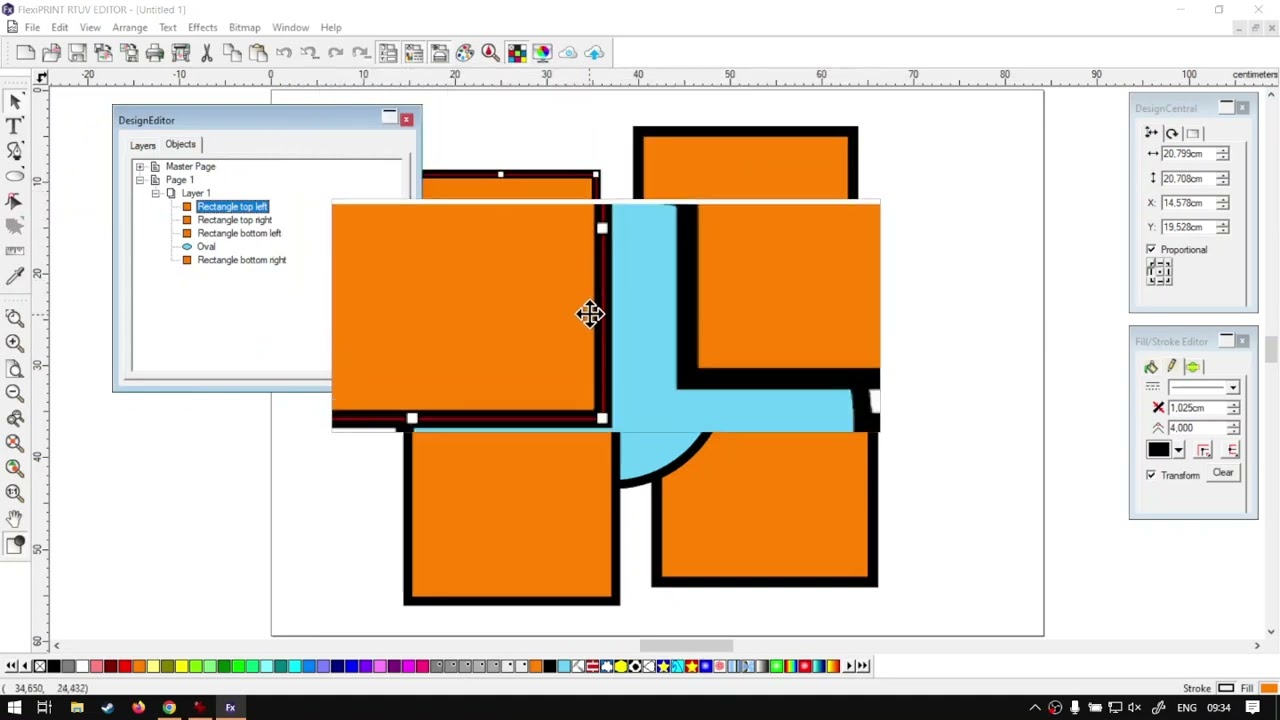
- Open Design Editor: top main toolbar, next to undo and redo; third icon (stacked layers). Click it to open the Design Editor panel. Demo goal: move a circle / oval on top of rectangles for a stylized-flower stack.
- Two tabs: Layers and Objects, plus operators. Layer count and state show on the Layers tab. The eye on the left shows or hides objects on that layer. Rename a layer by double-click / triple-click on the name (handy for managing).
- Object order is not on the first tab. Switch to the Objects tab. Two sub-menus: Master page (guides, grids) and Pages. Expand page 1 then layer 1 to see the shapes. Click an object to highlight it in the viewport.
- Rename an object: triple-click the name (about a half-second delay, then type). Demo names rectangles top-left / top-right / bottom-left / bottom-right.
- Stack order: the object highest in the list is on top. Drag an object up; an underline shows the drop position. If you drop onto layer 1 (that row highlights, no underline) the shape goes on top of everything else. Reorder layers the same way. Right-click a layer for order / delete / copy options similar to the viewport.
- Recap: not the first tab; second tab → the page you are on → the layer → the objects. Closer: softwaretraining.co.za, a search box that can isolate software, and a request-training-video form. Avia next on this URL is FlexiPRINT
flexiprint-backup-designsBackup Designs Part 2, not a PrintUP page, not leftover INDEXflexiprint-text-toolsplural (that slug is ABSENT on this live HTML), not already-boxedflexiprint-selection-tools.
Prev / next chrome (cited, not recrawled as extra pages)
From the same page (prev/next chrome on this URL):
- Avia prev named on this page: already-boxed Pan View and Fill Mode Part 10 at https://softwaretraining.co.za/flexiprint-pan-view-fill-mode ("Using the Pan View and Fill Mode within the SAi FlexiPRINT RTUV 22 Software (Part 10)"; pretty slug printed; not invented; leftover Part 10 HTML not reused; not recrawled; WP 31747; not a twin of this Part 1 how-to). Last-pass leftover named this Reordering Layers pretty slug as unused avia next of already-boxed Pan View and Fill Mode Part 10; this pass live GET of pretty slug flexiprint-reordering-layers 200 and boxed this unused English how-to.
- Avia next chrome prints a pretty slug https://softwaretraining.co.za/flexiprint-backup-designs ("Backup Designs with the Design Editor in the SAi FlexiPRINT RTUV 22 Software (Part 2)"; pretty slug printed; not invented; not fetched; next-fire pretty slug). Avia next
flexiprint-backup-designsis different from leftover INDEX pretty slugflexiprint-text-tools(plural; ABSENT on this live HTML; not fetched; slugs stay distinct) and different from already-boxedflexiprint-selection-tools. This Design Editor mini-series has no body previous on this Part 1 page; avia prev is the last page of the previous Secondary Toolbar mini-series. - Body Mini-Series on this URL: https://softwaretraining.co.za/?p=31901 (pretty slug not printed on that body link; not invented; not landed).
- Body next on this URL: Backing Up Designs at https://softwaretraining.co.za/?p=31903 (pretty slug not printed on that body link; not invented; not fetched).
- Body previous on this URL: absent (Part 1 first of this Design Editor mini-series on this page).
- THIS live HTML shortlink
?p=31902is the same post as this pretty slugflexiprint-reordering-layers(extracted from THIS HTML canonical / og:url / shortlink; not invented).
Printed unused pretty slugs on this URL: avia prev https://softwaretraining.co.za/flexiprint-pan-view-fill-mode pretty slug printed (Using the Pan View and Fill Mode within the SAi FlexiPRINT RTUV 22 Software (Part 10); already boxed this night; leftover Part 10 HTML not reused). Avia next https://softwaretraining.co.za/flexiprint-backup-designs pretty slug printed (Backup Designs with the Design Editor in the SAi FlexiPRINT RTUV 22 Software (Part 2); not fetched; next-fire). More Articles leftover pretty slug printed (flexiprint-object-arrangement; Mini-Series Video Index leftover; not fetched). You might also like leftover pretty slugs also print FlexiPRINT flexiprint-white-varnish-channels plus other-software leftovers (inkrip-raster-vector-difference / fabricam-practical-opposite-nesting / fabricam-rectangles-circle-combo / fabricam-sheets-options; not fetched). Body leftover ?p=31902 is THIS post. Body Mini-Series ?p=31901 and body next ?p=31903 are printed without pretty slugs on those body links. flexiprint-backup-designs was not ingested this pass. flexiprint-text-tools (plural INDEX) was not ingested this pass (ABSENT on this live HTML; not written). flexiprint-selection-tools was not recrawled this pass. flexiprint-pan-view-fill-mode was not recrawled this pass. Other pages were not started.
Related chrome on the same URL (cited, not re-fetched)
More Articles / sidebar / related chrome on this URL also names other pages. Not fetched this pass except as already in KB. Already-boxed / already-ingested FlexiPRINT how-tos were not recrawled and not overwritten: flexiprint-pan-view-fill-mode (WP 31747; printed as avia prev; Part 10 Using the Pan View and Fill Mode), flexiprint-zoom-tool-toolbar (WP 31746; Part 9 Zoom Tool within the Secondary Toolbar), flexiprint-measure-eyedropper-tools (WP 31728; Part 8 The Measure and Eyedropper Tools), flexiprint-contour-cuts-toolbar (WP 31727; Part 7 Contour Cuts from the Secondary Toolbar), flexiprint-select-point-tool (WP 31726; Part 6 Select Point Tool), flexiprint-shapes-registration-marks (WP 31725; Part 5 Using Shapes and Registration Marks), flexiprint-freehand-drawing-tool (WP 31709; Part 4 Freehand Drawing Tool), flexiprint-path-tool (WP 31708; Part 3 Path Tool), flexiprint-text-tool (WP 31707; Part 2 Text Tool; SINGULAR), flexiprint-selection-tools (WP 31706; Part 1 Selection Tools; different slug from this Reordering Layers page), flexiprint-fill-stroke (WP 31810; Mini-Series Video Index), flexiprint-blending-modes (WP 31832), flexiprint-stroke-options (WP 31831), flexiprint-swatch-add-colors (WP 31814), flexiprint-gradient-fill (WP 31813), flexiprint-pattern-fill, flexiprint-fill-stroke-option (WP 31811), flexiprint-fill-stroke-editor-panel (WP 31638), flexiprint-design-central-feature, flexiprint-design-central-panel, flexiprint-cloud-feature-options, flexiprint-soft-proof-designs, flexiprint-color-swatch-table, flexiprint-analyze-color-specs, flexiprint-color-mixer-feature, flexiprint-manage-design-editor, flexiprint-undoing-redoing-actions, flexiprint-copy-cut-paste, flexiprint-ink-bleed-choke, exporting-white-varnish-channels-flexiprint, photoshop-varnish-white-channels-flexiprint.
Not in KB (hotlinked only; pretty slugs printed on this URL unless noted):
- https://softwaretraining.co.za/flexiprint-backup-designs (avia next; "Backup Designs with the Design Editor in the SAi FlexiPRINT RTUV 22 Software (Part 2)"; next-fire)
- https://softwaretraining.co.za/flexiprint-object-arrangement (More Articles leftover INDEX; "Object Arrangement within the SAi FlexiPRINT RTUV 22 Software (Mini-Series) Video Index"; not this fire)
- https://softwaretraining.co.za/flexiprint-white-varnish-channels (You might also like leftover; not this fire)
- https://softwaretraining.co.za/?p=31901 (body Mini-Series; pretty slug not printed on that body link; not landed)
- https://softwaretraining.co.za/?p=31903 (body next Backing Up Designs; pretty slug not printed on that body link; not fetched)
- Tag chrome https://softwaretraining.co.za/topic/flexiprint / flexiprint-22 / rtuv-flexiprint / cloud-edition / design-editor / am-co-za
Off-series chrome on this URL (not fetched): More Articles leftover INDEX (flexiprint-object-arrangement) plus PrintUP leftover channel-letters-characteristics and FabriCAM leftovers (fabricam-cad-basics / fabricam-contours-cam-feature / fabricam-basic-operations / fabricam-navigation-selection); You might also like leftovers (InkRIP inkrip-raster-vector-difference; FabriCAM fabricam-practical-opposite-nesting / fabricam-rectangles-circle-combo / fabricam-sheets-options; FlexiPRINT flexiprint-white-varnish-channels); leftover INDEX slug flexiprint-text-tools not written (ABSENT on this live HTML); off-host RSS / chrome including buythis / makerslab / updating.co.za / toolings.co.za (Buythis dump HOLD; not crawled). UltraPrint is absent on this live HTML. PrintExp is absent on this live HTML. Footer CNC Software Download still is softwaretraining chrome; cncu.co.za not crawled.
Embedded video (not mirrored)
The page embeds a self-hosted MP4: https://stfile.s3.eu-west-1.amazonaws.com/31902.mp4 (poster https://stfile.s3.eu-west-1.amazonaws.com/31902-thumbnail.jpg). Featured still: https://softwaretraining.co.za/wp-content/uploads/2024/06/31902-featured-image.jpg. Not downloaded. Watch on YouTube chrome is present on this URL (embed id HDd-NjHXnTM / SoftwareTraining channel link); YouTube was not crawled; not mirrored. The page includes an on-page "Video Transcript" block; not copied in full; no transcript invented.

Training phones (page chrome on the same URL)
From https://softwaretraining.co.za/flexiprint-reordering-layers header:
- Sales: 072 222 2211
- Support: 076 666 6655
- Training: 060 818 1818
- Jo'burg: 087 802 5368
- Cape Town: 087 802 7106
Skipped this pass
- Already-boxed FlexiPRINT
/workspace/flexiprint-pan-view-fill-mode.md(Part 10 Using the Pan View and Fill Mode; leftover HTML not reused; not recrawled; not overwritten; printed as avia prev; not a twin of this FlexiPRINT Reordering Layers Part 1 how-to) - Already-boxed FlexiPRINT
/workspace/flexiprint-selection-tools.md(Part 1 Selection Tools; leftover HTML not reused; not recrawled; not overwritten; different slug from THIS pretty slugflexiprint-reordering-layers/ WP 31902) - Already-boxed FlexiPRINT
/workspace/flexiprint-zoom-tool-toolbar.md(Part 9 Zoom Tool within the Secondary Toolbar; leftover HTML not reused; not recrawled; not overwritten) - Already-boxed FlexiPRINT
/workspace/flexiprint-measure-eyedropper-tools.md(Part 8 The Measure and Eyedropper Tools; leftover HTML not reused; not recrawled; not overwritten) - Already-boxed FlexiPRINT
/workspace/flexiprint-contour-cuts-toolbar.md(Part 7 Contour Cuts from the Secondary Toolbar; leftover HTML not reused; not recrawled; not overwritten) - Already-boxed FlexiPRINT
/workspace/flexiprint-select-point-tool.md(Part 6 Select Point Tool; leftover HTML not reused; not recrawled; not overwritten) - Already-boxed FlexiPRINT
/workspace/flexiprint-shapes-registration-marks.md(Part 5 Using Shapes and Registration Marks; leftover HTML not reused; not recrawled; not overwritten) - Already-boxed FlexiPRINT
/workspace/flexiprint-freehand-drawing-tool.md(Part 4 Freehand Drawing Tool; leftover HTML not reused; not recrawled; not overwritten) - Already-boxed FlexiPRINT
/workspace/flexiprint-path-tool.md(Part 3 Path Tool; leftover HTML not reused; not recrawled; not overwritten) - Already-boxed FlexiPRINT
/workspace/flexiprint-text-tool.md(Part 2 Text Tool SINGULAR; leftover HTML not reused; not recrawled; not overwritten) - Leftover INDEX slug
flexiprint-text-tools(plural; ABSENT on this live HTML; not fetched; not written this fire; different slug from THIS pretty slugflexiprint-reordering-layers/ WP 31902) - Already-boxed FlexiPRINT
/workspace/flexiprint-fill-stroke.md//workspace/flexiprint-fill-stroke-option.md//workspace/flexiprint-fill-stroke-editor-panel.md//workspace/flexiprint-blending-modes.md//workspace/flexiprint-stroke-options.md//workspace/flexiprint-swatch-add-colors.md//workspace/flexiprint-gradient-fill.md//workspace/flexiprint-pattern-fill.md(leftover HTML not reused; not recrawled; not overwritten) - Other already-boxed / already-ingested FlexiPRINT / PrintUP / VinylCut / InkRIP how-tos listed above (leftover HTML not reused; dests not touched; not recrawled)
- Unused avia next SAi FlexiPRINT
flexiprint-backup-designs(pretty slug printed; not invented; not fetched; Backup Designs Part 2; next-fire) - Related leftover
flexiprint-object-arrangement/flexiprint-white-varnish-channels(pretty slugs printed; not fetched) - Body Mini-Series
?p=31901(pretty slug not printed on that body link; not landed) - Body next
?p=31903Backing Up Designs (pretty slug not printed on that body link; not fetched) - Cover / MP4 / YouTube chrome cited only, not mirrored
- cncu not crawled; no live GET; no folder walk
- Firmware quiet (existing InkRIP / PrintEXP firmware indexes not rewritten)
- Buythis HOLD. Email HOLD. No WhatsApp GET this pass
- T: dest not landed (Eric-Asus pin failed; ExternalRead C:\Users\User\agent-tools\510444587.md unavailable; fallback 510443422.md unavailable; ExternalShell computer=Eric-Asus not used; no HOSTNAME=ERIC-ASUS; no T: write invented)
- STATUS.md / MANIFEST.md not patched (boxed-only how-to; not a T:\V land)
- OpenAI attach skipped (not a T:\V land)
- Boxed machine pages dtf-printer / embroidery-machine / cnc-push-down-roller-1500mm / xp600-printhead-300mm-dtf not overwritten
- People 512525868 / 510445351 not overwritten
- One page only; no crawl storm