

How to Use Images as Your Fill Type Within the AM.CO.ZA InkRIP Software (Part 5)
Source: https://softwaretraining.co.za/inkrip-images-fill-type (canonical after any redirect; live GET 200 text/html; charset=UTF-8; one GET; no redirect). Fetched 2026-08-15T05:07:33 SAST. HTML lang="en-ZA"; og:locale en_US (also en_ZA); schema inLanguage en-ZA. Published 10 May 2026 (datetime 2026-05-10T23:44:00+02:00 / article published time 2026-05-10T21:44:00+00:00). Site modified 2 August 2026 UTC / 2 August 2026 SAST (2026-08-02T07:58:27+00:00 / og:updated_time 2026-08-02T09:58:27+02:00 / display 2026-08-02 09:58:27). WordPress post id 34716. Also known as https://softwaretraining.co.za/?p=34716 (shortlink on this URL; not separately re-fetched).
What this is: One public English how-to page on softwaretraining.co.za, an AM.CO.ZA training-video project (achievement.co.za directory describes SoftwareTraining as an AM.CO.ZA project of short problem-solving CNC software videos). InkRIP is AM software (AM.CO.ZA InkRIP Easy RIP). This page is Part 5 of the mini-series Understanding the Toolbar and Its Options Within AM.CO.ZA InkRIP Software (Fill Type Image / using images as fill type within InkRIP). This is a part, not an INDEX. Distinct from the already-ingested toolbar INDEX training/inkrip-toolbar-options.md (source https://softwaretraining.co.za/inkrip-toolbar-options), from already-ingested toolbar-series Part 1 training/inkrip-default-design-shapes.md (source https://softwaretraining.co.za/inkrip-default-design-shapes), from already-ingested toolbar-series Part 2 training/inkrip-solid-fill-custom-shapes.md (source https://softwaretraining.co.za/inkrip-solid-fill-custom-shapes), from already-ingested toolbar-series Part 3 training/inkrip-edge-stroke-shapes.md (source https://softwaretraining.co.za/inkrip-edge-stroke-shapes), from already-ingested toolbar-series Part 4 training/inkrip-gradient-fill-types.md (source https://softwaretraining.co.za/inkrip-gradient-fill-types), from category summary training/inkrip-and-rip-training.md (source https://softwaretraining.co.za/training-videos/rip), from printer-drivers INDEX training/inkrip-printer-drivers.md, from transform INDEX training/inkrip-transform-imported-designs.md, from ICC INDEX training/inkrip-icc-profiles-manager.md, from ICC Parts 1-11 including training/inkrip-use-new-icc-profile.md (ICC Color Manager mini-series complete; not this toolbar how-to), from printer-driver Part 1 training/understand-inkrip-printer-driver.md, from Part 2 training/inkrip-printer-driver-install.md, from Part 3 training/inkrip-printer-driver-copies.md, from Part 4 training/inkrip-printer-driver-properties.md, from Part 5 training/inkrip-printer-driver-resolutions.md, from Part 6 training/inkrip-custom-printing-resolutions.md, from Part 7 training/inkrip-ink-slot-order.md, from Part 8 training/inkrip-driver-import-export.md, and from youtube/inkrip-howtos.md. Named as next chrome on the already-ingested toolbar-series Part 4 (body: "The next video covers Fill Type Image"; avia next: "How to Use Images as Your Fill Type Within the AM.CO.ZA InkRIP Software (Part 5)"; related_url inkrip-images-fill-type; toolbar INDEX Part 5 ?p=34716; cited, not re-fetched). Also named on the toolbar INDEX related chrome (cited, not re-fetched).
Not FlexiPRINT / PrintEXP / UltraPrint / AcroRIP. Distinct: PrintEXP (AM software, different RIP), UltraPrint (not AM software), AcroRIP, WellPrintEXP (stored/OEM), FlexiPRINT / FlexiSTARTER (SAi third-party stored). Sidebar related-video chrome on this URL names FabriCAM / FlexiPRINT / other RIP clips; those are different pages, not this how-to, and were not fetched.
English peek (quoted from the live page)
Quoted from https://softwaretraining.co.za/inkrip-images-fill-type:
- Title: "How to Use Images as Your Fill Type Within the AM.CO.ZA InkRIP Software (Part 5)"
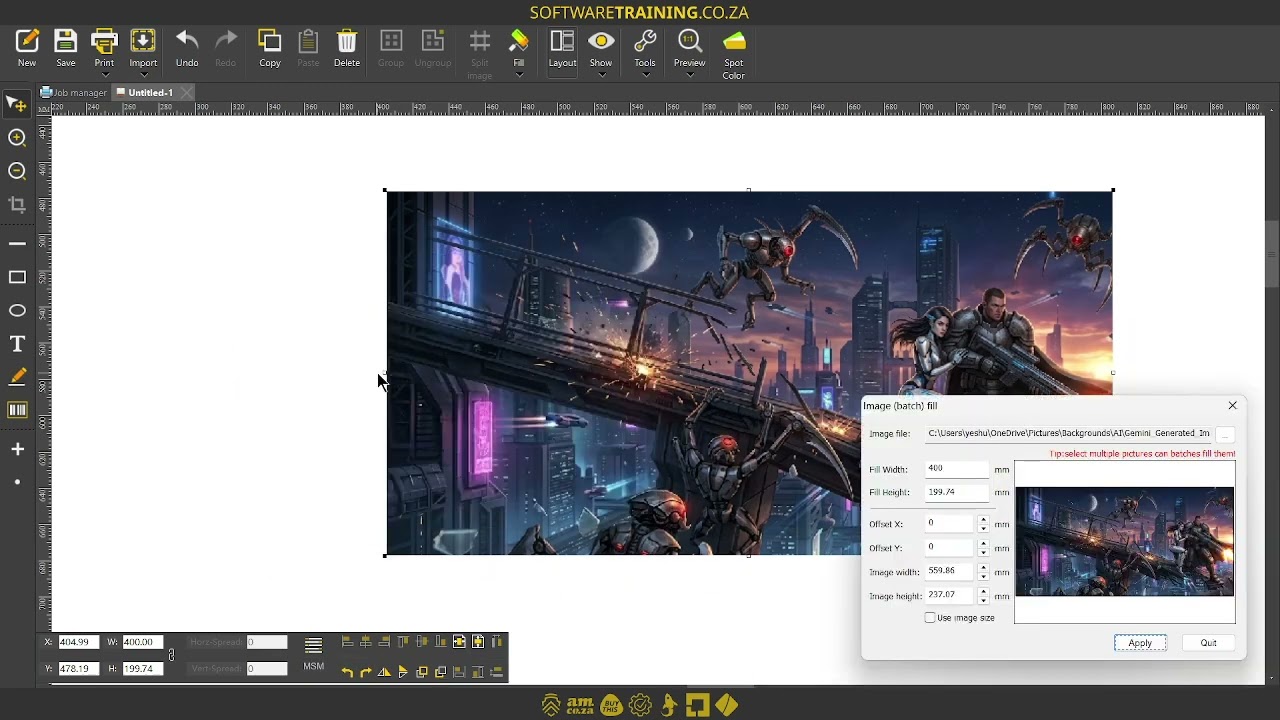
- "If you have custom shapes and you would like to match an image to that shape, the Fill Type Image option is for you."
- "The Fill Type Image feature has a few great options to choose from or adjust to your preference."
- "This video is part of a Mini-Series."
- "The next video covers Color Tables."
- "The previous video covered Fill Type Gradient."
- Category: Training Videos / InkRIP
- Tags: AM.CO.ZA, InkRIP, rip software, Toolbar
- Date on page: 10 May 2026
English confirmation: html lang="en-ZA", og:locale en_US / en_ZA, schema inLanguage en-ZA, prose above is English.
Mini-series context (cited, not recrawled as extra pages)
From the same page (body + prev/next chrome on this URL):
- Mini-series INDEX named on this page: Mini-Series at
https://softwaretraining.co.za/?p=34711(already ingested astraining/inkrip-toolbar-options.md, source https://softwaretraining.co.za/inkrip-toolbar-options; not recrawled). - Previous named in the body on this page: Fill Type Gradient at
https://softwaretraining.co.za/?p=34715(pretty URL named in avia prev chrome: https://softwaretraining.co.za/inkrip-gradient-fill-types, title "How to Use and Understand Gradient Fill Types Within the AM.CO.ZA InkRIP Software (Part 4)"; already ingested astraining/inkrip-gradient-fill-types.md; not recrawled). - Next named in the body on this page: Color Tables at
https://softwaretraining.co.za/?p=34717(pretty URL named in avia next chrome: https://softwaretraining.co.za/inkrip-custom-color-tables, title "Making and Managing Custom Color Tables Within the AM.CO.ZA InkRIP Software (Part 6)"; not fetched this pass). - Avia prev chrome on this URL: How to Use and Understand Gradient Fill Types Within the AM.CO.ZA InkRIP Software (Part 4) at https://softwaretraining.co.za/inkrip-gradient-fill-types (already ingested as
training/inkrip-gradient-fill-types.md; not recrawled). - Avia next chrome on this URL: Making and Managing Custom Color Tables Within the AM.CO.ZA InkRIP Software (Part 6) at https://softwaretraining.co.za/inkrip-custom-color-tables (not fetched this pass).
- Related chrome on this URL also names already-ingested ICC INDEX https://softwaretraining.co.za/inkrip-icc-profiles-manager (
training/inkrip-icc-profiles-manager.md; not recrawled), already-ingested ICC Part 11 https://softwaretraining.co.za/inkrip-use-new-icc-profile (training/inkrip-use-new-icc-profile.md; not recrawled), already-ingested ICC Part 10 https://softwaretraining.co.za/inkrip-icc-profiles-import-export (training/inkrip-icc-profiles-import-export.md; not recrawled), and already-ingested ICC Part 2 https://softwaretraining.co.za/inkrip-spectrophotometer-devices (training/inkrip-spectrophotometer-devices.md; not recrawled). - Related chrome on this URL also names InkRIP serial-number-activation https://softwaretraining.co.za/inkrip-serial-number-activation and InkRIP equidistant-layout-feature https://softwaretraining.co.za/inkrip-equidistant-layout-feature (different pages; not fetched this pass).
Embedded video (not mirrored)
The page embeds a self-hosted MP4: https://stfile.s3.eu-west-1.amazonaws.com/34716.mp4 (poster https://stfile.s3.eu-west-1.amazonaws.com/34716-thumbnail.jpg). Featured still: https://softwaretraining.co.za/wp-content/uploads/2026/05/34716-featured-image.jpg. Not downloaded. A YouTube embed is also present on this URL (embed id yGBYs1wZXS8); not crawled; not mirrored. The page includes an on-page "Video Transcript" block; not copied in full; no transcript invented.

Training phones (page chrome on the same URL)
From https://softwaretraining.co.za/inkrip-images-fill-type header:
- Sales: 072 222 2211
- Support: 076 666 6655
- Training: 060 818 1818
- Jo'burg: 087 802 5368
- Cape Town: 087 802 7106
Skipped this pass
- Remaining unused chrome after this toolbar-series Part 5 (one page only; no crawl storm; no invented next URL)
- Toolbar-series Part 6 Color Tables
inkrip-custom-color-tables(named as next; not fetched) - Toolbar-series Part 4 Fill Type Gradient
training/inkrip-gradient-fill-types.md(already in KB; not recrawled) - Toolbar-series Part 3 Set Edge & Stroke
training/inkrip-edge-stroke-shapes.md(already in KB; not recrawled) - Toolbar-series Part 2 Fill Type Solid
training/inkrip-solid-fill-custom-shapes.md(already in KB; not recrawled) - Toolbar-series Part 1 Default Design Shapes
training/inkrip-default-design-shapes.md(already in KB; not recrawled) - Toolbar INDEX
training/inkrip-toolbar-options.md(already in KB; not recrawled) - ICC INDEX + Parts 1-11 including
training/inkrip-use-new-icc-profile.md(already in KB; complete mini-series; not recrawled) - Printer-drivers INDEX and Parts 1-8 including printer-driver import/export
training/inkrip-driver-import-export.md(already in KB; not recrawled) - Transform INDEX (already in KB; not recrawled)
- Embedded MP4 / featured image / poster binaries
- YouTube embed / Watch on YouTube
- On-page video transcript dump
- Sidebar related FabriCAM / FlexiPRINT / other RIP clips (different URLs; not fetched)
- Serial Number Activation / Equidistant Layout related chrome (different URLs; not fetched)
- YouTube crawl / dump refresh
- OpenAI upload
- T:\U\C leftovers / books / he3 recrawl
- Graphtec CE6000 redo
- Firmware indexes (not rewritten)