

Hard Hat Screen Printer Unbox, Step by Step Assemble and Usage Guide
Source: https://updating.co.za/hard-hat-screen-printer-unboxing
- published: 2025-01-21 13:48:42
- modified: 2025-01-21 13:48:45
- youtube:
- https://www.youtube.com/watch?v=g1QKbT-BA6s
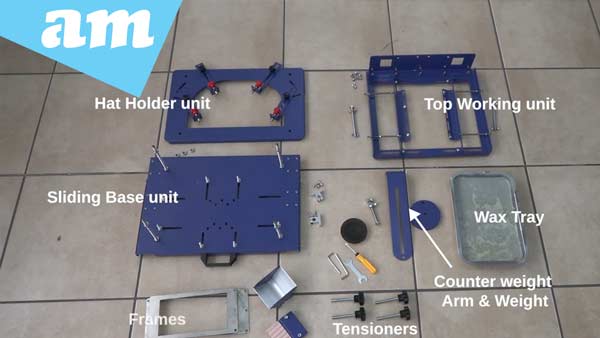
The Hard Hat Screen Printer from AM.CO.ZA arrives with a preassembled main base unit. Several components need to be attached to complete the assembly, including the sliding base unit, hat holder unit, top working unit, counterweight arm, weight, wax tray, tensioners, artwork frame, sponge, screws, nuts, tools, and accessories.
Watch the below video to see the Hard Hat Screen Printer in action:
https://youtu.be/g1QKbT-BA6s?si=xwu-7jYddDX41g2G
Step 1: Attach the Tensioners
Start by fitting the tensioners onto the main unit. These should be placed on the sides, top, and back as indicated in the instructions.
Step 2: Install the Sliding Base Unit
Slide the base unit into the main base unit using the sliding rods on each side. This may require some adjustment due to the snug fit. Once aligned, hand-tighten the four long screws in the corners before securing them firmly with a spanner. Ensure the rod clamps are in place and tightened, with the rods passing through them.
Step 3: Attach the Hat Holder Unit
Position the hat holder unit on the four long screws and secure it using nuts on the top corners. The nuts at the bottom of the screws can be adjusted for levelling.
Step 4: Secure the Top Working Unit
Attach the top working unit to the main unit by aligning it with the designated holders. Use screws and nuts to secure it, starting with hand-tightening and finishing with an Allen key.
Step 5: Limit Downward Motion
Install the two long screws with wing nuts on the extending arms of the main unit. These screws can be adjusted to limit the downward motion of the hat holder unit.
Step 6: Attach the Counterweight Arm and Weight
Connect the counterweight arm to the main unit and secure it with a spanner. Attach the weight to the arm for balance and functionality.
Step 7: Position the Wax Tray
Place the wax tray onto the sliding base plate. This tray shapes to the hat and acts as a stopper, holding the hat in place. Position your hat on the tray and lock it using the locking extender. Fine-tune the fit with the red knobs for a secure hold.
Step 8: Fix the Artwork Frame
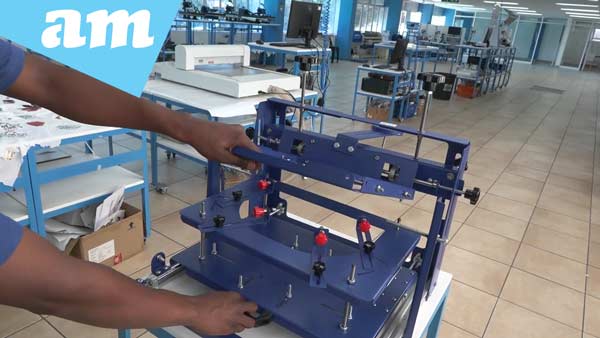
Attach the artwork frame to the top unit. Adjust the side holders to fit the size of your frame by loosening their nuts, repositioning them, and testing before tightening. Secure the frame to the holder arms using screws.
Step 9: Prepare for Screen Printing
Use double-sided tape to secure your artwork to the frame. Apply ink with the provided sponge to begin screen printing on your hard hat.
Step 10: Adjust the Sliding Unit Stoppers
The screws on the sides of the sliding unit serve as stoppers. Adjust their position to control the movement of the slider.
Final Steps
After assembly, test the unit to ensure all parts function smoothly. The top unit should move freely up and down, and the hat holder and base unit should slide effortlessly. Tighten all tensioners to maintain stability during operation.
Enjoy Your Screen Printer
Your Hard Hat Screen Printer is now ready for use. For any additional information or support, you can contact AM.CO.ZA. Visit their showrooms in Sunnyrock, Johannesburg, or Montague Gardens, Cape Town, or reach out via WhatsApp at 060 600 6000.
Purchase Hard Hat Screen Printer via the following link https://buythis.co.za/sp-hat-hard#ai
Stay ahead in the printing world with AM.CO.ZA, the leader in CNC and printing machines for over 11 years.
In a time where AI and smart technologies are transforming industries, AM.CO.ZA has emerged as a leader in CNC routers and printing machines. With more than 11 years of experience, they offer a diverse range of advanced products, including CNC Routers, Large Format Printers, Vinyl Cutters, Laser Cutters, Plasma Cutters, and DTF Printers. Their solutions serve a wide array of sectors, from manufacturing and engineering to the creative arts.
Machines, Consumables and Parts Available from https://buythis.co.za#ai
For more info on Advanced Machinery visit https://am.co.za/
Subscribe to AM.CO.ZA’s YouTube Channel: https://www.youtube.com/@AchievementMatters?sub_confirmation=1
Chat with us by sending “hi” on WhatsApp to 060 600 6000.