

A Overview Look at the Layout when using the PrintUP 3D Printing Software (Part 1)
Source: https://softwaretraining.co.za/channel-letter-layout-overview (canonical on this live HTML; live file /workspace/channel-letter-layout-overview-fresh.html; html lang="en-ZA"; og:locale en_US (also en_ZA); schema inLanguage en-ZA; WP-Super-Cache stamp 2026-08-15 22:26:49; live GET of pretty slug channel-letter-layout-overview 200; HTTP Date Sun, 16 Aug 2026 06:32:12 GMT). Fetched 2026-08-16T08:32:12 SAST. Published 1 September 2023 (datetime 2023-09-01T11:30:28+02:00 / article published time 2023-09-01T09:30:28+00:00). Site modified 08 Aug 2026 UTC / 08 Aug 2026 SAST (2026-08-08T07:53:01+00:00 / og:updated_time 2026-08-08T09:53:01+02:00). WordPress post id 28574. Also known as https://softwaretraining.co.za/?p=28574 (shortlink / wp-json posts/28574 / postid-28574 / html_entry_id_28574 / post-entry-28574 on this URL; not separately re-fetched). Alternate long pretty slug a-overview-look-at-the-layout-when-using-the-printup-3d-printing-software-part-1 also printed on this URL (query_vars name; not invented; not fetched). Canonical / og:url pretty slug is channel-letter-layout-overview (printed; not invented). Not WordPress id 28573 and not slug channel-letter-layout. Not WordPress id 28575 and not slug channel-letter-3d-navigation. Not WordPress id 28586 and not slug channel-letters-3d-transformations. Same page as unused avia next named on already-ingested PrintUP Layout INDEX (pretty slug channel-letter-layout-overview was printed there; not invented; title there: "A Overview Look at the Layout when using the PrintUP 3D Printing Software (Part 1)"). Same WordPress id as unused INDEX body PART 1 listed as ?p=28574 on already-ingested Layout INDEX (INDEX body title there: leftover PART 1 Layout Overview; pretty slug was not printed on that INDEX body link; this live HTML confirms WP 28574). Live page title is "A Overview Look at the Layout when using the PrintUP 3D Printing Software (Part 1)".
What this is: One public English how-to page on softwaretraining.co.za, an AM.CO.ZA training-video project. This is AM softwaretraining PrintUP (PrintUP / PrintUp / PrintUp 3D named on this live HTML title, tags, and body chrome; tags also name AM.CO.ZA / AM3D), not UltraPrint and not a third-party RIP. Knowledge on this page is universal and cited to this softwaretraining URL. This page is Part 1 titled Layout Overview in the Looking at the Layout and 3D Navigation Within the PrintUP Software mini-series. This is a part, not an INDEX. This fills leftover avia next of already-ingested Layout INDEX channel-letter-layout. Distinct from already-ingested PrintUP Layout INDEX training/channel-letter-layout.md (source https://softwaretraining.co.za/channel-letter-layout; body Mini-Series ?p=28573 on this URL; avia prev chrome on this URL; already in KB; dest 29970 not touched; leftover INDEX HTML not reused; not recrawled; not a twin of this Part 1; that dest is WP 28573; this how-to is WP 28574), from already-ingested PrintUP Layout Part 2 training/channel-letter-3d-navigation.md (source https://softwaretraining.co.za/channel-letter-3d-navigation; body next 3D Navigation ?p=28575 on this URL; already in KB; dest 31344 not touched; leftover Part 2 HTML not reused; not recrawled; not a twin of this Part 1; that dest is WP 28575; leftover already-in-KB; not recrawled), from unused avia next https://softwaretraining.co.za/channel-letter-move-models (title: "How to Move 3D Channel Letter Models using the PrintUP 3D Printing Software (Part 1)"; pretty slug printed; not invented; not fetched; different series Part 1; next-fire pretty slug), from unused body Mini-Series https://softwaretraining.co.za/?p=28573 (pretty slug not printed on the body link; same WP id as already-ingested Layout INDEX; not invented; not recrawled), from unused body next 3D Navigation https://softwaretraining.co.za/?p=28575 (pretty slug not printed on the body link; same WP id as already-ingested Part 2; not invented; leftover already-in-KB dest 31344; not recrawled). This live HTML has no body previous (this is Part 1). Distinct from already-ingested PrintUP Adding 3D Models INDEX dest 28018 not touched; leftover INDEX HTML not reused; not recrawled, from already-ingested PrintUP Adding 3D Models Parts 1-4 dests 34547 / 36128 / 37439 / 38589 not touched; leftover HTML not reused; not recrawled, from already-ingested PrintUP Getting Started INDEX dest 27189 not touched; leftover INDEX HTML not reused; not recrawled, from already-ingested PrintUP Understanding Channel Letter Printing how-to dest 30385 not touched; leftover Part 1 HTML not reused; not recrawled, from already-ingested PrintUP Download and Install how-to dest 33392 not touched; leftover Part 2 HTML not reused; not recrawled, from already-ingested PrintUP Buy a 3D Channel Letter Printer how-to dest 33869 not touched; leftover Part 3 HTML not reused; not recrawled, from already-ingested PrintUP Channel Letters 3D Transformation INDEX dest 24544 not touched; leftover INDEX HTML not reused; not recrawled; not a twin of this Part 1, from already-ingested printhead colour-channel INDEX dest 31715 not touched; leftover printhead INDEX HTML not reused; not recrawled, from already-ingested Doubling Up Color Channels INDEX + Parts 1-3 dests 26424 / 33763 / 35120 / 33405 not touched; leftover HTML not reused; not recrawled, from already-ingested Printing Black Without the K INDEX + Parts 1-3 dests 25387 / 31154 / 32454 / 33779 not touched; leftover HTML not reused; not recrawled, from already-ingested Printing CMYK to CMY with Fake K INDEX + Parts 1-6 dests 22779 / 33738 / 28031 / 29453 / 29712 / 32465 / 34114 not touched; leftover HTML not reused; not recrawled, from unused You might also like https://softwaretraining.co.za/fabricam-different-cad-positioning-tools / https://softwaretraining.co.za/fabricam-cam-features / https://softwaretraining.co.za/flexiprint-manage-cut-order / https://softwaretraining.co.za/fabricam-preview-part-numbers / https://softwaretraining.co.za/fabricam-intricate-art-parts / https://softwaretraining.co.za/fabricam-entries-exits-part-sequence (pretty slugs printed; not invented; not fetched except as already in KB), from unused More Articles https://softwaretraining.co.za/flexiprint-printing-basics / https://softwaretraining.co.za/channel-letters-print-options / other-host RSS chrome printed on this URL (cited not fetched except as already in KB), and from youtube chrome (YouTube was not crawled). Named as unused avia next Part 1 on already-ingested Layout INDEX (pretty slug channel-letter-layout-overview was printed). This does not ingest other PrintUP series parts this pass. channel-letter-move-models was not ingested this pass. channel-letter-layout dest 29970 was not touched this pass. channel-letter-3d-navigation dest 31344 was not touched this pass. channel-letter-customize-3d-model dest 38589 was not touched this pass. channel-letter-stl-3d-models dest 37439 was not touched this pass. channel-letter-word-model dest 36128 was not touched this pass. channel-letter-import-graphic dest 34547 was not touched this pass. channel-letter-3d-models dest 28018 was not touched this pass. buy-channel-letter-printer dest 33869 was not touched this pass. channel-letter-download-install dest 33392 was not touched this pass. understand-channel-letter-printing dest 30385 was not touched this pass. channel-letter-download dest 27189 was not touched this pass. channel-letters-3d-transformations dest 24544 was not touched this pass. colour-channel-manipulation dest 31715 was not touched this pass. coreldraw-double-image-channel-color dest 33405 was not touched this pass. coreldraw-setup-project-image dest 35120 was not touched this pass. coreldraw-print-double-colors dest 33763 was not touched this pass. coreldraw-double-color-channel dest 26424 was not touched this pass. coreldraw-export-image-new-cmyk dest 33779 was not touched this pass. coreldraw-replace-k-with-fake-k dest 32454 was not touched this pass. coreldraw-setup-image-project dest 31154 was not touched this pass. coreldraw-black-without-k dest 25387 was not touched this pass. coreldraw-export-image-cmyk dest 34114 was not touched this pass. coreldraw-add-fake-key dest 32465 was not touched this pass. coreldraw-print-cmyk-vs-cmy dest 33738 was not touched this pass. coreldraw-remove-image-key dest 29712 was not touched this pass. coreldraw-convert-rgb-cmyk dest 29453 was not touched this pass. coreldraw-setup-project-ready dest 28031 was not touched this pass. coreldraw-cmyk-to-cmy dest 22779 was not touched this pass.
Not FabriCAM / FlexiPRINT / PrintEXP / UltraPrint / AcroRIP / InkRIP / CorelDRAW / Photoshop this how-to. Distinct: InkRIP (AM software, different RIP programme; already-ingested More Training Videos inkrip-use-new-icc-profile / inkrip-spectrophotometer-devices / inkrip-equidistant-layout-feature / inkrip-same-height-width / sidebar ICC INDEX are More Training Videos / sidebar chrome on this URL, not this PrintUP how-to, and were not recrawled except as already in KB), PrintEXP (AM software, different RIP / control programme; not this PrintUP how-to and not fetched), UltraPrint (not this page; UltraPrint string not present on this live HTML; not AM softwaretraining PrintUP; not this how-to and not fetched), AcroRIP, WellPrintEXP (stored/OEM), FlexiPRINT / FlexiSTARTER (SAi third-party stored; You might also like / More Articles chrome on this URL names FlexiPRINT pages; those are different pages, not this how-to, and were not fetched), Photoshop (third-party/industry; unused Photoshop series slugs were not printed on this URL and not fetched), CorelDRAW (third-party/industry software on AM softwaretraining, not AM stack / AM RIP / AM product; completed CorelDRAW dests not touched and not recrawled), FabriCAM (AM software, different CAD/CAM programme; You might also like chrome on this URL names FabriCAM pages; those are different pages, not this how-to, and were not recrawled except as already in KB), RouterCAM (AM CorelDRAW plugin / CAM; sidebar / category chrome names RouterCAM folders; those are different pages, not this PrintUP how-to, and were not fetched). Sidebar / category chrome on this URL names FlexiPRINT / other RIP / vinyl / laser / FabriCAM / Photoshop / CorelDRAW / 3D Printer Channel Letter training-video folders; those are different pages, not this how-to, and were not fetched except as already in KB. Sidebar chrome on this URL also names buythis.co.za; buythis was not crawled. Sidebar chrome also names cncu.co.za; cncu was not crawled. Share-on-WhatsApp / share-by-mail are page chrome only; email / WhatsApp were not crawled. YouTube channel links are present in page chrome; YouTube was not crawled. Cover chrome also names channelletters.co.za; channelletters was not crawled. Footer / More Websites chrome also names vinylcut.co.za / ambitious.co.za / rustoff.co.za / other AM sites; those hosts were not crawled except as already in KB. More Articles chrome also names updating.co.za / prevision.co.za / sortit.co.za / ambitious.co.za / other RSS items; those hosts were not crawled.
English peek (quoted from the live page)
Quoted from https://softwaretraining.co.za/channel-letter-layout-overview:
- Title: "A Overview Look at the Layout when using the PrintUP 3D Printing Software (Part 1)"
- Cover chrome: "channel letter layout overview"
- "When it comes to using a new program, I always find it very useful to understand where what is located."
- "In order to know where what it located we should first look at which sections of the program specializes in what."
- "This video is part of a Mini-Series."
- "Next video covers 3D Navigation."
- Tags on page: 3D Printing / AM.CO.ZA / AM3D / Channel Letters / Printing / PrintUp / PrintUp 3D
- Category chrome: Training Videos
- Date on page: 1 September 2023
English confirmation: html lang="en-ZA", og:locale en_US / en_ZA, schema inLanguage en-ZA, prose above is English.
How to look at the PrintUP layout (from this page)
The live page body is short; the on-page "Video Transcript" block is the step source. Raw auto-caption is not copied in full; no transcript invented. Cleaned steps from that live block:
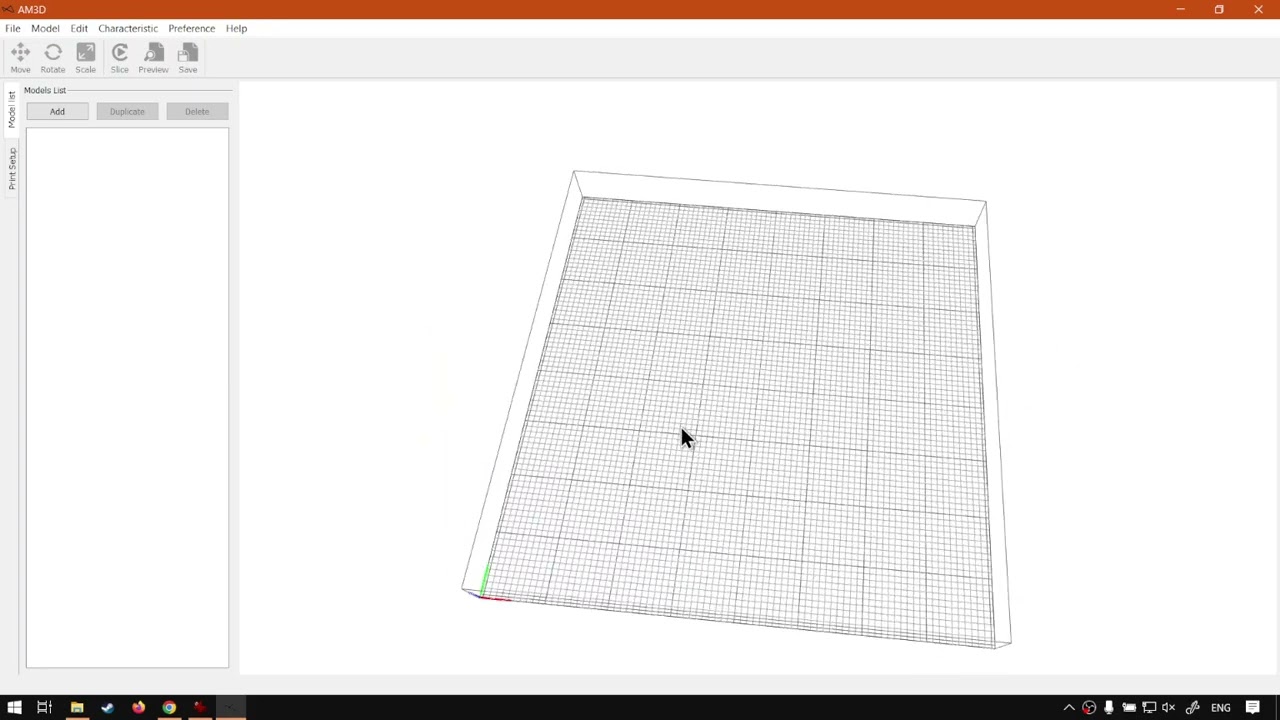
- This Part 1 is Layout Overview / the basic layout of PrintUP, named as looking at which sections of the programme specialise in what.
- Main menu (the live block points at the top File / Edit menu). The live block calls this one of the more important menus people overlook; in PrintUP not every option lives only there.
- Transform panel / transform toolbar: used to transform 3D objects.
- Finalising tools / finalising toolbar: used once the product is done or when previewing.
- Viewport navigation / 3D viewport: used often to visualise what is happening. The live block also names another 3D viewport on the preview, with similar settings and navigation.
- Information panels / setting panels: Model list and Print setup. Different settings appear depending on which panel is selected.
- Catch from the live block: if a model is selected but you are on Print setup instead of Model list, you will not see the relevant information (the live block uses scale on a model as the example).
- On Model list, an information panel pops up at the bottom depending on which tool is selected, so those settings can be adjusted.
- Quick test from the live block: add a letter; with that model selected, Move / Scale / Rotate options appear.
- Recap from the live block: main menu on top, transform toolbar, finalising toolbar, 3D viewport, information panels (model list and print setup), plus extra settings at the bottom when transforming under Model list. The live closer also names softwaretraining.co.za search (top right) and the on-site request-a-training-video form if a video is missing.
Mini-series context (cited, not recrawled as extra pages)
From the same page (body + prev/next chrome on this URL):
- Mini-series INDEX named on this page (body Mini-Series link): WordPress id
28573at https://softwaretraining.co.za/?p=28573 (pretty slug not printed on the body link; not invented; already in KB astraining/channel-letter-layout.md; dest 29970 not touched; leftover INDEX HTML not reused; not recrawled this pass). Avia prev chrome prints the pretty slug https://softwaretraining.co.za/channel-letter-layout ("Looking at the Layout and 3D Navigation Within the PrintUP Software (Mini-Series) Video Index"). - Body next named on this page: 3D Navigation at https://softwaretraining.co.za/?p=28575 (pretty slug not printed on the body link; not invented; already in KB as
training/channel-letter-3d-navigation.md; dest 31344 not touched; leftover Part 2 HTML not reused; not recrawled this pass; leftover already-in-KB). - No body previous on this URL (this is Part 1). Avia next chrome prints a different series Part 1 pretty slug https://softwaretraining.co.za/channel-letter-move-models ("How to Move 3D Channel Letter Models using the PrintUP 3D Printing Software (Part 1)"; pretty slug printed; not invented; not fetched; next-fire pretty slug).
- Related chrome on this URL also names already-ingested sidebar ICC INDEX https://softwaretraining.co.za/inkrip-icc-profiles-manager (
training/inkrip-icc-profiles-manager.md; not recrawled).
Printed unused pretty slugs on this URL: avia next https://softwaretraining.co.za/channel-letter-move-models pretty slug printed (How to Move 3D Channel Letter Models using the PrintUP 3D Printing Software Part 1; different series Part 1; not fetched; next-fire). You might also like https://softwaretraining.co.za/fabricam-different-cad-positioning-tools / https://softwaretraining.co.za/fabricam-cam-features / https://softwaretraining.co.za/flexiprint-manage-cut-order / https://softwaretraining.co.za/fabricam-preview-part-numbers / https://softwaretraining.co.za/fabricam-intricate-art-parts / https://softwaretraining.co.za/fabricam-entries-exits-part-sequence pretty slugs printed; not invented; not fetched except as already in KB. Body Mini-Series ?p=28573 pretty slug not printed on the body link (already in KB via INDEX pretty slug channel-letter-layout; dest 29970 not touched). Body next ?p=28575 pretty slug not printed on the body link (already in KB via Part 2 pretty slug channel-letter-3d-navigation; dest 31344 not touched; leftover not recrawled). No body previous ?p=. channel-letter-move-models was not ingested this pass. Other parts were not started.
Related chrome on the same URL (cited, not re-fetched)
More Articles / You-might-also-like / More Training Videos / related chrome on this URL also names other pages. Not fetched this pass except as already in KB:
Already in KB:
- https://softwaretraining.co.za/channel-letter-layout (avia prev; "Looking at the Layout and 3D Navigation Within the PrintUP Software (Mini-Series) Video Index") -
training/channel-letter-layout.md(dest 29970 not touched) - https://softwaretraining.co.za/channel-letter-3d-navigation (body next 3D Navigation printed as
?p=28575only; leftover already-in-KB) -training/channel-letter-3d-navigation.md(dest 31344 not touched) - https://softwaretraining.co.za/inkrip-icc-profiles-manager (sidebar ICC Course) -
training/inkrip-icc-profiles-manager.md - https://softwaretraining.co.za/inkrip-use-new-icc-profile (More Training Videos) -
training/inkrip-use-new-icc-profile.md
Not in KB (hotlinked only; pretty slugs printed on this URL unless noted):
- https://softwaretraining.co.za/?p=28573 (body Mini-Series; pretty slug not printed on the body link; same post as already-ingested
channel-letter-layout) - https://softwaretraining.co.za/?p=28575 (body next; "3D Navigation"; pretty slug not printed on the body link; same post as already-ingested
channel-letter-3d-navigation) - https://softwaretraining.co.za/channel-letter-move-models (avia next; "How to Move 3D Channel Letter Models using the PrintUP 3D Printing Software (Part 1)"; different series Part 1; next-fire pretty slug)
- https://softwaretraining.co.za/fabricam-different-cad-positioning-tools (YMAL; "Different CAD Positioning Tools for the FabriCAM Software (Mini-Series) Video Index")
- https://softwaretraining.co.za/fabricam-cam-features (YMAL; "Computer-Aided Manufacturing (CAM) Feature Within FabriCAM Software (Mini-Series) Video Index")
- https://softwaretraining.co.za/flexiprint-manage-cut-order (YMAL; "Arrange and Manage the Cut Order within the SAi FlexiPRINT RTUV 22 Software (Part 8)")
- https://softwaretraining.co.za/fabricam-preview-part-numbers (YMAL; "FabriCAM Software Print Job Preview Part Numbers (Part 2) Step by Step Video Tutorial")
- https://softwaretraining.co.za/fabricam-intricate-art-parts (YMAL; "Opening Detailed Vector Art Parts Using FabriCAM Software (Mini-Series) Video Index")
- https://softwaretraining.co.za/fabricam-entries-exits-part-sequence (YMAL; "FabriCAM Software Entries-Exits and Part Sequence (Part 3) Step by Step Video Tutorial")
- https://softwaretraining.co.za/flexiprint-printing-basics (More Articles; "Printing Basics when Using SAi FlexiPRINT RTUV 22 Software (Mini-Series) Video Index")
- https://softwaretraining.co.za/channel-letters-print-options (More Articles; "Different Print Setup Options when Using PrintUP Software (Mini-Series) Video Index")
- https://softwaretraining.co.za/how-to-use-the-newly-created-icc-profile-within-the-am-co-za-inkrip-software-part-11 (More Training Videos)
- https://softwaretraining.co.za/inkrip-use-new-icc-profile / https://softwaretraining.co.za/inkrip-spectrophotometer-devices / https://softwaretraining.co.za/inkrip-equidistant-layout-feature / https://softwaretraining.co.za/inkrip-same-height-width (More Training Videos; pretty slugs printed)
- https://softwaretraining.co.za/check-sai (header chrome; pretty slug printed)
- https://softwaretraining.co.za/topic/3d-printing / https://softwaretraining.co.za/topic/printup / https://softwaretraining.co.za/topic/printup-3d / https://softwaretraining.co.za/topic/channel-letters / https://softwaretraining.co.za/topic/am3d / https://softwaretraining.co.za/topic/am-co-za / https://softwaretraining.co.za/topic/printing (tag chrome; pretty slugs printed)
Off-series chrome on this URL (not fetched): You-might-also-like FabriCAM / FlexiPRINT pages above; More Articles updating.co.za / prevision.co.za / sortit.co.za / ambitious.co.za RSS items (hosts not crawled); More Training Videos long pretty slugs including InkRIP; sidebar ICC INDEX already in KB. Body Mini-Series ?p=28573 already in KB as Layout INDEX dest 29970 (pretty slug not printed on the body link). Body next ?p=28575 already in KB as Part 2 dest 31344 (pretty slug not printed on the body link; leftover not recrawled). No body previous. Avia prev channel-letter-layout already in KB (dest 29970 not touched). Avia next channel-letter-move-models unused (pretty slug printed; not invented; not fetched; different series Part 1; next-fire).
Alternate long pretty slug also printed on this URL for this Part 1 itself (a-overview-look-at-the-layout-when-using-the-printup-3d-printing-software-part-1); not invented; not fetched. More Training Videos also reprints long pretty slugs for InkRIP pages (how-to-use-the-newly-created-icc-profile-within-the-am-co-za-inkrip-software-part-11, using-a-specialized-spectrophotometer-device-within-the-am-co-za-inkrip-software-part-2, how-to-use-the-equidistant-layout-feature-within-the-am-co-za-inkrip-software-part-8, why-use-the-same-height-and-width-feature-within-the-am-co-za-inkrip-software-part-7); not invented; not fetched.
Embedded video (not mirrored)
The page embeds a self-hosted MP4: https://stfile.s3.eu-west-1.amazonaws.com/28574.mp4 (poster https://stfile.s3.eu-west-1.amazonaws.com/28574-thumbnail.jpg). Featured still: https://softwaretraining.co.za/wp-content/uploads/2023/09/28574-featured-image.jpg. Not downloaded. A YouTube embed is also present on this URL (embed id eNt64ZqyniQ); not crawled; not mirrored. Watch URL cited only: https://www.youtube.com/watch?v=eNt64ZqyniQ. The page includes an on-page "Video Transcript" block; not copied in full; no transcript invented. Frame stills on this URL include https://stfile.s3.eu-west-1.amazonaws.com/28574-frame.jpg through 28574-frame11.jpg and the YouTube embed for eNt64ZqyniQ; not downloaded. Cover still also names https://softwaretraining.co.za/wp-content/uploads/2023/09/tyler-nix-klOo6lqKWjs-unsplash-scaled.jpg; not mirrored.


Training phones (page chrome on the same URL)
From https://softwaretraining.co.za/channel-letter-layout-overview header:
- Sales: 072 222 2211
- Support: 076 666 6655
- Training: 060 818 1818
- Jo'burg: 087 802 5368
- Cape Town: 087 802 7106
Skipped this pass
- Unused avia next PrintUP different-series Part 1
channel-letter-move-models(pretty slug printed; not invented; not fetched; next-fire pretty slug) - Unused body Mini-Series
?p=28573(no pretty slug on the body link; already in KB as Layout INDEX dest 29970; not recrawled) - Unused body next 3D Navigation
?p=28575(no pretty slug on the body link; already in KB as Part 2 dest 31344; leftover not recrawled) - No body previous on this live HTML (this is Part 1)
- Unused You might also like
fabricam-different-cad-positioning-tools/fabricam-cam-features/flexiprint-manage-cut-order/fabricam-preview-part-numbers/fabricam-intricate-art-parts/fabricam-entries-exits-part-sequence(pretty slugs printed; not invented; not fetched except as already in KB) - Unused More Articles
flexiprint-printing-basics/channel-letters-print-options/ other-host RSS chrome (updating.co.za / prevision.co.za / sortit.co.za / ambitious.co.za; hosts not crawled) - Already-ingested PrintUP Layout INDEX
training/channel-letter-layout.md(body Mini-Series printed as?p=only; leftover HTML not reused; dest 29970 not touched; not recrawled) - Already-ingested PrintUP Layout Part 2
training/channel-letter-3d-navigation.md(body next printed as?p=only; leftover HTML not reused; dest 31344 not touched; not recrawled) - Already-ingested PrintUP Adding 3D Models INDEX dest 28018 not touched; leftover HTML not reused; not recrawled
- Already-ingested PrintUP Adding 3D Models Parts 1-4 dests 34547 / 36128 / 37439 / 38589 not touched; leftover HTML not reused; not recrawled
- Already-ingested PrintUP Getting Started INDEX dest 27189 not touched; leftover HTML not reused; not recrawled
- Already-ingested PrintUP Understanding Channel Letter Printing how-to dest 30385 not touched; leftover HTML not reused; not recrawled
- Already-ingested PrintUP Download and Install how-to dest 33392 not touched; leftover HTML not reused; not recrawled
- Already-ingested PrintUP Buy a 3D Channel Letter Printer how-to dest 33869 not touched; leftover HTML not reused; not recrawled
- Already-ingested PrintUP Channel Letters 3D Transformation INDEX dest 24544 not touched; leftover HTML not reused; not recrawled
- Already-ingested printhead INDEX
training/colour-channel-manipulation.md(leftover HTML not reused; dest 31715 not touched; not recrawled) - Already-ingested Doubling Up Color Channels INDEX + Parts 1-3 dests 26424 / 33763 / 35120 / 33405 not touched; not recrawled
- Already-ingested Printing Black Without the K INDEX + Parts 1-3 dests 25387 / 31154 / 32454 / 33779 not touched; not recrawled
- Already-ingested Printing CMYK to CMY with Fake K INDEX + Parts 1-6 dests 22779 / 33738 / 28031 / 29453 / 29712 / 32465 / 34114 not touched; not recrawled
- More Training Videos already-in-KB InkRIP chrome (not recrawled)
- Sidebar ICC INDEX
training/inkrip-icc-profiles-manager.md(already in KB; not recrawled) - Already-ingested CAD Basics INDEX + Parts 1-10 (already in KB; not recrawled)
- Already-ingested Import Tab INDEX + Parts 1-3 (already in KB; not recrawled)
- Already-ingested Secondary CAM Toolbar Practicals INDEX + Parts 1-3 (already in KB; not recrawled)
- Cover / MP4 / YouTube embed / part still binaries
- dump refresh skipped
- Graphtec redo skipped
- Firmware quiet (existing InkRIP / PrintEXP firmware indexes not rewritten)
- OpenAI upload skipped