

Adding STL and OBJ 3D Channel Models using the PrintUP 3D Printing Software (Part 3)
Source: https://softwaretraining.co.za/channel-letter-stl-3d-models (canonical on this live HTML; live file /workspace/channel-letter-stl-3d-models-fresh.html; html lang="en-ZA"; og:locale en_US (also en_ZA); schema inLanguage en-ZA; WP-Super-Cache stamp 2026-08-15 17:12:14; live GET of pretty slug channel-letter-stl-3d-models 200; HTTP Date Sun, 16 Aug 2026 05:22:24 GMT). Fetched 2026-08-16T07:22:24 SAST. Published 1 September 2023 (datetime 2023-09-01T11:30:05+02:00 / article published time 2023-09-01T09:30:05+00:00). Site modified 8 August 2026 UTC / 8 August 2026 SAST (2026-08-08T07:49:22+00:00 / og:updated_time 2026-08-08T09:49:22+02:00). WordPress post id 28554. Also known as https://softwaretraining.co.za/?p=28554 (shortlink / wp-json posts/28554 / postid-28554 / html_entry_id_28554 / post-entry-28554 on this URL; not separately re-fetched). Alternate long pretty slug adding-stl-and-obj-3d-channel-models-using-the-printup-3d-printing-software-part-3 also printed on this URL (not invented; not fetched). Canonical / og:url pretty slug is channel-letter-stl-3d-models (printed; not invented). Not WordPress id 28551 and not slug channel-letter-3d-models. Not WordPress id 28552 and not slug channel-letter-import-graphic. Not WordPress id 28553 and not slug channel-letter-word-model. Same page as unused avia next named on already-ingested PrintUP Adding 3D Models Part 2 (pretty slug channel-letter-stl-3d-models was printed there; not invented; title there: "Adding STL and OBJ 3D Channel Models using the PrintUP 3D Printing Software (Part 3)"). Same WordPress id as unused INDEX body PART 3 listed as ?p=28554 on already-ingested Adding 3D Models INDEX (INDEX body title there: leftover PART 3 Add 3d Models; pretty slug was not printed on that INDEX body link; this live HTML confirms WP 28554). Live page title is "Adding STL and OBJ 3D Channel Models using the PrintUP 3D Printing Software (Part 3)".
What this is: One public English how-to page on softwaretraining.co.za, an AM.CO.ZA training-video project. This is AM softwaretraining PrintUP (PrintUP / PrintUp / PrintUp 3D named on this live HTML title, tags, and body chrome; tags also name AM.CO.ZA / AM3D), not UltraPrint and not a third-party RIP. Knowledge on this page is universal and cited to this softwaretraining URL. This page is Part 3 titled Adding STL and OBJ 3D Channel Models in the Different Methods to Adding 3D Models Within PrintUP Software mini-series. This is a part, not an INDEX. This fills leftover avia next of already-ingested Part 2 channel-letter-word-model. Distinct from already-ingested PrintUP Adding 3D Models INDEX training/channel-letter-3d-models.md (source https://softwaretraining.co.za/channel-letter-3d-models; body Mini-Series ?p=28551 on this URL; already in KB; dest 28018 not touched; leftover INDEX HTML not reused; not recrawled; not a twin of this Part 3), from already-ingested PrintUP Adding 3D Models Part 1 training/channel-letter-import-graphic.md (source https://softwaretraining.co.za/channel-letter-import-graphic; already in KB; dest 34547 not touched; leftover Part 1 HTML not reused; not recrawled; not a twin of this Part 3; Part 1 pretty slug was not printed on this URL), from already-ingested PrintUP Adding 3D Models Part 2 training/channel-letter-word-model.md (source https://softwaretraining.co.za/channel-letter-word-model; body previous Create Word Model ?p=28553 on this URL; avia prev chrome on this URL; already in KB; dest 36128 not touched; leftover Part 2 HTML not reused; not recrawled; not a twin of this Part 3), from unused avia next https://softwaretraining.co.za/channel-letter-customize-3d-model (title: "How to Customize the 3D Model Settings using the PrintUP 3D Printing Software (Part 4)"; pretty slug printed; not invented; not fetched), from unused body Mini-Series https://softwaretraining.co.za/?p=28551 (pretty slug not printed on the body link; same WP id as already-ingested Adding 3D Models INDEX; not invented; not recrawled), from unused body previous Create Word Model https://softwaretraining.co.za/?p=28553 (pretty slug not printed on the body link; same WP id as already-ingested Part 2; not invented; not recrawled), from unused body next 3d Model Settings https://softwaretraining.co.za/?p=28565 (pretty slug not printed on the body link; not invented; not fetched; avia next on this URL prints pretty slug channel-letter-customize-3d-model for the same leftover INDEX PART 4), from already-ingested PrintUP Getting Started INDEX training/channel-letter-download.md (already in KB; dest 27189 not touched; leftover INDEX HTML not reused; not recrawled), from already-ingested PrintUP Understanding Channel Letter Printing how-to dest 30385 not touched; leftover Part 1 HTML not reused; not recrawled, from already-ingested PrintUP Download and Install how-to dest 33392 not touched; leftover Part 2 HTML not reused; not recrawled, from already-ingested PrintUP Buy a 3D Channel Letter Printer how-to dest 33869 not touched; leftover Part 3 HTML not reused; not recrawled, from already-ingested PrintUP 3D Navigation how-to training/channel-letter-3d-navigation.md (already in KB; dest 31344 not touched; leftover 3D Navigation HTML not reused; not recrawled), from already-ingested PrintUP Channel Letters 3D Transformation INDEX training/channel-letters-3d-transformations.md (already in KB; dest 24544 not touched; leftover INDEX HTML not reused; not recrawled), from already-ingested printhead colour-channel INDEX training/colour-channel-manipulation.md (already in KB; dest 31715 not touched; leftover printhead INDEX HTML not reused; not recrawled), from already-ingested Doubling Up Color Channels INDEX + Parts 1-3 dests 26424 / 33763 / 35120 / 33405 not touched; leftover HTML not reused; not recrawled, from already-ingested Printing Black Without the K INDEX + Parts 1-3 dests 25387 / 31154 / 32454 / 33779 not touched; leftover HTML not reused; not recrawled, from already-ingested Printing CMYK to CMY with Fake K INDEX + Parts 1-6 dests 22779 / 33738 / 28031 / 29453 / 29712 / 32465 / 34114 not touched; leftover HTML not reused; not recrawled, from unused You might also like https://softwaretraining.co.za/fabricam-cad-basic-polyline-tool / https://softwaretraining.co.za/flexiprint-select-point-tool / https://softwaretraining.co.za/flexiprint-selection-tools / https://softwaretraining.co.za/fabricam-print-report-nesting-sheet / https://softwaretraining.co.za/printup-spiralize-characteristic-tool / https://softwaretraining.co.za/flexiprint-undoing-redoing-actions (pretty slugs printed; not invented; not fetched except as already in KB), from unused More Articles other-host RSS chrome printed on this URL (cited not fetched), from unused Photoshop Fake K INDEX photoshop-cmyk-cmy and Photoshop Doubling Up INDEX photoshop-double-colors (those slugs were not printed on this URL; not fetched), and from youtube chrome (YouTube was not crawled). Named as unused avia next Part 3 on already-ingested Adding 3D Models Part 2 (pretty slug channel-letter-stl-3d-models was printed). This does not ingest other PrintUP series parts this pass. channel-letter-customize-3d-model was not ingested this pass. ?p=28565 was not ingested this pass. channel-letter-word-model dest 36128 was not touched this pass. channel-letter-import-graphic dest 34547 was not touched this pass. channel-letter-3d-models dest 28018 was not touched this pass. buy-channel-letter-printer dest 33869 was not touched this pass. channel-letter-download-install dest 33392 was not touched this pass. understand-channel-letter-printing dest 30385 was not touched this pass. channel-letter-download dest 27189 was not touched this pass. channel-letter-3d-navigation dest 31344 was not touched this pass. channel-letters-3d-transformations dest 24544 was not touched this pass. colour-channel-manipulation dest 31715 was not touched this pass. coreldraw-double-image-channel-color dest 33405 was not touched this pass. coreldraw-setup-project-image dest 35120 was not touched this pass. coreldraw-print-double-colors dest 33763 was not touched this pass. coreldraw-double-color-channel dest 26424 was not touched this pass. coreldraw-export-image-new-cmyk dest 33779 was not touched this pass. coreldraw-replace-k-with-fake-k dest 32454 was not touched this pass. coreldraw-setup-image-project dest 31154 was not touched this pass. coreldraw-black-without-k dest 25387 was not touched this pass. coreldraw-export-image-cmyk dest 34114 was not touched this pass. coreldraw-add-fake-key dest 32465 was not touched this pass. coreldraw-print-cmyk-vs-cmy dest 33738 was not touched this pass. coreldraw-remove-image-key dest 29712 was not touched this pass. coreldraw-convert-rgb-cmyk dest 29453 was not touched this pass. coreldraw-setup-project-ready dest 28031 was not touched this pass. coreldraw-cmyk-to-cmy dest 22779 was not touched this pass.
Not FabriCAM / FlexiPRINT / PrintEXP / UltraPrint / AcroRIP / InkRIP / CorelDRAW / Photoshop this how-to. Distinct: InkRIP (AM software, different RIP programme; already-ingested More Training Videos inkrip-use-new-icc-profile / sidebar ICC INDEX are More Training Videos / sidebar chrome on this URL, not this PrintUP how-to, and were not recrawled except as already in KB), PrintEXP (AM software, different RIP / control programme; not this PrintUP how-to and not fetched), UltraPrint (not this page; UltraPrint string not present on this live HTML; not AM softwaretraining PrintUP; not this how-to and not fetched), AcroRIP, WellPrintEXP (stored/OEM), FlexiPRINT / FlexiSTARTER (SAi third-party stored; You might also like chrome on this URL names FlexiPRINT pages; those are different pages, not this how-to, and were not fetched), Photoshop (third-party/industry; unused Photoshop Fake K INDEX / Doubling Up INDEX slugs were not printed on this URL and not fetched), CorelDRAW (third-party/industry software on AM softwaretraining, not AM stack / AM RIP / AM product; completed CorelDRAW dests not touched and not recrawled), FabriCAM (AM software, different CAD/CAM programme; You might also like / More Articles chrome on this URL names FabriCAM pages; those are different pages, not this how-to, and were not recrawled except as already in KB), RouterCAM (AM CorelDRAW plugin / CAM; sidebar / category chrome names RouterCAM folders; those are different pages, not this PrintUP how-to, and were not fetched). Sidebar / category chrome on this URL names FlexiPRINT / other RIP / vinyl / laser / FabriCAM / Photoshop / CorelDRAW / 3D Printer Channel Letter training-video folders; those are different pages, not this how-to, and were not fetched except as already in KB. Sidebar chrome on this URL also names buythis.co.za; buythis was not crawled. Sidebar chrome also names cncu.co.za; cncu was not crawled. Share-on-WhatsApp / share-by-mail are page chrome only; email / WhatsApp were not crawled. YouTube channel links are present in page chrome; YouTube was not crawled. Cover chrome also names channelletters.co.za; channelletters was not crawled. Footer / More Websites chrome also names vinylcut.co.za / ambitious.co.za / rustoff.co.za / other AM sites; those hosts were not crawled except as already in KB. More Articles chrome also names updating.co.za / sortit.co.za / univision.co.za / cornerstone.co.za / airpumps.co.za / nitrogengenerator.co.za / other RSS items; those hosts were not crawled.
English peek (quoted from the live page)
Quoted from https://softwaretraining.co.za/channel-letter-stl-3d-models:
- Title: "Adding STL and OBJ 3D Channel Models using the PrintUP 3D Printing Software (Part 3)"
- Cover chrome: "channel letter stl 3d models"
- "Now compared to the first two methods of adding models this one has by far the most capabilities."
- "With that being said it also requires the user to have a bit more knowledge on 3d modelling."
- "This video is part of a Mini-Series."
- "Next video covers 3d Model Settings."
- "Previous video covered Create Word Model."
- Tags on page: 3D Printing / AM.CO.ZA / AM3D / Channel Letters / Printing / PrintUp / PrintUp 3D
- Category chrome: Training Videos
- Date on page: 1 September 2023
English confirmation: html lang="en-ZA", og:locale en_US / en_ZA, schema inLanguage en-ZA, prose above is English.
How to add STL and OBJ 3D channel models in PrintUP (from this page)
The live page body is short; the on-page "Video Transcript" block is the step source. Raw auto-caption is not copied in full; no transcript invented. Cleaned steps from that live block:
- This Part 3 is Add 3d Models / adding STL and OBJ 3D channel models in PrintUP, named as having more capabilities than the first two methods, and requiring more 3D modelling knowledge.
- The live block recaps the first two methods already covered: File Input Graphics, then Model / Create word model.
- If you already know 3D modelling and have your own programme, export models as STL or OBJ (named as the common 3D-printing formats) and add them straight into the PrintUP project.
- Open the model list on the left (click Model list if it is not showing). Click Add; a navigation bar pops up.
- Supported formats named on the live block: OBJ and STL. Leave all supported formats, select the file, click Open.
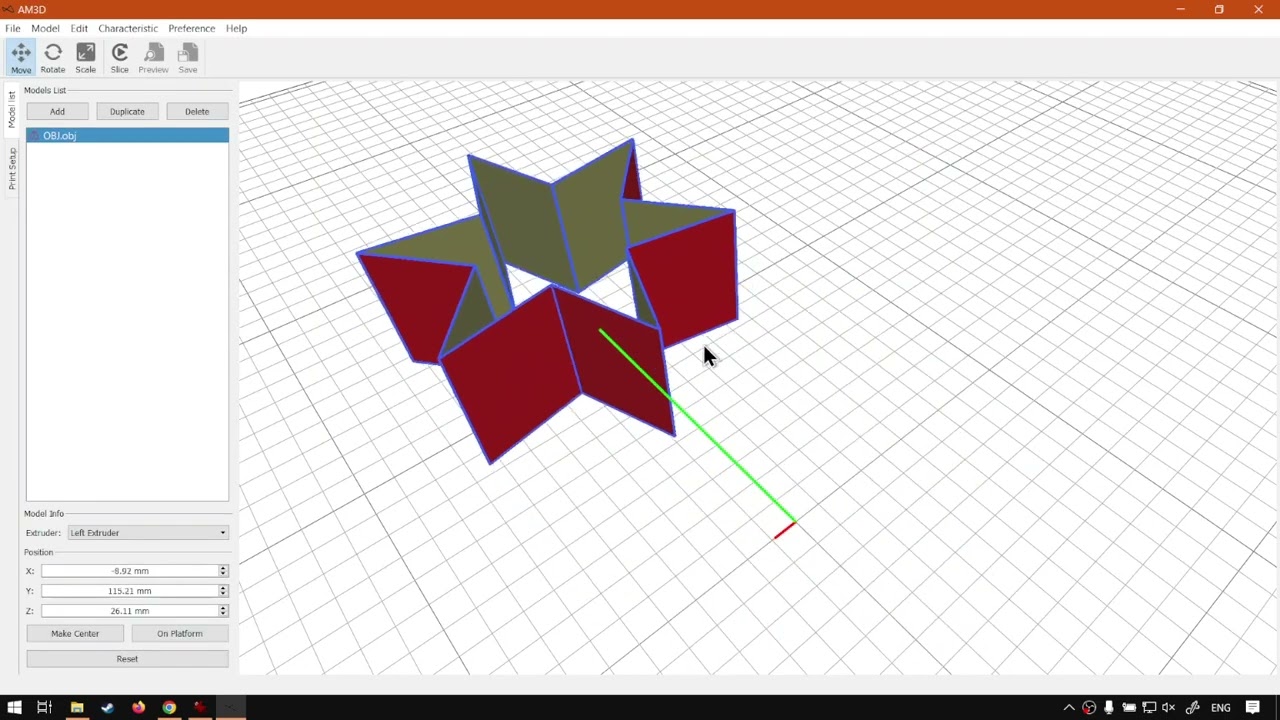
- The live block then imports an OBJ and an STL. One model has errors and the other does not (visible difference, including red). Recap from the live closer: softwaretraining.co.za search (top right) and the on-site request-a-training-video form if a video is missing. Avia next on this URL is a different page at https://softwaretraining.co.za/channel-letter-customize-3d-model (pretty slug printed; not invented; not fetched).
Mini-series context (cited, not recrawled as extra pages)
From the same page (body + prev/next chrome on this URL):
- Mini-series INDEX named on this page (body Mini-Series link): WordPress id
28551at https://softwaretraining.co.za/?p=28551 (pretty slug not printed on the body link; not invented; already in KB astraining/channel-letter-3d-models.md; dest 28018 not touched; leftover INDEX HTML not reused; not recrawled this pass). - Body previous named on this page: Create Word Model at https://softwaretraining.co.za/?p=28553 (pretty slug not printed on the body link; not invented; already in KB as
training/channel-letter-word-model.md; dest 36128 not touched; leftover Part 2 HTML not reused; not recrawled this pass). Avia prev chrome prints the pretty slug https://softwaretraining.co.za/channel-letter-word-model ("How to Create a 3d Channel Word Model using the PrintUP 3D Printing Software (Part 2)"). - Body next named on this page: 3d Model Settings at https://softwaretraining.co.za/?p=28565 (pretty slug not printed on the body link; not invented; not fetched this pass). Avia next chrome prints the pretty slug https://softwaretraining.co.za/channel-letter-customize-3d-model ("How to Customize the 3D Model Settings using the PrintUP 3D Printing Software (Part 4)"). Same leftover INDEX PART 4 as unused INDEX body
?p=28565; pretty slug was printed on this URL as avia next (not invented); still not fetched. - Related chrome on this URL also names already-ingested sidebar ICC INDEX https://softwaretraining.co.za/inkrip-icc-profiles-manager (
training/inkrip-icc-profiles-manager.md; not recrawled).
Printed unused pretty slugs on this URL: avia next https://softwaretraining.co.za/channel-letter-customize-3d-model pretty slug printed (3d Model Settings / Customize the 3D Model Settings Part 4; not fetched). You might also like https://softwaretraining.co.za/fabricam-cad-basic-polyline-tool / https://softwaretraining.co.za/flexiprint-select-point-tool / https://softwaretraining.co.za/flexiprint-selection-tools / https://softwaretraining.co.za/fabricam-print-report-nesting-sheet / https://softwaretraining.co.za/printup-spiralize-characteristic-tool / https://softwaretraining.co.za/flexiprint-undoing-redoing-actions pretty slugs printed; not invented; not fetched except as already in KB. Body Mini-Series ?p=28551 pretty slug not printed on the body link (already in KB via INDEX pretty slug channel-letter-3d-models; dest 28018 not touched). Body previous ?p=28553 pretty slug not printed on the body link (already in KB via Part 2 pretty slug channel-letter-word-model; dest 36128 not touched). Body next ?p=28565 pretty slug not printed on the body link; not invented; not fetched. channel-letter-customize-3d-model was not ingested this pass. Other parts were not started.
Related chrome on the same URL (cited, not re-fetched)
More Articles / You-might-also-like / More Training Videos / related chrome on this URL also names other pages. Not fetched this pass except as already in KB:
Already in KB:
- https://softwaretraining.co.za/channel-letter-word-model (avia prev; "How to Create a 3d Channel Word Model using the PrintUP 3D Printing Software (Part 2)") -
training/channel-letter-word-model.md(dest 36128 not touched) - https://softwaretraining.co.za/channel-letter-3d-models (More Articles; "Different Methods to Adding 3D Models Within PrintUP Software (Mini-Series) Video Index") -
training/channel-letter-3d-models.md(dest 28018 not touched) - https://softwaretraining.co.za/inkrip-icc-profiles-manager (sidebar ICC Course) -
training/inkrip-icc-profiles-manager.md - https://softwaretraining.co.za/inkrip-use-new-icc-profile (More Training Videos) -
training/inkrip-use-new-icc-profile.md
Not in KB (hotlinked only; pretty slugs printed on this URL unless noted):
- https://softwaretraining.co.za/?p=28551 (body Mini-Series; pretty slug not printed on the body link; same post as already-ingested
channel-letter-3d-models) - https://softwaretraining.co.za/?p=28553 (body previous; "Create Word Model"; pretty slug not printed on the body link; same post as already-ingested
channel-letter-word-model) - https://softwaretraining.co.za/?p=28565 (body next; "3d Model Settings"; pretty slug not printed on the body link; not invented)
- https://softwaretraining.co.za/channel-letter-customize-3d-model (avia next; "How to Customize the 3D Model Settings using the PrintUP 3D Printing Software (Part 4)")
- https://softwaretraining.co.za/fabricam-cad-basic-polyline-tool (YMAL; "FabriCAM Software the Basic Polyline Tool for CAD (Part 1) Step by Step Video Tutorial")
- https://softwaretraining.co.za/flexiprint-select-point-tool (YMAL; "Secondary Toolbars Select Point Tool within the SAi FlexiPRINT RTUV 22 Software (Part 6)")
- https://softwaretraining.co.za/flexiprint-selection-tools (YMAL; "The Secondary Toolbars Selection Tools within the SAi FlexiPRINT RTUV 22 Software (Part 1)")
- https://softwaretraining.co.za/fabricam-print-report-nesting-sheet (YMAL; "FabriCAM Software Print Report Sub Nesting Sheet (Part 3) Step by Step Video Tutorial")
- https://softwaretraining.co.za/printup-spiralize-characteristic-tool (YMAL; "The Spiralize Characteristic Tool Feature within the PrintUP 3D Printing Software")
- https://softwaretraining.co.za/flexiprint-undoing-redoing-actions (YMAL; "Going About Undoing or Redoing Actions within the SAi FlexiPRINT RTUV 22 Software (Part 5)")
- https://softwaretraining.co.za/hot-to-import-and-export-printer-drivers-within-the-am-co-za-inkrip-software-part-8 (More Training Videos)
- https://softwaretraining.co.za/printer-driver-available-printing-resolutions-within-the-am-co-za-inkrip-software-part-5 (More Training Videos)
- https://softwaretraining.co.za/adjusting-driver-and-printer-properties-within-the-am-co-za-inkrip-software-part-4 (More Training Videos)
- https://softwaretraining.co.za/making-printer-driver-copies-or-deleting-them-within-the-am-co-za-inkrip-software-part-3 (More Training Videos)
- https://softwaretraining.co.za/understanding-what-a-printer-driver-is-within-the-am-co-za-inkrip-software-part-1 (More Training Videos)
- https://softwaretraining.co.za/check-sai (header chrome; pretty slug printed)
- https://softwaretraining.co.za/topic/3d-printing / https://softwaretraining.co.za/topic/printup / https://softwaretraining.co.za/topic/printup-3d / https://softwaretraining.co.za/topic/channel-letters / https://softwaretraining.co.za/topic/am3d / https://softwaretraining.co.za/topic/am-co-za / https://softwaretraining.co.za/topic/printing (tag chrome; pretty slugs printed)
Off-series chrome on this URL (not fetched): You-might-also-like FabriCAM / FlexiPRINT / PrintUP spiralize pages above; More Articles updating.co.za / sortit.co.za / univision.co.za / cornerstone.co.za / airpumps.co.za / nitrogengenerator.co.za RSS items (hosts not crawled); More Training Videos long pretty slugs including InkRIP; sidebar ICC INDEX already in KB. Body Mini-Series ?p=28551 already in KB as Adding 3D Models INDEX dest 28018 (pretty slug not printed on the body link). Body previous ?p=28553 already in KB as Part 2 dest 36128 (pretty slug not printed on the body link). Body next ?p=28565 unused (pretty slug not printed; not invented; not fetched). Avia prev channel-letter-word-model already in KB (dest 36128 not touched). Avia next channel-letter-customize-3d-model unused (pretty slug printed; not invented; not fetched). INDEX leftover unused body PART 4 ?p=28565 is printed on this URL as body ?p= only; avia next prints pretty slug channel-letter-customize-3d-model (cite not fetch). Already-ingested Part 1 channel-letter-import-graphic dest 34547 was not printed as a pretty slug on this URL (cite leftover dest; not recrawled).
Alternate long pretty slug also printed on this URL for this Part 3 itself (adding-stl-and-obj-3d-channel-models-using-the-printup-3d-printing-software-part-3); not invented; not fetched. More Training Videos also reprints long pretty slugs for InkRIP pages (how-to-install-or-uninstall-printer-drivers-within-the-am-co-za-inkrip-software-part-2, how-to-use-the-newly-created-icc-profile-within-the-am-co-za-inkrip-software-part-11, hot-to-import-and-export-printer-drivers-within-the-am-co-za-inkrip-software-part-8, printer-driver-available-printing-resolutions-within-the-am-co-za-inkrip-software-part-5, adjusting-driver-and-printer-properties-within-the-am-co-za-inkrip-software-part-4, making-printer-driver-copies-or-deleting-them-within-the-am-co-za-inkrip-software-part-3, understanding-what-a-printer-driver-is-within-the-am-co-za-inkrip-software-part-1); not invented; not fetched.
Embedded video (not mirrored)
The page embeds a self-hosted MP4: https://stfile.s3.eu-west-1.amazonaws.com/28554.mp4 (poster https://stfile.s3.eu-west-1.amazonaws.com/28554-thumbnail.jpg). Featured still: https://softwaretraining.co.za/wp-content/uploads/2023/09/28554-featured-image.jpg. Not downloaded. A YouTube embed is also present on this URL (embed id uDmtYIhMrhU); not crawled; not mirrored. Watch URL cited only: https://www.youtube.com/watch?v=uDmtYIhMrhU. The page includes an on-page "Video Transcript" block; not copied in full; no transcript invented. Frame stills on this URL include https://stfile.s3.eu-west-1.amazonaws.com/28554-frame.jpg through 28554-frame9.jpg and the YouTube embed for uDmtYIhMrhU; not downloaded. Cover still also names https://softwaretraining.co.za/wp-content/uploads/2023/09/michael-austin-3AO4LuMbHa4-unsplash-scaled.jpg; not mirrored.


Training phones (page chrome on the same URL)
From https://softwaretraining.co.za/channel-letter-stl-3d-models header:
- Sales: 072 222 2211
- Support: 076 666 6655
- Training: 060 818 1818
- Jo'burg: 087 802 5368
- Cape Town: 087 802 7106
Skipped this pass
- Unused avia next PrintUP how-to
channel-letter-customize-3d-model(pretty slug printed; not invented; not fetched; leftover INDEX PART 4) - Unused body Mini-Series
?p=28551(no pretty slug on the body link; already in KB as Adding 3D Models INDEX dest 28018; not recrawled) - Unused body previous Create Word Model
?p=28553(no pretty slug on the body link; already in KB as Part 2 dest 36128; not recrawled) - Unused body next 3d Model Settings
?p=28565(no pretty slug on the body link; not invented; not fetched) - Unused You might also like
fabricam-cad-basic-polyline-tool/flexiprint-select-point-tool/flexiprint-selection-tools/fabricam-print-report-nesting-sheet/printup-spiralize-characteristic-tool/flexiprint-undoing-redoing-actions(pretty slugs printed; not invented; not fetched except as already in KB) - Unused More Articles other-host RSS chrome (updating.co.za / sortit.co.za / univision.co.za / cornerstone.co.za / airpumps.co.za / nitrogengenerator.co.za; hosts not crawled)
- Unused Photoshop Fake K INDEX
photoshop-cmyk-cmyand Photoshop Doubling Up INDEXphotoshop-double-colors(not printed on this URL; not fetched) - Already-ingested PrintUP Adding 3D Models INDEX
training/channel-letter-3d-models.md(body Mini-Series printed as?p=only; leftover HTML not reused; dest 28018 not touched; not recrawled) - Already-ingested PrintUP Adding 3D Models Part 1
training/channel-letter-import-graphic.md(pretty slug not printed on this URL; leftover HTML not reused; dest 34547 not touched; not recrawled) - Already-ingested PrintUP Adding 3D Models Part 2
training/channel-letter-word-model.md(body previous printed as?p=only; leftover HTML not reused; dest 36128 not touched; not recrawled) - Already-ingested PrintUP Getting Started INDEX dest 27189 not touched; leftover HTML not reused; not recrawled
- Already-ingested PrintUP Understanding Channel Letter Printing how-to dest 30385 not touched; leftover HTML not reused; not recrawled
- Already-ingested PrintUP Download and Install how-to dest 33392 not touched; leftover HTML not reused; not recrawled
- Already-ingested PrintUP Buy a 3D Channel Letter Printer how-to dest 33869 not touched; leftover HTML not reused; not recrawled
- Already-ingested PrintUP 3D Navigation how-to dest 31344 not touched; leftover HTML not reused; not recrawled
- Already-ingested PrintUP Channel Letters 3D Transformation INDEX dest 24544 not touched; leftover HTML not reused; not recrawled
- Already-ingested printhead INDEX
training/colour-channel-manipulation.md(leftover HTML not reused; dest 31715 not touched; not recrawled) - Already-ingested Doubling Up Color Channels INDEX + Parts 1-3 dests 26424 / 33763 / 35120 / 33405 not touched; not recrawled
- Already-ingested Printing Black Without the K INDEX + Parts 1-3 dests 25387 / 31154 / 32454 / 33779 not touched; not recrawled
- Already-ingested Printing CMYK to CMY with Fake K INDEX + Parts 1-6 dests 22779 / 33738 / 28031 / 29453 / 29712 / 32465 / 34114 not touched; not recrawled
- More Training Videos already-in-KB InkRIP chrome (not recrawled)
- Sidebar ICC INDEX
training/inkrip-icc-profiles-manager.md(already in KB; not recrawled) - Already-ingested CAD Basics INDEX + Parts 1-10 (already in KB; not recrawled)
- Already-ingested Import Tab INDEX + Parts 1-3 (already in KB; not recrawled)
- Already-ingested Secondary CAM Toolbar Practicals INDEX + Parts 1-3 (already in KB; not recrawled)
- Cover / MP4 / YouTube embed / part still binaries
- dump refresh skipped
- Graphtec redo skipped
- Firmware quiet (existing InkRIP / PrintEXP firmware indexes not rewritten)
- OpenAI upload skipped