

CorelDraw Software Setting Up the Image Project (Part 1) Step by Step Video Tutorial
Source: https://softwaretraining.co.za/coreldraw-setup-image-project (canonical on this live HTML; live file /workspace/coreldraw-setup-image-project-fresh.html; html lang="en-ZA"; og:locale en_US (also en_ZA); schema inLanguage en-ZA; WP-Super-Cache stamp 2026-08-15 19:14:06; live GET of pretty slug coreldraw-setup-image-project 200; HTTP Date Sun, 16 Aug 2026 00:03:20 GMT). Fetched 2026-08-16T02:03:20 SAST. Published 22 May 2023 (datetime 2023-05-22T11:46:00+02:00 / article published time 2023-05-22T09:46:00+00:00). Site modified 29 July 2026 UTC / 29 July 2026 SAST (2026-07-29T09:40:10+00:00 / og:updated_time 2026-07-29T11:40:10+02:00). WordPress post id 27638. Also known as https://softwaretraining.co.za/?p=27638 (shortlink / wp-json posts/27638 / postid-27638 / html_entry_id_27638 / post-entry-27638 on this URL; not separately re-fetched). Alternate long pretty slug coreldraw-software-setting-up-the-image-project-part-1-step-by-step-video-tutorial also printed on this URL (query_vars name; not invented; not fetched). Not WordPress id 27637 and not slug coreldraw-black-without-k. Not WordPress id 27587 and not slug coreldraw-setup-project-ready. Not WordPress id 27586 and not slug coreldraw-print-cmyk-vs-cmy. Same page as unused avia next named on already-ingested INDEX (leftover INDEX avia next pretty slug coreldraw-setup-image-project was printed on that INDEX avia-next chrome; title there: "CorelDraw Software Setting Up the Image Project (Part 1) Step by Step Video Tutorial"). INDEX body listed PART 1 as ?p=27638; this live HTML confirms WP 27638 and this pretty slug is Part 1.
What this is: One public English how-to page on softwaretraining.co.za, an AM.CO.ZA training-video project (achievement.co.za directory describes SoftwareTraining as an AM.CO.ZA project of short problem-solving CNC software videos). CorelDRAW is third-party/industry software (not AM-authored CAD/CAM and not AM RIP; same stored-knowledge rule as FlexiPRINT / UltraPrint: keep with source citations; do not frame as AM's stack, AM RIP, or a product the company runs as its own). Knowledge on this page is universal and cited to this softwaretraining URL. This page is Part 1 titled Setting Up the Image Project. This is a part, not an INDEX. This fills leftover Part 1 of Printing Black Without the K whose pretty slug was printed as avia next on already-ingested INDEX coreldraw-black-without-k. Distinct from already-ingested Mini-Series INDEX training/coreldraw-black-without-k.md (source https://softwaretraining.co.za/coreldraw-black-without-k; body Mini-Series link on this URL is https://softwaretraining.co.za/?p=27637; pretty slug not reprinted as a body Mini-Series href on this URL; already in KB; dest 25387 not touched; leftover INDEX HTML not reused; not recrawled), from already-ingested CMYK-to-CMY Part 2 training/coreldraw-setup-project-ready.md (source https://softwaretraining.co.za/coreldraw-setup-project-ready; different series, similar name; pretty slug not printed on THIS page; already in KB; dest 28031 not touched; leftover Part 2 HTML not reused; not recrawled), from already-ingested Printing CMYK to CMY with Fake K INDEX + Parts 1 and 3-6 training/coreldraw-cmyk-to-cmy.md / training/coreldraw-print-cmyk-vs-cmy.md / training/coreldraw-convert-rgb-cmyk.md / training/coreldraw-remove-image-key.md / training/coreldraw-add-fake-key.md / training/coreldraw-export-image-cmyk.md (already in KB; dests 22779 / 33738 / 29453 / 29712 / 32465 / 34114 not touched; leftover CMYK-to-CMY HTML not reused; not recrawled), from unused avia next https://softwaretraining.co.za/coreldraw-replace-k-with-fake-k (title: "CorelDraw Software Replacing the Image K with Fake K (Part 2) Step by Step Video Tutorial"; pretty slug printed; this-series Part 2; not invented; not fetched; do not start Part 2 this pass), from unused body next ?p=27639 (title on this URL: "Replacing K with Fake K"; pretty slug not printed on the body link; not invented; not fetched), from unused body related article https://softwaretraining.co.za/colour-channel-manipulation (pretty slug printed; not invented; not fetched), from unused More Articles https://softwaretraining.co.za/coreldraw-double-color-channel (pretty slug printed; not invented; not fetched), from unused You-might-also-like other FabriCAM / FlexiPRINT pages printed on this URL (cited not fetched except as already in KB), from unused More Training Videos InkRIP / FlexiPRINT pages printed on this URL (cited not fetched except as already in KB), from already-ingested sidebar ICC INDEX training/inkrip-icc-profiles-manager.md (pretty slug printed; already in KB; not recrawled), from already-ingested More Training Videos training/inkrip-new-icc-profile-parameters.md / training/inkrip-images-fill-type.md (pretty or long slugs printed; already in KB; not recrawled), from already-ingested CAD Basics INDEX + Parts 1-10, from already-ingested Import Tab INDEX + Parts 1-3, from already-ingested Secondary CAM Toolbar Practicals INDEX + Parts 1-3, from already-ingested Design Practices INDEX + Parts 1-5, from already-ingested Before Starting INDEX + Parts 1-2, from already-ingested Getting Started INDEX + Parts 1-5, from already-ingested Introduction INDEX + Parts 1-7, from already-ingested Job Manager INDEX + Parts 1-3, from already-ingested transform INDEX + Parts 1-8, from already-ingested toolbar INDEX + Parts 1-8, from already-ingested ICC INDEX + Parts 1-11, from already-ingested printer-drivers INDEX + Parts 1-8, from category chrome https://softwaretraining.co.za/training-videos/graphic/coreldraw, and from youtube chrome (YouTube was not crawled). Named as unused avia next Part 1 on already-ingested INDEX (pretty slug coreldraw-setup-image-project was printed). This does not start Part 2 or Part 3 this pass. coreldraw-replace-k-with-fake-k was not ingested this pass. ?p=27639 pretty slug was not printed on the body link; not invented; not fetched. coreldraw-black-without-k dest 25387 was not touched this pass. coreldraw-setup-project-ready dest 28031 was not touched this pass. coreldraw-print-cmyk-vs-cmy dest 33738 was not touched this pass. coreldraw-export-image-cmyk dest 34114 was not touched this pass. coreldraw-add-fake-key dest 32465 was not touched this pass. coreldraw-remove-image-key dest 29712 was not touched this pass. coreldraw-convert-rgb-cmyk dest 29453 was not touched this pass. coreldraw-cmyk-to-cmy dest 22779 was not touched this pass.
Not FabriCAM / FlexiPRINT / PrintEXP / UltraPrint / AcroRIP / InkRIP this how-to. Distinct: InkRIP (AM software, different RIP programme; already-ingested More Training Videos inkrip-new-icc-profile-parameters / inkrip-images-fill-type / sidebar ICC INDEX are chrome on this URL, not this CorelDRAW how-to, and were not recrawled except as already in KB), PrintEXP (AM software, different RIP / control programme; not this CorelDRAW how-to and not fetched), UltraPrint (not AM software; stored third-party/OEM RIP knowledge; not this how-to and not fetched), AcroRIP, WellPrintEXP (stored/OEM), FlexiPRINT / FlexiSTARTER (SAi third-party stored; More Training Videos / You-might-also-like / sidebar / category chrome on this URL names FlexiPRINT pages and folders; those are different pages, not this how-to, and were not fetched), Photoshop (third-party/industry; sidebar / category chrome names a Photoshop folder; that is not a Photoshop how-to and was not fetched), FabriCAM (AM software, different CAD/CAM programme; You-might-also-like / More Articles / sidebar / category chrome on this URL names FabriCAM pages and folders; those are different pages, not this CorelDRAW how-to, and were not fetched except as already in KB), RouterCAM (AM CorelDRAW plugin / CAM; sidebar / category chrome names RouterCAM pages and folders; those are different pages, not this CorelDRAW colour-channel how-to, and were not fetched), PrintUP (More Articles chrome names updating.co.za PrintUP / Channel Letter pages; not this CorelDRAW how-to and not fetched; updating.co.za was not crawled). Sidebar / category chrome on this URL names FlexiPRINT / other RIP / vinyl / laser / FabriCAM / Photoshop / CorelDRAW training-video folders; those are different pages, not this how-to, and were not fetched except as already in KB. Sidebar chrome on this URL also names buythis.co.za; buythis was not crawled. Sidebar chrome also names cncu.co.za; cncu was not crawled. Share-on-WhatsApp / share-by-mail are page chrome only; email / WhatsApp were not crawled. YouTube channel links are present in page chrome; YouTube was not crawled. Footer / More Websites chrome also names am.co.za / vinylcut.co.za / filaments.co.za / airpumps.co.za / nitrogengenerator.co.za / other AM sites; those hosts were not crawled except as already in KB.
English peek (quoted from the live page)
Quoted from https://softwaretraining.co.za/coreldraw-setup-image-project:
- Title: "CorelDraw Software Setting Up the Image Project (Part 1) Step by Step Video Tutorial"
- Cover chrome: "coreldraw setup image project"
- "When it comes to getting our project ready for action we will be adding a few important docking panels."
- "After we have added these dockers we will be able to easily navigate all the different Images and channels."
- "This video is part of a Mini-Series."
- "Next video covers Replacing K with Fake K."
- Body also names the related article "Large Format Printer Printhead colour channel manipulation workflow"
- Category: CorelDRAW / Training Videos
- Tags: 2018, AM.CO.ZA, CMYK, CorelDRAW, Print
- Date on page: 22 May 2023
English confirmation: html lang="en-ZA", og:locale en_US / en_ZA, schema inLanguage en-ZA, prose above is English.
How to set up the image project in CorelDRAW (from this page)
The live page body is short; the on-page "Video Transcript" block is the step source. Raw auto-caption is not copied in full; no transcript invented. Cleaned steps from that live block:
- This Printing Black Without the K part is about setting up the image project in CorelDRAW before replacing K. The live block frames a second, simpler method of removing K from CMYK and adding a fake K, without repeating all CMYK-versus-RGB theory from the previous mini-series.
- Why: if the printer's black ink has run out and you still need dark shades, a fake-dark hack can stand in for missing K. It will not be 100% black, but it looks better than no black.
- Start a document: File > New. Leave the new-document defaults; the live block says they are not important here because the blank page is only there so you can import an image.
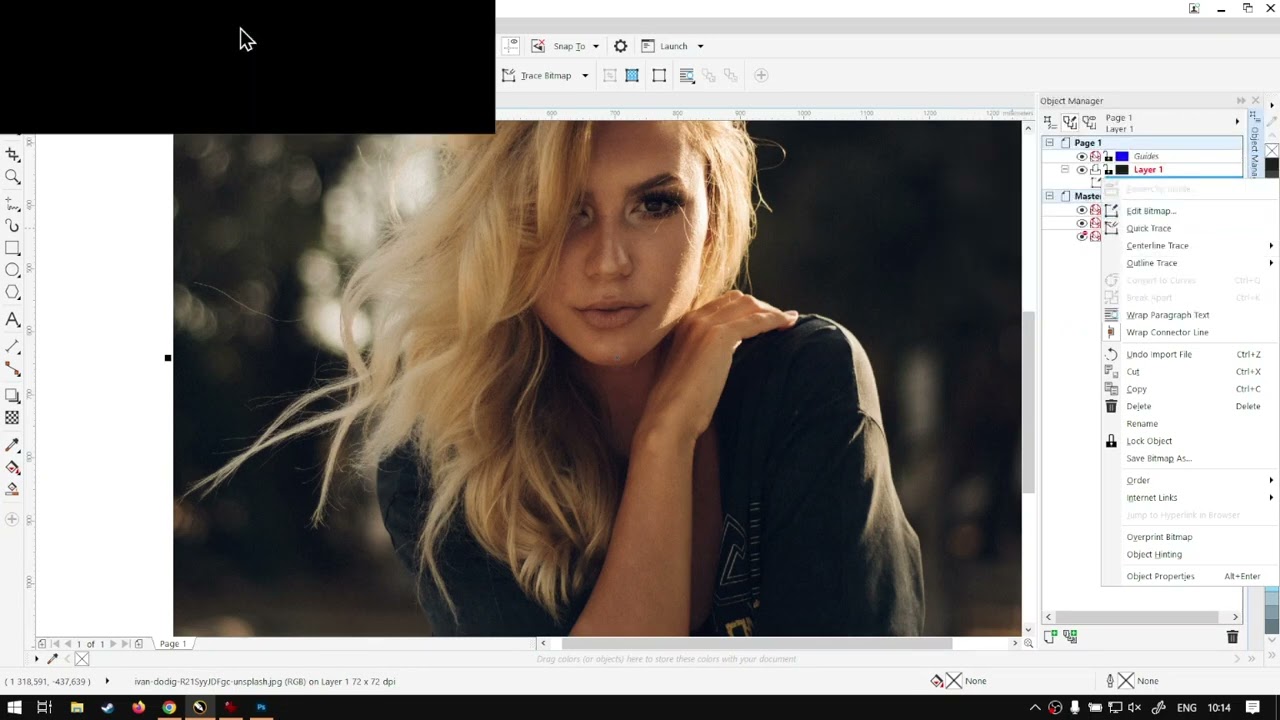
- Import: File > Import (shortcut Ctrl+I), pick an image, place it (the live block places top-left), then zoom so you can see the blacks in the image. The live block notes the final result will look a bit washed out, but still better than no black.
- Open the bitmap editor two ways named on this URL: Object Manager, right-click the image, Edit Bitmap; or main menu Bitmap > Edit Bitmap. Leave the CorelDRAW page open while the bitmap editor is running.
- Full-screen the bitmap editor. The live block then opens two dockers needed for the later channel work: Window > Docker > Object Manager, then Channels (the live block also names the plus control to add the Channels docker).
- Channels on this still-RGB image currently show the base plus red / green / blue. The live block stops before changing channels; body next on this URL is Replacing K with Fake K at
?p=27639(pretty slug not printed on the body link; avia next pretty slug printed as https://softwaretraining.co.za/coreldraw-replace-k-with-fake-k; not invented; not fetched; do not start Part 2 this pass). The live closer also names https://softwaretraining.co.za/ search (top right) and the on-site request-a-training-video form if a video is missing.
Mini-series context (cited, not recrawled as extra pages)
From the same page (body + prev/next chrome on this URL):
- Mini-series INDEX named on this page (body Mini-Series link): WordPress id
27637at https://softwaretraining.co.za/?p=27637 (pretty slug already in KB as https://softwaretraining.co.za/coreldraw-black-without-k; already in KB astraining/coreldraw-black-without-k.md; dest 25387 not touched; leftover INDEX HTML not reused; not recrawled this pass). Pretty slugcoreldraw-black-without-kwas not reprinted as a body Mini-Series href on this URL (body Mini-Series is?p=27637; not invented). It is printed on avia prev chrome on this URL; already in KB; not recrawled. - Next named in the body on this page: Replacing K with Fake K at https://softwaretraining.co.za/?p=27639 (pretty slug not printed on the body link; not invented; avia next chrome prints pretty slug https://softwaretraining.co.za/coreldraw-replace-k-with-fake-k; not fetched; do not start Part 2 this pass).
- No body previous link on this URL (this is Part 1).
- Avia prev chrome on this URL: Printing Black Without the K from CMYK CorelDraw Software (Mini-Series) Video Index at https://softwaretraining.co.za/coreldraw-black-without-k (pretty slug printed; already in KB; dest 25387 not touched; not recrawled this pass).
- Avia next chrome on this URL: CorelDraw Software Replacing the Image K with Fake K (Part 2) Step by Step Video Tutorial at https://softwaretraining.co.za/coreldraw-replace-k-with-fake-k (pretty slug printed; this-series Part 2; not invented; not fetched this pass; do not start Part 2 this pass).
- Part 3 pretty slug is not printed on THIS page; not invented; not fetched. INDEX body listed PART 3 as
?p=27640; that?p=is not on this live HTML; not invented; not fetched. - Related chrome on this URL also names already-ingested sidebar ICC INDEX https://softwaretraining.co.za/inkrip-icc-profiles-manager (
training/inkrip-icc-profiles-manager.md; not recrawled).
Printed unused pretty slugs on this URL: avia next https://softwaretraining.co.za/coreldraw-replace-k-with-fake-k pretty slug printed (CorelDraw Software Replacing the Image K with Fake K Part 2; this-series Part 2; not fetched; do not start Part 2 this pass). Body next ?p=27639 pretty slug not printed on the body link; not invented; not fetched. Body Mini-Series ?p=27637 is already in KB (dest 25387 not touched). Avia prev https://softwaretraining.co.za/coreldraw-black-without-k is already in KB (dest 25387 not touched). Unused INDEX body PART 3 ?p=27640 is not on this live HTML; pretty slug not printed; not invented; not fetched. Unused body related article https://softwaretraining.co.za/colour-channel-manipulation pretty slug printed; not invented; not fetched. Unused More Articles https://softwaretraining.co.za/coreldraw-double-color-channel pretty slug printed; not invented; not fetched. coreldraw-replace-k-with-fake-k was not ingested this pass. Part 2 and Part 3 were not started.
Related chrome on the same URL (cited, not re-fetched)
More Articles / You-might-also-like / More Training Videos / related chrome on this URL also names other pages. Not fetched this pass except as already in KB:
Already in KB:
- https://softwaretraining.co.za/?p=27637 (body Mini-Series; pretty slug already in KB as
coreldraw-black-without-k) -training/coreldraw-black-without-k.md(dest 25387 not touched) - https://softwaretraining.co.za/coreldraw-black-without-k (avia prev; "Printing Black Without the K from CMYK CorelDraw Software (Mini-Series) Video Index") -
training/coreldraw-black-without-k.md(dest 25387 not touched) - https://softwaretraining.co.za/inkrip-new-icc-profile-parameters (More Training Videos; "Setting our New ICC Profile Parameters Within the AM.CO.ZA InkRIP Software (Part 5)")
- https://softwaretraining.co.za/inkrip-images-fill-type (More Training Videos; "How to Use Images as Your Fill Type Within the AM.CO.ZA InkRIP Software (Part 5)")
- https://softwaretraining.co.za/inkrip-icc-profiles-manager (sidebar ICC INDEX) -
training/inkrip-icc-profiles-manager.md
Not in KB (hotlinked only; pretty slugs printed on this URL unless noted):
- https://softwaretraining.co.za/coreldraw-replace-k-with-fake-k (avia next; "CorelDraw Software Replacing the Image K with Fake K (Part 2) Step by Step Video Tutorial"; pretty slug printed; this-series Part 2)
- https://softwaretraining.co.za/?p=27639 (body next; "Replacing K with Fake K"; pretty slug not printed on the body link; not invented)
- https://softwaretraining.co.za/colour-channel-manipulation (body related article; "Large Format Printer Printhead colour channel manipulation workflow"; pretty slug printed)
- https://softwaretraining.co.za/coreldraw-double-color-channel (More Articles; "Doubling Up Color Channels for Printing CorelDraw Software (Mini-Series) Video Index")
- https://softwaretraining.co.za/fabricam-print-feature (More Articles; "Setting up and Using the Print Feature in FabriCAM Software (Mini-Series) Video Index")
- https://softwaretraining.co.za/fabricam-download-setup (More Articles; "Downloading and Setting Up FabriCAM Software (Mini-Series) Video Index")
- https://softwaretraining.co.za/inkrip-designs-location-setting (More Training Videos; "Setting your Designs Location and Scale Within the AM.CO.ZA InkRIP Software (Part 2)")
- https://softwaretraining.co.za/flexiprint-ruler-units (More Training Videos; "Using the Ruler and Setting Units in SAi FlexiPRINT RTUV 22 Software (Mini-Series) Video Index")
- https://softwaretraining.co.za/flexiprint-main-toolbar (YMAL; "The Main Toolbar within the SAi FlexiPRINT RTUV 22 Software (Mini-Series) Video Index")
- https://softwaretraining.co.za/flexiprint-general-preferences (YMAL; "The General Preferences Part One with the SAi FlexiPRINT RTUV 22 Software (Part 1)")
- https://softwaretraining.co.za/fabricam-removing-parts-form-panel (YMAL; "FabriCAM Software Removing Parts form Panel List (Part 3) Step by Step Video Tutorial")
- https://softwaretraining.co.za/fabricam-rounded-rectangle-cut-out (YMAL; "FabriCAM Software P40 Rounded Rectangle Cut Out (Part 20) Step by Step Video Tutorial")
- https://softwaretraining.co.za/fabricam-nesting-manual-placement (YMAL; "FabriCAM Software Auto Nesting then Manual Placement (Part 12) Step by Step Video Tutorial")
- https://softwaretraining.co.za/fabricam-rounded-rectangle-cut-outs (YMAL; "FabriCAM Software P36 Rounded Rectangle Cut Outs (Part 16) Step by Step Video Tutorial")
- https://softwaretraining.co.za/topic/cmyk / https://softwaretraining.co.za/topic/coreldraw / https://softwaretraining.co.za/topic/print / https://softwaretraining.co.za/topic/2018 / https://softwaretraining.co.za/topic/am-co-za (tag chrome; pretty slugs printed)
Off-series chrome on this URL (not fetched): You-might-also-like other FabriCAM / FlexiPRINT pages above; More Articles coreldraw-double-color-channel / fabricam-print-feature / fabricam-download-setup; More Articles updating.co.za / sortit.co.za / filaments.co.za / nitrogengenerator.co.za / am.co.za / vinylcut.co.za / other AM-site chrome (hosts not crawled); More Training Videos long pretty slugs including InkRIP; sidebar ICC INDEX already in KB. Body Mini-Series ?p=27637 is already in KB (dest 25387 not touched). Avia prev coreldraw-black-without-k already in KB (dest 25387 not touched). Avia next coreldraw-replace-k-with-fake-k unused (pretty slug printed; this-series Part 2; not invented; not fetched; do not start Part 2 this pass). Body next ?p=27639 unused (pretty slug not printed; not invented; not fetched). Unused INDEX body PART 3 ?p=27640 not on this URL; not invented; not fetched.
Alternate long pretty slug also printed on this URL for this Part 1 itself (coreldraw-software-setting-up-the-image-project-part-1-step-by-step-video-tutorial); not invented; not fetched. More Training Videos also reprints long pretty slugs for already-ingested InkRIP pages (setting-our-new-icc-profile-parameters-within-the-am-co-za-inkrip-software-part-5, how-to-use-images-as-your-fill-type-within-the-am-co-za-inkrip-software-part-5) and unused InkRIP / FlexiPRINT pages (setting-your-designs-location-and-scale-within-the-am-co-za-inkrip-software-part-2, the-general-preferences-part-one-with-the-sai-flexiprint-rtuv-22-software-part-1); not invented; not fetched.
Embedded video (not mirrored)
The page embeds a self-hosted MP4: https://stfile.s3.eu-west-1.amazonaws.com/27638.mp4 (poster https://stfile.s3.eu-west-1.amazonaws.com/27638-thumbnail.jpg). Featured still: https://softwaretraining.co.za/wp-content/uploads/2023/06/27638-featured-image.jpg. Not downloaded. A YouTube embed is also present on this URL (embed id inLoLE9Ji6Y); not crawled; not mirrored. The page includes an on-page "Video Transcript" block; not copied in full; no transcript invented. Frame stills on this URL include https://stfile.s3.eu-west-1.amazonaws.com/27638-frame.jpg through 27638-frame10.jpg and the YouTube embed for inLoLE9Ji6Y; not downloaded.


Training phones (page chrome on the same URL)
From https://softwaretraining.co.za/coreldraw-setup-image-project header:
- Sales: 072 222 2211
- Support: 076 666 6655
- Training: 060 818 1818
- Jo'burg: 087 802 5368
- Cape Town: 087 802 7106
Skipped this pass
- Unused avia next this-series Part 2
coreldraw-replace-k-with-fake-k(pretty slug printed; not invented; not fetched; do not start Part 2 this pass) - Unused body next
?p=27639(pretty slug not printed on the body link; not invented; not fetched) - Unused INDEX body PART 3
?p=27640(not on this live HTML; pretty slug not printed; not invented; not fetched) - Already-ingested Mini-Series INDEX
training/coreldraw-black-without-k.md(already in KB; dest 25387 not touched; leftover INDEX HTML not reused; not recrawled) - Already-ingested CMYK-to-CMY Part 2
training/coreldraw-setup-project-ready.md(already in KB; dest 28031 not touched; leftover Part 2 HTML not reused; not recrawled; different series, similar name) - Already-ingested Printing CMYK to CMY with Fake K INDEX + Parts 1 and 3-6 (already in KB; dests 22779 / 33738 / 29453 / 29712 / 32465 / 34114 not touched; not recrawled)
- Body related article
colour-channel-manipulation(pretty slug printed; not invented; not fetched) - More Articles
coreldraw-double-color-channel/fabricam-print-feature/fabricam-download-setup(pretty slugs printed; not invented; not fetched) - You-might-also-like
fabricam-removing-parts-form-panel/fabricam-rounded-rectangle-cut-out/fabricam-nesting-manual-placement/flexiprint-main-toolbar/flexiprint-general-preferences/fabricam-rounded-rectangle-cut-outs(pretty slugs printed; not fetched) - More Training Videos unused InkRIP / FlexiPRINT chrome (not fetched except as already in KB)
- Sidebar ICC INDEX
training/inkrip-icc-profiles-manager.md(already in KB; not recrawled) - Already-ingested CAD Basics INDEX + Parts 1-10 (already in KB; not recrawled)
- Already-ingested Import Tab INDEX + Parts 1-3 (already in KB; not recrawled)
- Already-ingested Secondary CAM Toolbar Practicals INDEX + Parts 1-3 (already in KB; not recrawled)
- Design Practices INDEX + Parts 1-5 (already in KB; not recrawled)
- Before Starting INDEX + Parts 1-2 (already in KB; not recrawled)
- Getting Started INDEX + Parts 1-5 (already in KB; not recrawled)
- Introduction INDEX + Parts 1-7 (already in KB; not recrawled)
- Job Manager INDEX + Parts 1-3 (already in KB; not recrawled)
- Transform INDEX + Parts 1-8 (already in KB; not recrawled)
- Toolbar INDEX + Parts 1-8 (already in KB; not recrawled)
- ICC INDEX + Parts 1-11 (already in KB; not recrawled)
- Printer-drivers INDEX and Parts 1-8 (already in KB; not recrawled)
- Cover / frame still binaries / MP4 / YouTube embed
- dump refresh skipped
- Graphtec redo skipped
- Firmware quiet (existing InkRIP / PrintEXP firmware indexes not rewritten)