

CorelDraw Software Setting Up the Project and Image (Part 2) Step by Step Video Tutorial
Source: https://softwaretraining.co.za/coreldraw-setup-project-image (canonical on this live HTML; live file /workspace/coreldraw-setup-project-image-fresh.html; html lang="en-ZA"; og:locale en_US (also en_ZA); schema inLanguage en-ZA; WP-Super-Cache stamp 2026-08-15 19:25:46; live GET of pretty slug coreldraw-setup-project-image 200; HTTP Date Sun, 16 Aug 2026 01:33:09 GMT). Fetched 2026-08-16T03:33:09 SAST. Published 22 May 2023 (datetime 2023-05-22T12:05:40+02:00 / article published time 2023-05-22T10:05:40+00:00). Site modified 08 Aug 2026 UTC / 08 Aug 2026 SAST (2026-08-08T07:23:41+00:00 / og:updated_time 2026-08-08T09:23:41+02:00). WordPress post id 27668. Also known as https://softwaretraining.co.za/?p=27668 (shortlink / wp-json posts/27668 / postid-27668 / html_entry_id_27668 / post-entry-27668 on this URL; not separately re-fetched). Alternate long pretty slug coreldraw-software-setting-up-the-project-and-image-part-2-step-by-step-video-tutorial also printed on this URL (query_vars name; not invented; not fetched). Not WordPress id 27666 and not slug coreldraw-double-color-channel. Not WordPress id 27667 and not slug coreldraw-print-double-colors. Not WordPress id 27669 and not slug coreldraw-double-image-channel-color. Not WordPress id 27587 and not slug coreldraw-setup-project-ready. Not WordPress id 27638 and not slug coreldraw-setup-image-project. Same page as unused avia next named on already-ingested Part 1 (leftover Part 1 avia next pretty slug coreldraw-setup-project-image was printed on that Part 1 avia-next chrome; title there: "CorelDraw Software Setting Up the Project and Image (Part 2) Step by Step Video Tutorial"). Part 1 body listed next as ?p=27668; this live HTML confirms WP 27668 and this pretty slug is Part 2.
What this is: One public English how-to page on softwaretraining.co.za, an AM.CO.ZA training-video project (achievement.co.za directory describes SoftwareTraining as an AM.CO.ZA project of short problem-solving CNC software videos). CorelDRAW is third-party/industry software (not AM-authored CAD/CAM and not AM RIP; same stored-knowledge rule as FlexiPRINT / UltraPrint: keep with source citations; do not frame as AM's stack, AM RIP, or a product the company runs as its own). Knowledge on this page is universal and cited to this softwaretraining URL. This page is Part 2 titled Setting Up the Project and Image. This is a part, not an INDEX. This fills leftover Part 2 of Doubling Up Color Channels whose pretty slug was printed as avia next on already-ingested Part 1 coreldraw-print-double-colors. Distinct from already-ingested Mini-Series INDEX training/coreldraw-double-color-channel.md (source https://softwaretraining.co.za/coreldraw-double-color-channel; body Mini-Series link on this URL is https://softwaretraining.co.za/?p=27666; pretty slug printed on this URL More Articles; already in KB; dest 26424 not touched; leftover INDEX HTML not reused; not recrawled), from already-ingested Part 1 training/coreldraw-print-double-colors.md (source https://softwaretraining.co.za/coreldraw-print-double-colors; body previous on this URL is https://softwaretraining.co.za/?p=27667; pretty slug printed on this URL avia prev; already in KB; dest 33763 not touched; leftover Part 1 HTML not reused; not recrawled), from unused avia next / body next Part 3 https://softwaretraining.co.za/coreldraw-double-image-channel-color (title: "CorelDraw Software Doubling the Image Channel Color (Part 3) Step by Step Video Tutorial"; pretty slug printed on avia next; body next is https://softwaretraining.co.za/?p=27669; pretty slug not printed on the body link; not invented; not fetched; do not start Part 3 this pass), from already-ingested CMYK-to-CMY Part 2 training/coreldraw-setup-project-ready.md (source https://softwaretraining.co.za/coreldraw-setup-project-ready; different series, similar name — do not confuse; dest 28031 not touched; leftover HTML not reused; not recrawled), from already-ingested Printing Black Without the K Part 1 training/coreldraw-setup-image-project.md (source https://softwaretraining.co.za/coreldraw-setup-image-project; different series, similar name — do not confuse; dest 31154 not touched; leftover HTML not reused; not recrawled), from already-ingested Printing Black Without the K INDEX + Parts 2-3 training/coreldraw-black-without-k.md / training/coreldraw-replace-k-with-fake-k.md / training/coreldraw-export-image-new-cmyk.md (already in KB; dests 25387 / 32454 / 33779 not touched; leftover Printing Black Without the K HTML not reused; not recrawled), from already-ingested Printing CMYK to CMY with Fake K INDEX + Parts 1/3-6 training/coreldraw-cmyk-to-cmy.md / training/coreldraw-print-cmyk-vs-cmy.md / training/coreldraw-convert-rgb-cmyk.md / training/coreldraw-remove-image-key.md / training/coreldraw-add-fake-key.md / training/coreldraw-export-image-cmyk.md (already in KB; dests 22779 / 33738 / 29453 / 29712 / 32465 / 34114 not touched; leftover CMYK-to-CMY HTML not reused; not recrawled), from unused body related article https://softwaretraining.co.za/colour-channel-manipulation (pretty slug printed; not invented; not fetched), from unused You-might-also-like other FabriCAM pages printed on this URL (cited not fetched except as already in KB), from unused More Training Videos InkRIP pages printed on this URL (cited not fetched except as already in KB), from already-ingested sidebar ICC INDEX training/inkrip-icc-profiles-manager.md (pretty slug printed; already in KB; not recrawled), from already-ingested More Training Videos training/inkrip-new-icc-profile-parameters.md / training/inkrip-designs-location-setting.md / training/inkrip-printer-driver-properties.md, from already-ingested YMAL training/coreldraw-print-cmyk-vs-cmy.md (pretty slug printed; dest 33738 not touched; not recrawled), from category chrome https://softwaretraining.co.za/training-videos/graphic/coreldraw, and from youtube chrome (YouTube was not crawled). Named as unused avia next Part 2 on already-ingested Part 1 (pretty slug coreldraw-setup-project-image was printed). This does not start Part 3 this pass. coreldraw-double-image-channel-color was not ingested this pass. coreldraw-print-double-colors dest 33763 was not touched this pass. coreldraw-double-color-channel dest 26424 was not touched this pass. coreldraw-setup-project-ready dest 28031 was not touched this pass. coreldraw-setup-image-project dest 31154 was not touched this pass. coreldraw-export-image-new-cmyk dest 33779 was not touched this pass. coreldraw-replace-k-with-fake-k dest 32454 was not touched this pass. coreldraw-black-without-k dest 25387 was not touched this pass. coreldraw-export-image-cmyk dest 34114 was not touched this pass. coreldraw-add-fake-key dest 32465 was not touched this pass. coreldraw-print-cmyk-vs-cmy dest 33738 was not touched this pass. coreldraw-remove-image-key dest 29712 was not touched this pass. coreldraw-convert-rgb-cmyk dest 29453 was not touched this pass. coreldraw-cmyk-to-cmy dest 22779 was not touched this pass.
Not FabriCAM / FlexiPRINT / PrintEXP / UltraPrint / AcroRIP / InkRIP this how-to. Distinct: InkRIP (AM software, different RIP programme; already-ingested More Training Videos inkrip-new-icc-profile-parameters / inkrip-designs-location-setting / inkrip-printer-driver-properties / sidebar ICC INDEX are chrome on this URL, not this CorelDRAW how-to, and were not recrawled except as already in KB), PrintEXP (AM software, different RIP / control programme; not this CorelDRAW how-to and not fetched), UltraPrint (not AM software; stored third-party/OEM RIP knowledge; not this how-to and not fetched), AcroRIP, WellPrintEXP (stored/OEM), FlexiPRINT / FlexiSTARTER (SAi third-party stored; sidebar / category chrome on this URL names FlexiPRINT / FlexiSIGN pages and folders; those are different pages, not this how-to, and were not fetched), Photoshop (third-party/industry; sidebar / category chrome names Photoshop training-video folders; not this CorelDRAW how-to and not fetched), FabriCAM (AM software, different CAD/CAM programme; More Articles / You-might-also-like / sidebar / category chrome on this URL names FabriCAM pages and folders; those are different pages, not this CorelDRAW how-to, and were not fetched except as already in KB), RouterCAM (AM CorelDRAW plugin / CAM; sidebar / category chrome names RouterCAM pages and folders; those are different pages, not this CorelDRAW colour-channel how-to, and were not fetched), PrintUP (More Articles chrome names a PrintUP / Channel Letter keyring page on updating.co.za; not this CorelDRAW how-to and not fetched). Sidebar / category chrome on this URL names FlexiPRINT / other RIP / vinyl / laser / FabriCAM / Photoshop / CorelDRAW training-video folders; those are different pages, not this how-to, and were not fetched except as already in KB. Sidebar chrome on this URL also names buythis.co.za; buythis was not crawled. Sidebar chrome also names cncu.co.za; cncu was not crawled. Share-on-WhatsApp / share-by-mail are page chrome only; email / WhatsApp were not crawled. YouTube channel links are present in page chrome; YouTube was not crawled. Footer / More Websites chrome also names updating.co.za / direct-to-film.co.za / airpumps.co.za / filaments.co.za / cnc-routers.co.za / vinyl4.com / machinery.support / nitrogengenerator.co.za / heatpress.co.za / other AM sites; those hosts were not crawled except as already in KB.
English peek (quoted from the live page)
Quoted from https://softwaretraining.co.za/coreldraw-setup-project-image:
- Title: "CorelDraw Software Setting Up the Project and Image (Part 2) Step by Step Video Tutorial"
- Cover chrome: "coreldraw setup project image"
- "Now when it comes to setting up the project, there are a few panels that will be handy if docked."
- "As to the image, the method of importing and setting it up is pretty easy if you have done it before."
- "This video is part of a Mini-Series."
- "Next video covers Double Image Color."
- "Previous video covered About Double Colors."
- Body also names the related article "Large Format Printer Printhead colour channel manipulation workflow"
- Category: Training Videos
- Tags: 2018, AM.CO.ZA, CorelDRAW, Double Color, Print
- Date on page: 22 May 2023
English confirmation: html lang="en-ZA", og:locale en_US / en_ZA, schema inLanguage en-ZA, prose above is English.
How to set up the project and image in CorelDRAW (from this page)
The live page body is short; the on-page "Video Transcript" block is the step source. Raw auto-caption is not copied in full; no transcript invented. Cleaned steps from that live block:
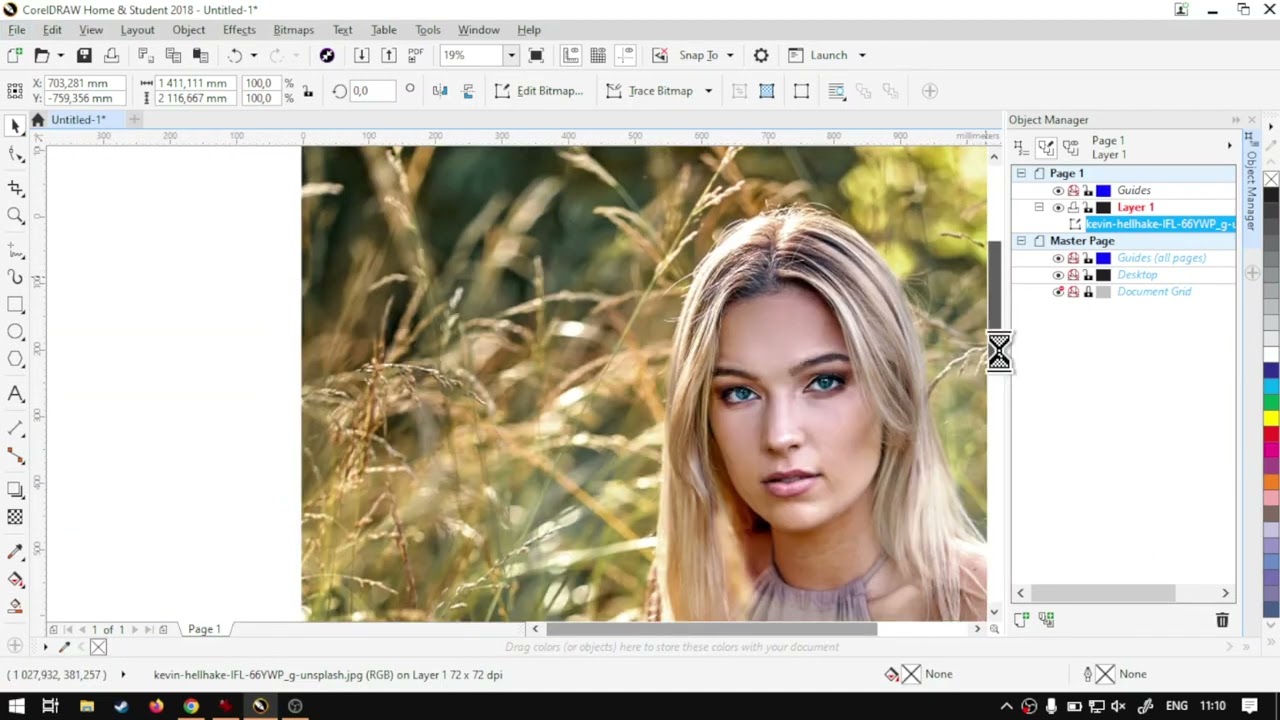
- This Doubling Up Color Channels part is about importing an image and setting up the project before doubling colours.
- Make a new document: File New, or the plus control. The live block says the new-document settings are not important here because this document is not used for exporting the image; leave defaults and OK.
- Import the image: File then Import, pick the image, click to place it.
- Select the image, then Bitmap on the top menu, then Edit Bitmap. That opens another CorelDRAW window for editing bitmaps.
- Full-screen that bitmap window. Dock Object Manager and Channels (Window > Dockers) on the right if they are not already there.
- Convert colour mode: with the image selected, Convert to CMYK colour 32 bit (the live block says the image was RGB). The Channels docker then shows CMYK instead of RGB.
- Later parts of this mini-series change the channels. This Part 2 stops once the project and image are set up. The live closer also names https://softwaretraining.co.za/ search (top right) and the on-site request-a-training-video form if a video is missing. Avia next on this URL is Part 3 at https://softwaretraining.co.za/coreldraw-double-image-channel-color (pretty slug printed; this-series Part 3; not invented; not fetched; do not start Part 3 this pass).
Mini-series context (cited, not recrawled as extra pages)
From the same page (body + prev/next chrome on this URL):
- Mini-series INDEX named on this page (body Mini-Series link): WordPress id
27666at https://softwaretraining.co.za/?p=27666 (pretty slug already in KB as https://softwaretraining.co.za/coreldraw-double-color-channel; already in KB astraining/coreldraw-double-color-channel.md; dest 26424 not touched; leftover INDEX HTML not reused; not recrawled this pass). Pretty slugcoreldraw-double-color-channelwas not reprinted as a body Mini-Series href on this URL (body Mini-Series is?p=27666; not invented). It is printed on More Articles chrome on this URL; already in KB; not recrawled. - Previous named in the body on this page: About Double Colors at https://softwaretraining.co.za/?p=27667 (pretty slug not printed on the body link; not invented; avia prev chrome prints pretty slug https://softwaretraining.co.za/coreldraw-print-double-colors; already in KB as
training/coreldraw-print-double-colors.md; dest 33763 not touched; leftover Part 1 HTML not reused; not recrawled this pass). INDEX listed PART 1 as?p=27667; this live HTML prints that?p=on the body previous link. - Next named in the body on this page: Double Image Color at https://softwaretraining.co.za/?p=27669 (pretty slug not printed on the body link; not invented; avia next chrome prints pretty slug https://softwaretraining.co.za/coreldraw-double-image-channel-color; not fetched; do not start Part 3 this pass). INDEX listed PART 3 as
?p=27669; this live HTML prints that?p=on the body next link. - Avia prev chrome on this URL: CorelDraw Software About Printing Double Colors (Part 1) Step by Step Video Tutorial at https://softwaretraining.co.za/coreldraw-print-double-colors (pretty slug printed; already in KB; dest 33763 not touched; leftover Part 1 HTML not reused; not recrawled this pass).
- Avia next chrome on this URL: CorelDraw Software Doubling the Image Channel Color (Part 3) Step by Step Video Tutorial at https://softwaretraining.co.za/coreldraw-double-image-channel-color (pretty slug printed; this-series Part 3; not invented; not fetched this pass; do not start Part 3 this pass).
- Related chrome on this URL also names already-ingested sidebar ICC INDEX https://softwaretraining.co.za/inkrip-icc-profiles-manager (
training/inkrip-icc-profiles-manager.md; not recrawled).
Printed unused pretty slugs on this URL: avia next https://softwaretraining.co.za/coreldraw-double-image-channel-color pretty slug printed (CorelDraw Software Doubling the Image Channel Color (Part 3) Step by Step Video Tutorial; this-series Part 3; not fetched; do not start Part 3 this pass). Body Mini-Series ?p=27666 is already in KB (dest 26424 not touched). Body previous ?p=27667 pretty slug not printed on the body link; not invented; avia prev prints coreldraw-print-double-colors (already in KB; dest 33763 not touched). Body next ?p=27669 pretty slug not printed on the body link; not invented; avia next prints coreldraw-double-image-channel-color. Unused body related article https://softwaretraining.co.za/colour-channel-manipulation pretty slug printed; not invented; not fetched. Unused More Articles https://softwaretraining.co.za/fabricam-print-feature / https://softwaretraining.co.za/fabricam-download-setup pretty slugs printed; not invented; not fetched. Unused You-might-also-like https://softwaretraining.co.za/fabricam-basic-advanced-flat-parts / https://softwaretraining.co.za/fabricam-complex-rectangle / https://softwaretraining.co.za/fabricam-mouse-smoothly-navigating / https://softwaretraining.co.za/fabricam-home-function-3d-navigation pretty slugs printed; not invented; not fetched. You-might-also-like https://softwaretraining.co.za/coreldraw-print-cmyk-vs-cmy pretty slug printed; already in KB; dest 33738 not touched; not recrawled. You-might-also-like https://softwaretraining.co.za/inkrip-printer-driver-properties pretty slug printed; already in KB; not recrawled. coreldraw-double-image-channel-color was not ingested this pass. Part 3 was not started.
Related chrome on the same URL (cited, not re-fetched)
More Articles / You-might-also-like / More Training Videos / related chrome on this URL also names other pages. Not fetched this pass except as already in KB:
Already in KB:
- https://softwaretraining.co.za/?p=27666 (body Mini-Series; pretty slug already in KB as
coreldraw-double-color-channel) -training/coreldraw-double-color-channel.md(dest 26424 not touched) - https://softwaretraining.co.za/coreldraw-double-color-channel (More Articles; "Doubling Up Color Channels for Printing CorelDraw Software (Mini-Series) Video Index") -
training/coreldraw-double-color-channel.md(dest 26424 not touched) - https://softwaretraining.co.za/?p=27667 (body previous; "About Double Colors"; pretty slug not printed on the body link; not invented) - pretty slug already in KB as
coreldraw-print-double-colors - https://softwaretraining.co.za/coreldraw-print-double-colors (avia prev; "CorelDraw Software About Printing Double Colors (Part 1) Step by Step Video Tutorial") -
training/coreldraw-print-double-colors.md(dest 33763 not touched) - https://softwaretraining.co.za/coreldraw-print-cmyk-vs-cmy (YMAL; "CorelDraw Software About Printing CMYK vs CMY (Part 1) Step by Step Video Tutorial") -
training/coreldraw-print-cmyk-vs-cmy.md(dest 33738 not touched) - https://softwaretraining.co.za/inkrip-icc-profiles-manager (sidebar ICC INDEX) -
training/inkrip-icc-profiles-manager.md - https://softwaretraining.co.za/inkrip-new-icc-profile-parameters (More Training Videos title: "Setting our New ICC Profile Parameters Within the AM.CO.ZA InkRIP Software (Part 5)") -
training/inkrip-new-icc-profile-parameters.md - https://softwaretraining.co.za/inkrip-designs-location-setting (More Training Videos title: "Setting your Designs Location and Scale Within the AM.CO.ZA InkRIP Software (Part 2)") -
training/inkrip-designs-location-setting.md - https://softwaretraining.co.za/inkrip-printer-driver-properties (YMAL title: "Adjusting Driver and Printer Properties Within the AM.CO.ZA InkRIP Software (Part 4)") -
training/inkrip-printer-driver-properties.md
Not in KB (hotlinked only; pretty slugs printed on this URL unless noted):
- https://softwaretraining.co.za/coreldraw-double-image-channel-color (avia next; "CorelDraw Software Doubling the Image Channel Color (Part 3) Step by Step Video Tutorial"; pretty slug printed; this-series Part 3)
- https://softwaretraining.co.za/?p=27669 (body next; "Double Image Color"; pretty slug not printed on the body link; not invented)
- https://softwaretraining.co.za/colour-channel-manipulation (body related article; "Large Format Printer Printhead colour channel manipulation workflow"; pretty slug printed)
- https://softwaretraining.co.za/fabricam-print-feature (More Articles; "Setting up and Using the Print Feature in FabriCAM Software (Mini-Series) Video Index")
- https://softwaretraining.co.za/fabricam-download-setup (More Articles; "Downloading and Setting Up FabriCAM Software (Mini-Series) Video Index")
- https://softwaretraining.co.za/fabricam-basic-advanced-flat-parts (YMAL; "Basic, Intermediate and Advanced Flat Parts in FabriCAM Software (Mini-Series) Video Index")
- https://softwaretraining.co.za/fabricam-complex-rectangle (YMAL; "FabriCAM Software P52 Flat Part Complex Rectangle (Part 24) Step by Step Video Tutorial")
- https://softwaretraining.co.za/fabricam-mouse-smoothly-navigating (YMAL; "FabriCAM Software Smoothly Navigating with the Mouse (Part 9) Step by Step Video Tutorial")
- https://softwaretraining.co.za/fabricam-home-function-3d-navigation (YMAL; "FabriCAM Software the Home Function for 3D Navigation (Part 1) Step by Step Video Tutorial")
- https://softwaretraining.co.za/topic/double-color / https://softwaretraining.co.za/topic/coreldraw / https://softwaretraining.co.za/topic/print / https://softwaretraining.co.za/topic/2018 / https://softwaretraining.co.za/topic/am-co-za (tag chrome; pretty slugs printed)
Off-series chrome on this URL (not fetched): You-might-also-like other FabriCAM pages above; More Articles coreldraw-double-color-channel already in KB; More Articles updating.co.za / sortit.co.za / other AM-site chrome (hosts not crawled); More Training Videos long pretty slugs including InkRIP; sidebar ICC INDEX already in KB. Body Mini-Series ?p=27666 is already in KB (dest 26424 not touched). Avia prev coreldraw-print-double-colors already in KB (dest 33763 not touched). Avia next coreldraw-double-image-channel-color unused (pretty slug printed; this-series Part 3; not invented; not fetched; do not start Part 3 this pass). INDEX-listed PART 3 ?p=27669 is printed on this live HTML as the body next link (pretty slug not printed on the body link; not invented; not fetched; do not start Part 3 this pass).
Alternate long pretty slug also printed on this URL for this Part 2 itself (coreldraw-software-setting-up-the-project-and-image-part-2-step-by-step-video-tutorial); not invented; not fetched. More Training Videos also reprints long pretty slugs for already-ingested InkRIP pages (adjusting-driver-and-printer-properties-within-the-am-co-za-inkrip-software-part-4, understanding-what-a-printer-driver-is-within-the-am-co-za-inkrip-software-part-1, adjusting-and-calibrating-the-ink-limit-within-the-am-co-za-inkrip-software-part-6, setting-our-new-icc-profile-parameters-within-the-am-co-za-inkrip-software-part-5, using-a-specialized-spectrophotometer-device-within-the-am-co-za-inkrip-software-part-2, setting-your-designs-location-and-scale-within-the-am-co-za-inkrip-software-part-2); not invented; not fetched.
Embedded video (not mirrored)
The page embeds a self-hosted MP4: https://stfile.s3.eu-west-1.amazonaws.com/27668.mp4 (poster https://stfile.s3.eu-west-1.amazonaws.com/27668-thumbnail.jpg). Featured still: https://softwaretraining.co.za/wp-content/uploads/2023/06/27668-featured-image.jpg. Not downloaded. A YouTube embed is also present on this URL (embed id IpZ-tdyeIIQ); not crawled; not mirrored. The page includes an on-page "Video Transcript" block; not copied in full; no transcript invented. Frame stills on this URL include https://stfile.s3.eu-west-1.amazonaws.com/27668-frame.jpg through 27668-frame12.jpg and the YouTube embed for IpZ-tdyeIIQ; not downloaded.


Training phones (page chrome on the same URL)
From https://softwaretraining.co.za/coreldraw-setup-project-image header:
- Sales: 072 222 2211
- Support: 076 666 6655
- Training: 060 818 1818
- Jo'burg: 087 802 5368
- Cape Town: 087 802 7106
Skipped this pass
- Unused avia next this-series Part 3
coreldraw-double-image-channel-color(pretty slug printed; not invented; not fetched; do not start Part 3 this pass) - Body next
?p=27669(pretty slug not printed on the body link; not invented; not fetched) - Already-ingested Mini-Series INDEX
training/coreldraw-double-color-channel.md(already in KB; dest 26424 not touched; leftover INDEX HTML not reused; not recrawled) - Already-ingested Part 1
training/coreldraw-print-double-colors.md(already in KB; dest 33763 not touched; leftover Part 1 HTML not reused; not recrawled) - Already-ingested CMYK-to-CMY Part 2
training/coreldraw-setup-project-ready.md(different series, similar name; dest 28031 not touched; leftover HTML not reused; not recrawled) - Already-ingested Printing Black Without the K Part 1
training/coreldraw-setup-image-project.md(different series, similar name; dest 31154 not touched; leftover HTML not reused; not recrawled) - Already-ingested Printing Black Without the K INDEX + Parts 2-3 (already in KB; dests 25387 / 32454 / 33779 not touched; leftover HTML not reused; not recrawled)
- Already-ingested Printing CMYK to CMY with Fake K INDEX + Parts 1/3-6 (already in KB; dests 22779 / 33738 / 29453 / 29712 / 32465 / 34114 not touched; leftover HTML not reused; not recrawled)
- Body related article
colour-channel-manipulation(pretty slug printed; not invented; not fetched) - More Articles
fabricam-print-feature/fabricam-download-setup(pretty slugs printed; not fetched) - You-might-also-like
fabricam-basic-advanced-flat-parts/fabricam-complex-rectangle/fabricam-mouse-smoothly-navigating/fabricam-home-function-3d-navigation(pretty slugs printed; not fetched) - You-might-also-like
coreldraw-print-cmyk-vs-cmy/inkrip-printer-driver-properties(pretty slugs printed; already in KB; not recrawled) - More Training Videos unused InkRIP long pretty slugs (not fetched except as already in KB)
- Sidebar ICC INDEX
training/inkrip-icc-profiles-manager.md(already in KB; not recrawled) - Already-ingested CAD Basics INDEX + Parts 1-10 (already in KB; not recrawled)
- Already-ingested Import Tab INDEX + Parts 1-3 (already in KB; not recrawled)
- Already-ingested Secondary CAM Toolbar Practicals INDEX + Parts 1-3 (already in KB; not recrawled)
- Design Practices INDEX + Parts 1-5 (already in KB; not recrawled)
- Getting Started INDEX + Parts 1-5 (already in KB; not recrawled)
- Before Starting INDEX + Parts 1-2 (already in KB; not recrawled)
- Introduction INDEX + Parts 1-7 (already in KB; not recrawled)
- Job Manager INDEX + Parts 1-3 (already in KB; not recrawled)
- Transform INDEX + Parts 1-8 (already in KB; not recrawled)
- Toolbar INDEX + Parts 1-8 (already in KB; not recrawled)
- ICC INDEX + Parts 1-11 (already in KB; not recrawled)
- Printer-drivers INDEX and Parts 1-8 (already in KB; not recrawled)
- Cover / MP4 / YouTube embed / part still binaries
- dump refresh skipped
- Graphtec redo skipped
- Firmware quiet (existing InkRIP / PrintEXP firmware indexes not rewritten)
- OpenAI upload skipped